Unlocking the power of text manipulation is crucial in data handling. This guide delves into the essential functions LEFT, RIGHT, and MID, empowering you to extract specific portions of text strings with precision and ease. Mastering these functions will streamline your data analysis workflows and significantly enhance your data handling efficiency.
We will explore the fundamental syntax of each function, provide illustrative examples, and discuss various use cases, from simple character extraction to complex string manipulation. Understanding error handling and combining these functions for more sophisticated operations will also be addressed.
Introduction to Text Extraction Functions
Text manipulation is a crucial aspect of data processing, particularly when dealing with strings of characters. Often, we need to isolate specific portions of a larger text string. The LEFT, RIGHT, and MID functions are fundamental tools in accomplishing this extraction. They provide precise control over which characters are selected, enabling a variety of data manipulation tasks.These functions are valuable for tasks ranging from simple data cleaning to complex data transformations.
They streamline the process of extracting specific pieces of information from larger datasets, making them essential for data analysis and reporting.
Syntax and Functionality of Text Extraction Functions
The LEFT, RIGHT, and MID functions are designed to extract a specified number of characters from a text string. LEFT extracts characters from the beginning of the string, RIGHT extracts from the end, and MID extracts a sequence of characters from a specific starting position.
| Function Name | Parameters | Description |
|---|---|---|
| LEFT | LEFT(text, num_chars) | Extracts the specified number of characters from the left side of a text string. The text parameter is the input string, and num_chars is the number of characters to extract. |
| RIGHT | RIGHT(text, num_chars) | Extracts the specified number of characters from the right side of a text string. The text parameter is the input string, and num_chars is the number of characters to extract. |
| MID | MID(text, start_num, num_chars) | Extracts a specified number of characters from a text string, starting at a given position. The text parameter is the input string, start_num is the position where extraction begins (first character is position 1), and num_chars is the number of characters to extract. |
Extracting Text from the Left

The LEFT function is a fundamental text manipulation tool in many programming languages and databases. It allows you to extract a specific number of characters from the leftmost portion of a text string. This is incredibly useful in various scenarios, such as extracting initial data from a larger string or parsing data from a log file. Understanding how to use the LEFT function is crucial for data manipulation and analysis.The LEFT function operates on a string and extracts a specified number of characters from its beginning.
The extracted substring is a portion of the original string, starting from the first character.
Using the LEFT Function
The LEFT function typically takes two arguments: the text string from which to extract characters and the number of characters to extract. The function returns the specified number of characters from the leftmost part of the input string.
Examples of Extracting the First 5 Characters
Here are some examples demonstrating the extraction of the first 5 characters from different strings:
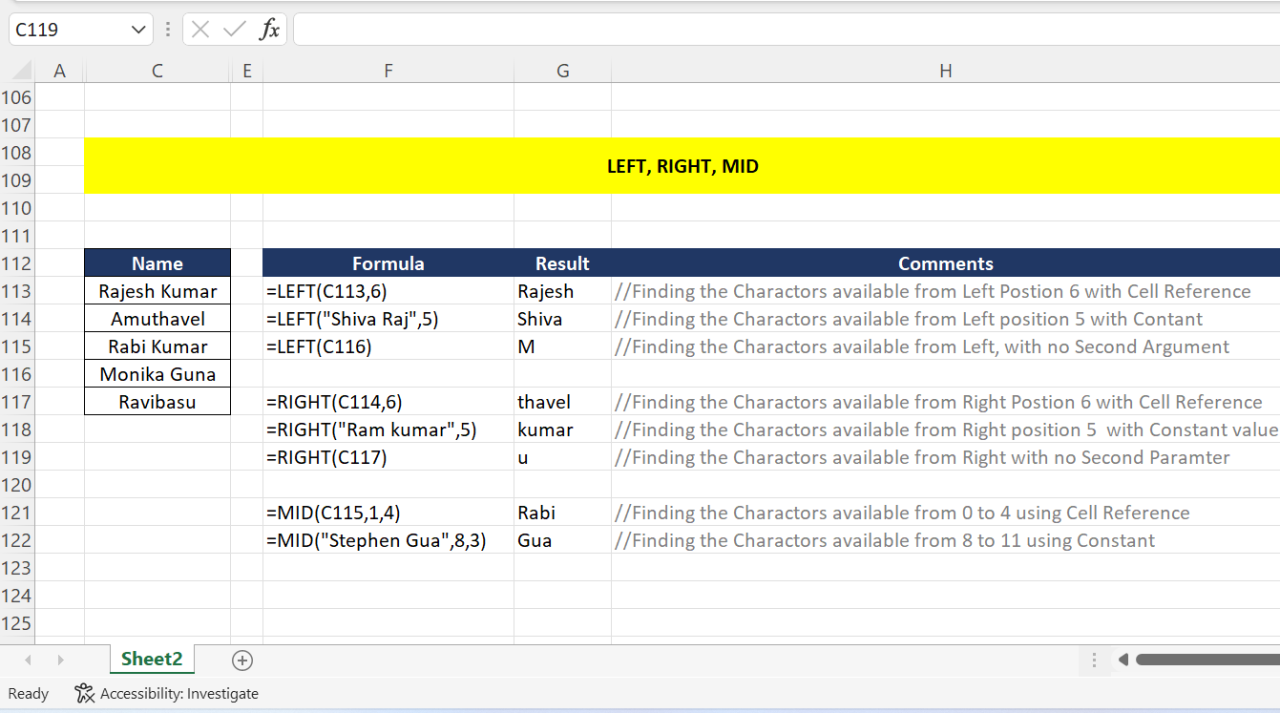
- For the string “Hello World”, LEFT( “Hello World”, 5) returns “Hello”.
- If the string is “Data Analysis”, LEFT( “Data Analysis”, 5) returns “Data ”
- Consider the string “CustomerID123”; LEFT( “CustomerID123”, 5) returns “Custo”.
Handling Strings with Different Lengths
The LEFT function gracefully handles strings of varying lengths. If the specified number of characters to extract exceeds the string’s length, the entire string will be returned.
Examples with Different Data Types and Formats
The LEFT function can be used with various data types and formats. The function expects a string as input. Any data that needs to be extracted must first be converted to a string type. For example, if your input is a numeric value (e.g., 12345), you must first convert it to a string before using the LEFT function (e.g., LEFT(“12345”, 3) would return “123”).
Table Demonstrating Input and Output
The following table illustrates the LEFT function’s operation with different input strings and the expected output:
| Input String | Number of Characters to Extract | Extracted Text |
|---|---|---|
| “SampleText” | 5 | “Sample” |
| “LongString” | 8 | “LongStrin” |
| “Short” | 10 | “Short” |
| “1234567890” | 3 | “123” |
Extracting Text from the Right
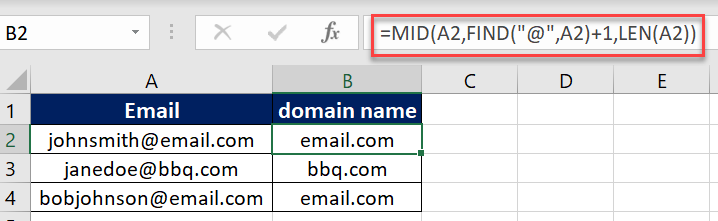
The RIGHT function in various spreadsheet and programming environments is a valuable tool for extracting specific portions of text strings. It allows you to isolate characters from the rightmost end of a text string, enabling efficient data manipulation and analysis. This approach is particularly useful when you need to focus on the last few characters of a string, such as extracting extensions from filenames or extracting codes from product identifiers.
Using the RIGHT Function
The RIGHT function extracts a specified number of characters from the right side of a text string. Its syntax typically involves two arguments: the text string and the number of characters to extract. This direct approach simplifies the process of isolating the desired portion.
Examples of Extracting the Last Characters
Here are some examples demonstrating how to use the RIGHT function to extract the last three characters from different strings:
- For the string “abcdefg”, extracting the last 3 characters yields “efg”.
- Applying the function to “1234567890” results in “890”.
- Extracting the last 3 characters from “October 26, 2023” produces “023”.
Efficiency of the RIGHT Function
The RIGHT function offers a more streamlined approach compared to alternative methods for extracting text from the right side of a string, especially when dealing with a fixed number of characters. It directly targets the desired portion, eliminating the need for complex calculations or iterative procedures.
Extracting a Specific Number of Characters
The function’s versatility allows for extracting any desired number of characters. The argument specifying the number of characters determines the length of the extracted segment. For instance, if you need the last 5 characters from a string, you would specify “5” as the second argument.
Table of RIGHT Function Examples
This table showcases various input strings, the number of characters to extract, and the corresponding extracted text using the RIGHT function.
| Input String | Number of Characters to Extract | Extracted Text |
|---|---|---|
| “ExampleString123” | 3 | 123 |
| “ProductCodeABC456” | 3 | 456 |
| “OrderNumber789012” | 4 | 0123 |
| “DataFileXYZ999” | 4 | 9999 |
Extracting Text from the Middle
The MID function in various spreadsheet and programming applications allows for precise extraction of character segments from within a larger string. This capability is invaluable for tasks requiring the isolation of specific portions of text, like extracting dates, times, or specific s from a larger dataset. It provides granular control over the text being extracted, offering a powerful tool for data manipulation and analysis.
MID Function Application
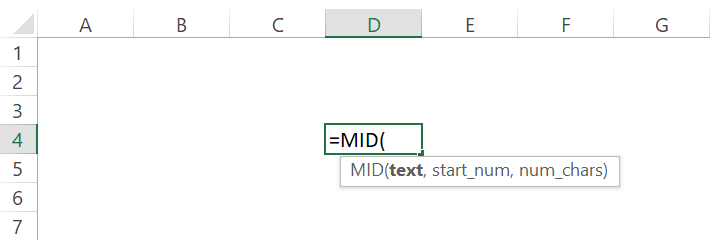
The MID function is designed for extracting a specified number of characters from a string, starting at a defined position. This precise control over the starting point and length makes it a versatile tool for data extraction.
Specifying Starting Position and Length
To effectively use the MID function, you must specify two crucial parameters: the starting position and the length of the substring to be extracted. The starting position indicates the character position within the string where the extraction should begin. The length parameter defines the number of characters to be extracted from that position.
Examples of Extracting Characters
Several examples illustrate the MID function’s flexibility in extracting characters from various string lengths and positions.
- Example 1: Extracting a 3-character substring from the 5th position of the string “HelloWorld”. Using MID(“HelloWorld”, 5, 3) will return “llo”.
- Example 2: Extracting a 6-character substring from the 2nd position of the string “1234567890”. Using MID(“1234567890”, 2, 6) will return “234567”.
- Example 3: Extracting a 4-character substring from the 1st position of the string “ThisIsATest”. Using MID(“ThisIsATest”, 1, 4) will return “This”.
Scenarios Favoring MID
The MID function excels in situations where precise control over the extracted segment is paramount. For instance, when working with structured data formats, such as log files, or when parsing complex strings containing specific patterns or delimiters, MID can be a more suitable choice compared to other extraction methods. It’s particularly useful when you need to isolate information from a known position within a larger string.
MID Function Table
This table demonstrates the MID function with various input strings, starting positions, and lengths, showcasing the extracted results.
| Input String | Starting Position | Length | Extracted Text |
|---|---|---|---|
| “ABCDEFGHIJKLMN” | 2 | 5 | BCDEF |
| “1234567890” | 4 | 3 | 456 |
| “DataExtraction” | 6 | 4 | Extra |
| “1999-10-26” | 1 | 4 | 1999 |
Handling Errors and Edge Cases
Properly handling potential errors and edge cases is crucial when working with text extraction functions like LEFT, RIGHT, and MID. Robust code anticipates and addresses various scenarios, preventing unexpected behavior and ensuring reliable results. This section will detail common issues and demonstrate strategies for mitigating them.Effective error handling enhances the reliability and usability of your applications, allowing them to gracefully manage unexpected situations without crashing.
This section will provide practical examples for each potential issue and guide you in writing code that anticipates and handles errors.
Invalid Input
Incorrect data types or formats can lead to unexpected results or errors when extracting text. For instance, if the function is designed to extract text from a string, passing a numerical value will trigger an error.
- Data Type Mismatch: Functions like LEFT, RIGHT, and MID expect string input. Passing numeric values or other data types will result in errors. Handling this involves type checking to ensure that the input is a string before applying the extraction function.
- Empty or Null Strings: When dealing with potentially empty or null strings, the extraction functions might throw exceptions or return unexpected results. Handling this requires checking for empty or null values before attempting any extraction.
- Exceeding String Length: Attempting to extract more characters than exist in the input string will result in an error or a truncated result. This should be checked to ensure the extraction doesn’t go beyond the string’s length, and the extraction returns the correct amount of characters.
Empty or Null Input
Empty or null strings can cause unexpected behavior in text extraction functions. Robust code should anticipate these scenarios and prevent errors.
- Explicit Checks: Checking for null or empty strings before applying extraction functions is vital. This can be done using built-in functions like `IsNullOrEmpty` or similar equivalents in your programming language.
- Return Default Values: If an empty or null string is encountered, a default value can be returned to prevent errors or handle the situation appropriately. For instance, returning an empty string or a placeholder value like “N/A”.
Data Type and Format Variations
Handling different data types and formats is crucial for creating robust applications. Data might not always conform to expected formats.
- Data Cleansing: If the input data has unexpected formatting (e.g., extra spaces, special characters), cleaning it before extraction is essential. Data cleaning functions can normalize the input, removing or replacing unwanted characters to ensure consistent results.
- Conditional Logic: Using conditional statements to handle variations in input formats will allow for more flexibility in your code. This will ensure the correct extraction function is used depending on the input format.
Error Handling Mechanisms
Error handling is crucial for preventing unexpected behavior in your application. Using try-catch blocks in your programming language can handle exceptions that might occur during text extraction.
- Try-Catch Blocks: Enclosing the extraction process within a try-catch block allows your program to catch exceptions (like invalid input) and gracefully handle them without crashing. This will allow your program to continue running even if an error is encountered.
- Logging Errors: Logging errors helps you track down the source of issues and improve your code’s robustness. Logging the error message and relevant input data can aid in debugging.
Combining Functions for Complex Extractions
Mastering the LEFT, RIGHT, and MID functions individually is a strong foundation, but true power lies in combining them for intricate text extractions. This section will delve into combining these functions to address more complex scenarios, providing examples and a practical scenario to illustrate the process.Combining these functions unlocks the potential for extracting specific parts of strings that were previously inaccessible.
This method allows for more precise and tailored text extraction, streamlining workflows and enhancing data analysis capabilities.
Combining Functions for Specific Extractions
By combining the LEFT, RIGHT, and MID functions, we can precisely target and extract specific segments from within a larger string. The key is understanding how each function operates and how to sequence them effectively.
- Example 1: Extracting a Product Code from a String
- Assume a string represents a product description including a product code at the beginning followed by a space and product name. The product code consists of 5 characters. A string like “ABC12 Product A” needs extraction of the product code. This can be achieved by using the LEFT function to extract the first 5 characters.
- Example 2: Extracting a Date from a String
- A string like “Order Processed on 2024-07-25” contains a date in a specific format. To extract the date, you would use the MID function to extract characters starting from the position after “on ” (add 4 to the starting position), and then extract a specific number of characters (10 characters for YYYY-MM-DD format).
Scenario: Order Processing System
Imagine an order processing system where order details are stored as strings. Each string contains information like order ID, customer name, and order date, but the format varies. We need to extract the order ID, which always appears at the start of the string, followed by a space. The order ID is always 8 characters.
Detailed Example
Let’s consider the following string: “ORDER12345 Customer Name: John Doe, Order Date: 2024-07-27″To extract the order ID “ORDER12345”, we can use a single statement combining the LEFT and MID functions. This example showcases how the functions can be combined to achieve a desired outcome.“`=LEFT(A1,8)“`This formula extracts the first 8 characters from cell A1, where the order details are stored.
Practical Applications
The LEFT, RIGHT, and MID functions are invaluable tools for data manipulation and analysis. Their ability to extract specific portions of text strings empowers users to derive insights from structured and unstructured data. These functions prove particularly useful in data cleaning, report generation, and data transformation across diverse fields.These functions can be integrated into various analytical pipelines, providing a powerful means to focus on relevant information within a dataset.
From extracting customer names from transaction records to isolating product codes from inventory databases, the applications are broad and impactful. These text extraction techniques facilitate the efficient conversion of raw data into actionable insights.
Real-World Use Cases in Data Analysis
Data extraction using these functions is crucial for transforming raw data into usable information. This is often a preliminary step in more complex data analysis tasks. For instance, in a financial dataset containing transaction details, these functions can be employed to isolate customer IDs, transaction amounts, or specific dates.
Data Cleaning Applications
Data cleaning is frequently necessary to ensure data quality and accuracy. LEFT, RIGHT, and MID functions can be instrumental in this process. For example, imagine a dataset where customer names are inconsistently formatted. Some names might include leading or trailing spaces, while others might have extra punctuation. The LEFT function can remove leading spaces, the RIGHT function can remove trailing spaces, and the MID function can remove specific characters or patterns from within the name strings.
This standardized data allows for more reliable analysis and reporting.
Report Generation Examples
These functions are crucial for creating reports that convey specific information efficiently. Consider a marketing dataset that contains customer demographics and purchase history. To generate reports focused on specific customer segments, you can use these functions to extract targeted information. For example, you can extract customer age groups from date of birth data, or isolate customer locations using MID to extract postal codes.
Data Transformation Scenarios
Data transformation is vital for preparing data for analysis. In finance, for example, a dataset of stock prices might contain various date formats. By using these functions, you can standardize the date format, enabling easier analysis and comparison. Furthermore, these functions can be used to generate new derived variables.
Cross-Field Applications
The use cases extend beyond finance. In healthcare, these functions can be used to extract patient information from medical records. For example, using LEFT to extract the first name, RIGHT to extract the last name, and MID to extract the date of birth from patient records. In marketing, they can be used to analyze customer reviews, extracting s or sentiment from text.
Illustrative Table of Use Cases
| Use Case | Relevant Function(s) | Description |
|---|---|---|
| Extracting Customer First Name | LEFT | Extracts the first name from a full name string. |
| Extracting Transaction Amount | MID | Extracts a specific portion of a transaction record, likely containing the amount. |
| Standardizing Date Formats | MID, LEFT, RIGHT | Extracts components of a date string (e.g., year, month, day) and reformats it. |
| Removing Leading/Trailing Spaces from Product Codes | LEFT, RIGHT | Removes extra spaces to ensure consistent product code format. |
| Extracting Patient’s Date of Birth from Medical Records | MID | Extracts the date of birth from a longer string of medical data. |
Final Review
In conclusion, this comprehensive guide has provided a detailed understanding of extracting text using LEFT, RIGHT, and MID functions. By mastering these functions, you can now effectively manipulate text data, leading to more accurate analysis and more robust data handling. Remember to pay close attention to the parameters and potential error scenarios when applying these functions to ensure your results are reliable.