Harnessing the power of spreadsheet applications, “How to Use the Goal Seek Tool for What-If Analysis” provides a detailed and practical guide to this valuable tool. This comprehensive resource explores the intricacies of using Goal Seek, from fundamental concepts to advanced applications and troubleshooting common issues.
This guide walks you through setting up, interpreting, and utilizing Goal Seek for a wide range of scenarios, encompassing everything from basic problem-solving to complex business decision-making. Discover how this powerful tool can assist you in optimizing outcomes, performing sensitivity analysis, and identifying crucial break-even points.
Introduction to Goal Seek

The Goal Seek tool in spreadsheet applications is a powerful iterative solver that helps you determine an input value needed to achieve a specific target output. It’s a valuable asset for what-if analysis, allowing users to explore various scenarios and understand how different inputs affect the desired outcome. It’s particularly useful in financial modeling, engineering design, and other fields where understanding the relationship between variables is crucial.Goal Seek operates by systematically adjusting a cell’s value until the result in another cell matches a predetermined target.
This dynamic process is far more efficient than manually experimenting with various input values. By identifying the specific input that produces the desired output, Goal Seek provides a clear and concise solution to a wide range of problems.
Common Use Cases
Goal Seek is a versatile tool applicable in a multitude of scenarios. Its primary function is to find the input value that generates a desired output. Its usefulness stems from its ability to automate the process of trial-and-error calculations, accelerating problem-solving.
Scenarios Where Goal Seek is Helpful
This table illustrates common situations where Goal Seek can streamline the process of finding a specific input value to achieve a desired output:
| Scenario | Description | Goal Seek Application |
|---|---|---|
| Calculating Discount Rate | Determining the discount rate required to achieve a target net present value (NPV) for an investment. | Input: Discount rate; Target: NPV. Goal Seek finds the discount rate that yields the desired NPV. |
| Estimating Sales Volume | Calculating the sales volume needed to achieve a specific profit margin or target revenue. | Input: Sales volume; Target: Profit margin/Revenue. Goal Seek identifies the sales volume needed to meet the target. |
| Financial Planning | Determining the monthly savings needed to achieve a target retirement fund balance. | Input: Monthly savings; Target: Retirement fund balance. Goal Seek calculates the necessary monthly savings. |
| Engineering Design | Calculating the necessary material dimensions to achieve a desired structural load capacity. | Input: Material dimensions; Target: Load capacity. Goal Seek finds the appropriate dimensions for the desired load capacity. |
| Market Research | Estimating the price point for a product to achieve a desired market share. | Input: Price; Target: Market share. Goal Seek determines the optimal price for achieving the target market share. |
Setting Up a Goal Seek Problem
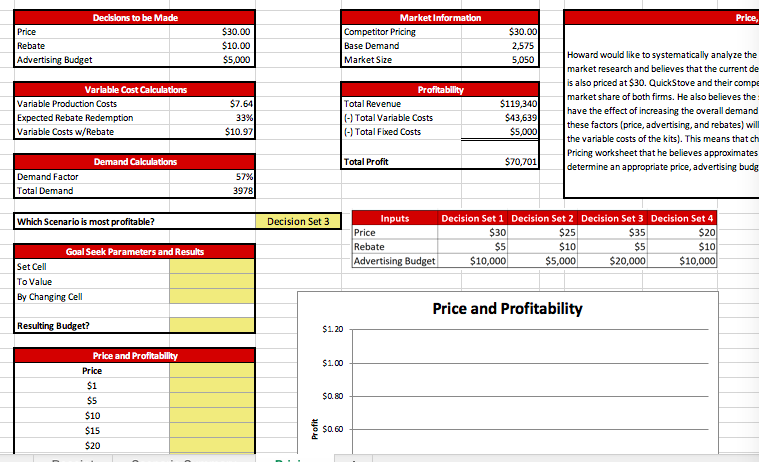
Goal Seek is a powerful tool for what-if analysis, enabling users to determine the input value needed to achieve a specific target output. Effective utilization hinges on accurately defining the necessary inputs and parameters. This section details the crucial elements for setting up a Goal Seek problem.Setting up a Goal Seek problem involves specifying the relationship between input and output variables, defining the desired output, and identifying the input variable that needs adjustment.
These elements are essential for Goal Seek to calculate the appropriate input value.
Required Inputs for Goal Seek
Understanding the inputs necessary for Goal Seek is paramount for successful what-if analysis. The tool requires a defined relationship between the input and output variables, the desired target output value, and the input variable to be adjusted. The specific inputs required depend on the context and the complexity of the relationship between the variables.
Parameters Defining a Goal Seek Problem
The parameters defining a Goal Seek problem are crucial to ensure the tool functions correctly. These parameters must be meticulously defined.
- Target Cell: This cell in the spreadsheet represents the desired output value. It’s the value you want the model to achieve.
- Target Value: This is the specific numerical value you want the target cell to attain. For example, if you want the total sales to reach $100,000, the target value would be $100,000.
- Changing Cell: This cell represents the input variable that will be adjusted by Goal Seek to achieve the target value. This is the unknown variable that needs to be determined.
Examples of Scenarios Requiring Specific Input Parameters
Different scenarios necessitate varying input parameters for Goal Seek. Consider these examples:
- Calculating Discount Rate: A company wants to determine the discount rate needed to achieve a specific target profit. The target cell would be the profit column, the target value would be the desired profit, and the changing cell would be the discount rate input.
- Calculating Sales Volume: A sales team wants to determine the sales volume required to meet a specific revenue target. The target cell would be the revenue column, the target value would be the desired revenue, and the changing cell would be the sales volume input.
- Calculating Loan Payment: A homeowner wants to determine the loan amount that results in a specific monthly payment. The target cell would be the monthly payment, the target value would be the desired payment, and the changing cell would be the loan amount.
Illustrative Table of Input Parameters
This table illustrates the different types of input parameters and their corresponding uses within a Goal Seek problem.
| Parameter Type | Description | Use |
|---|---|---|
| Target Cell | The cell containing the output value you want to change. | Specifies the output variable to be adjusted. |
| Target Value | The desired value for the target cell. | Defines the specific target for the output variable. |
| Changing Cell | The cell containing the input variable you want Goal Seek to adjust. | Identifies the variable to be adjusted to meet the target. |
Interpreting Goal Seek Results
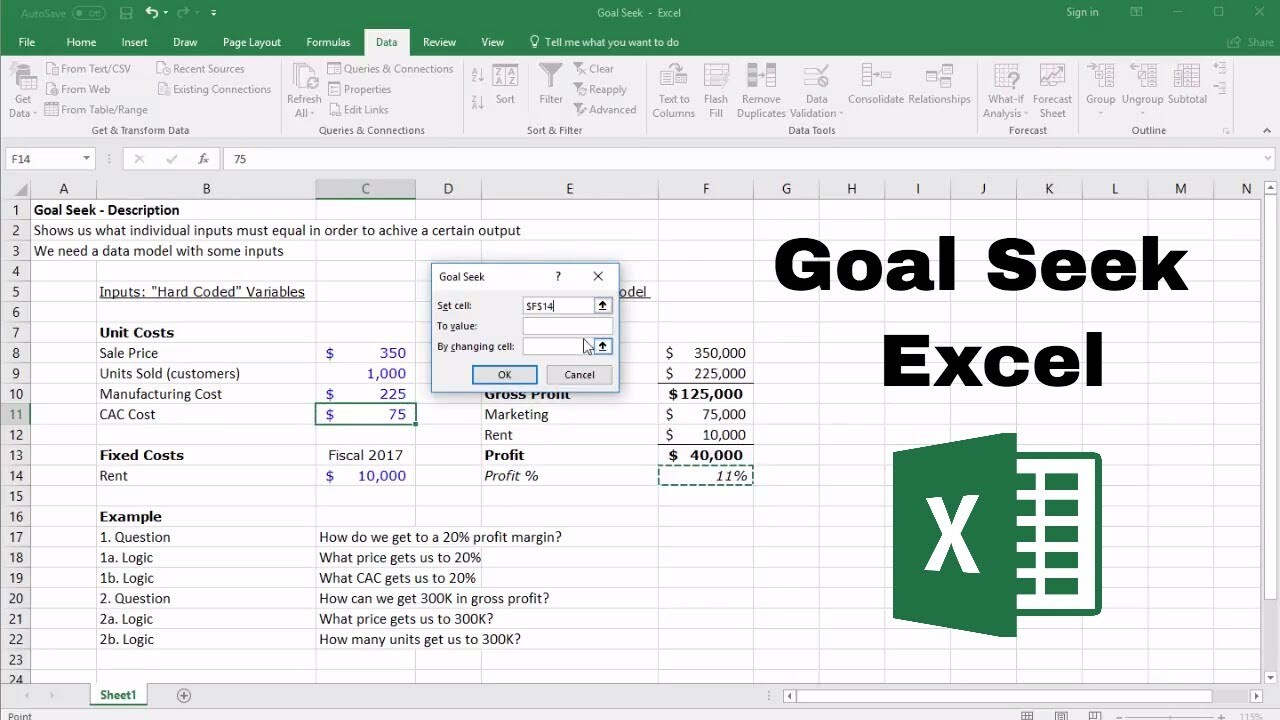
The Goal Seek tool in spreadsheet software provides a solution to a “what-if” question, finding the input value that yields a desired output. Understanding the output format and common interpretations is crucial for effectively leveraging this tool. A correct interpretation allows users to make informed decisions based on the results.
Output Format
Goal Seek presents its results in a straightforward manner. The primary output is the value of the changing cell (the input variable) that satisfies the specified goal. This value is often accompanied by a confirmation message that the goal has been met, along with the corresponding values in other relevant cells in the spreadsheet.
Common Interpretations
Understanding the goal seek results typically involves analyzing the relationship between the input and output variables. If the result is a realistic and expected value, it confirms the accuracy of the model and assumptions. Conversely, if the result seems implausible, it signals a need to re-evaluate the model or the assumptions underlying the goal.
Interpreting Counter-Intuitive Results
Occasionally, Goal Seek produces results that may appear counter-intuitive or unexpected. This is often due to hidden relationships or constraints in the model not immediately apparent. A thorough review of the formula and model structure is necessary to identify any overlooked factors. For example, if a goal seek calculation predicts a negative sales figure for a product, the analysis should delve into the underlying assumptions of the model to understand the possible factors, such as competitor actions or market changes.
Scenario Analysis
| Scenario | Goal | Changing Cell | Goal Seek Result | Interpretation |
|---|---|---|---|---|
| Product Pricing | Achieve $100,000 in revenue | Selling Price | $50 per unit | The model suggests a selling price of $50 per unit is required to achieve the desired revenue. Further analysis should examine the cost structure and other potential factors. |
| Investment Return | Obtain a 10% return on investment | Initial Investment | $10,000 | The model predicts that an initial investment of $10,000 is needed to achieve a 10% return. Potential risks and alternative investment options should be considered. |
| Inventory Management | Maintain a desired inventory level of 100 units | Production Quantity | 50 units per week | The model indicates a production quantity of 50 units per week is needed to maintain the target inventory level. This result might be due to a higher rate of sales or a faster rate of inventory turnover. |
| Budgeting | Allocate funds to meet a certain project cost | Allocated Budget | $15,000 | The result of $15,000 indicates the required budget to meet the project’s cost. A thorough analysis should be performed to understand if the allocated budget is sufficient to complete the project on time. |
Advanced Applications of Goal Seek
Goal Seek, while a straightforward tool, offers powerful capabilities beyond simple “what-if” scenarios. This section explores its utility in more complex analyses, including sensitivity analysis, break-even point calculations, and even solving for multiple variables within a spreadsheet model. Understanding these advanced applications allows for a deeper and more insightful interpretation of data.
Sensitivity Analysis with Goal Seek
Sensitivity analysis assesses how changes in one input variable affect an output. Goal Seek is well-suited for this because it systematically finds the input value needed to achieve a specific output. For instance, consider a pricing model for a product. By varying the price (input) and observing the resulting profit (output), we can understand the impact of price fluctuations on profitability.
Repeated Goal Seek operations with different price inputs can generate a sensitivity curve, illustrating the profit changes as price changes.
Identifying Break-Even Points
Goal Seek efficiently calculates break-even points, the point where total revenue equals total costs. In a business context, this critical juncture marks the transition from operating at a loss to generating profit. By inputting a target output of zero profit (or loss), Goal Seek finds the corresponding input values (e.g., sales volume) that achieve this break-even condition. This allows for informed decision-making regarding pricing strategies, production volumes, and cost management.
Solving for Multiple Variables
While Goal Seek primarily targets a single variable, it can be incorporated into more intricate spreadsheet models to solve for multiple variables indirectly. This involves using Goal Seek iteratively, setting a target output for one variable while adjusting another, and repeating this process until all desired variables are optimized. Consider a financial model predicting future investments. By setting a target return on investment, Goal Seek can help determine the necessary investment amounts and interest rates, working within constraints.
Comparing Goal Seek with Other Spreadsheet Tools
| Feature | Goal Seek | Other Spreadsheet Tools (e.g., Solver) |
|---|---|---|
| Target Variable | Single output cell | Multiple output cells |
| Equation Type | Typically linear or relatively simple relationships | More complex equations and non-linear relationships |
| Optimization Type | Finding a single input value for a specific output | Finding optimal input values for multiple outputs simultaneously |
| Ease of Use | Intuitive and relatively straightforward | Potentially more complex setup and interpretation |
| Computational Speed | Generally faster for simple problems | Potentially slower for complex models |
This table provides a comparative overview of Goal Seek versus other spreadsheet tools like Solver, highlighting their strengths and weaknesses in different problem-solving scenarios. Solver excels at handling more complex equations and simultaneous optimization, while Goal Seek remains a powerful tool for single-variable, “what-if” analyses.
Practical Examples and Use Cases

Goal Seek, a powerful tool within spreadsheet software, offers a versatile approach to what-if analysis. It allows users to explore different scenarios and determine input values needed to achieve a specific target output. This section provides practical examples demonstrating how Goal Seek can be applied in various business contexts.
Business Decision-Making
Goal Seek proves invaluable in business decision-making by facilitating the exploration of various scenarios. For instance, a company might want to determine the necessary sales volume to achieve a targeted profit margin. By utilizing Goal Seek, they can input the desired profit and the associated cost structures to calculate the required sales volume. This process can inform pricing strategies, production planning, and resource allocation decisions.
Production Optimization
Goal Seek can be a valuable tool for optimizing production levels. Consider a manufacturing company aiming to minimize production costs while maintaining desired output. By using Goal Seek, the company can input target output and existing cost structures. The tool then helps identify the optimal production level to achieve the desired output at the lowest cost. This optimization process is critical for maximizing profitability and minimizing waste.
Pricing Strategies
Determining ideal pricing strategies is a common challenge for businesses. Goal Seek can assist in this process by exploring different pricing scenarios. For example, a retailer might want to determine the selling price that generates a specific target profit. By inputting the target profit, cost of goods sold, and desired sales volume, Goal Seek can help find the optimal price point.
This ensures the company maximizes revenue while maintaining profitability.
Sales Prediction
Goal Seek can also aid in sales prediction. A company might want to determine the marketing budget required to achieve a particular sales target. By inputting the target sales figure, the current sales volume, and the anticipated cost of marketing initiatives, Goal Seek can calculate the required marketing budget. This can inform budgeting and resource allocation decisions, and help identify potential areas for improvement.
Industry Applications
| Industry | Goal Seek Application |
|---|---|
| Retail | Determining optimal pricing strategies, calculating break-even points, and predicting sales figures based on different marketing campaigns. |
| Manufacturing | Optimizing production levels to minimize costs while maintaining output targets, identifying optimal inventory levels, and evaluating the impact of raw material price fluctuations. |
| Finance | Estimating the required investment return to achieve a target financial goal, calculating the required interest rate to meet a specific loan payment, and assessing the impact of different investment strategies on projected returns. |
| Technology | Predicting software sales based on different pricing models, assessing the impact of new product features on market share, and evaluating the optimal resource allocation for software development projects. |
Troubleshooting and Common Errors
Goal Seek, a powerful tool for what-if analysis, can sometimes encounter issues. Understanding potential errors and their solutions is crucial for effective use. By recognizing common pitfalls, users can efficiently resolve problems and achieve accurate results.
Common Mistakes in Using Goal Seek
A careful review of the setup is essential to avoid common mistakes. Incorrect input parameters, incompatible data types, or insufficient constraints in the model can lead to inaccurate or nonsensical results. Understanding the assumptions embedded within the model being analyzed is also important to ensure the goal seek analysis is relevant.
Potential Errors and Troubleshooting Strategies
Goal Seek’s limitations and potential errors should be considered. One common issue arises from circular references or dependencies in the spreadsheet. Circular references, where a cell’s value depends on itself, can create an infinite loop and cause Goal Seek to fail to converge. Another issue can be the lack of a suitable solution within the defined constraints.
The target cell’s value may not be achievable given the relationships and parameters in the model. A systematic approach to identifying and resolving these issues is essential for obtaining accurate and reliable results.
Types of Errors During Goal Seek Usage
Several types of errors can occur during Goal Seek operations. These include issues with the formula structure or syntax, incompatibility of data types, or the absence of a solution that aligns with the model’s constraints. Additionally, errors can stem from the model’s underlying assumptions, such as the accuracy of the relationships between variables or the completeness of the data.
Error Codes and Explanations
| Error Code | Explanation |
|---|---|
| 1 | No Solution Found: The specified goal cannot be achieved within the defined constraints of the model. The relationships between variables may prevent the target value from being reached. Re-evaluate the model’s assumptions or adjust the target value to ensure feasibility. |
| 2 | Convergence Failure: Goal Seek could not converge on a solution. This is often due to a circular reference, an ill-conditioned model, or an insufficient step size in the iterative process. Verify the model for circular dependencies, adjust the input parameters, or try different initial values. |
| 3 | Invalid Input: The input values or the goal value are not compatible with the model’s requirements. Ensure that the data types are appropriate and that the formulas are correctly written. Check the units and ensure the data is consistent with the model’s parameters. |
| 4 | Model Instability: The model’s relationships between variables are unstable or create a situation where multiple solutions are possible. This often happens with non-linear or complex models. Re-examine the model structure or try different initial values to ensure the solution is valid. |
Alternatives and Comparisons
Goal Seek is a valuable tool for what-if analysis, but it’s not the only option. Understanding alternative methods and their strengths and weaknesses allows for a more comprehensive approach to problem-solving. This section explores alternative what-if analysis techniques and highlights when each might be preferable to Goal Seek.
Alternative What-If Analysis Methods
Several methods complement or replace Goal Seek for examining different scenarios. These include using data tables, scenario manager, and Solver. Each tool offers unique functionalities, making them suitable for various analytical tasks.
Data Tables
Data tables provide a visual representation of how changing one or more input variables affects a specific output. They excel at displaying the results of a wide range of input values in a tabular format. They allow quick identification of trends and patterns in output changes. The simplicity of creating and interpreting data tables makes them a powerful tool for initial what-if analyses.
Scenario Manager
The Scenario Manager allows the creation and comparison of different sets of input values, known as scenarios. Users can define various scenarios and then analyze how each scenario impacts the output of the model. This feature is particularly useful when evaluating several specific “what-if” situations, such as different sales projections or production volumes. Scenario Manager facilitates a structured exploration of multiple alternatives.
Solver
Solver is a more sophisticated tool for optimization problems. It can be used to find the best possible solution within a given set of constraints. While Goal Seek focuses on finding a specific output value, Solver can handle more complex scenarios involving multiple variables and constraints. Its ability to identify optimal solutions makes it suitable for a wider range of optimization tasks.
Comparison of What-If Analysis Tools
The following table summarizes the key characteristics of Goal Seek, Data Tables, Scenario Manager, and Solver, highlighting their strengths and weaknesses:
| Feature | Goal Seek | Data Tables | Scenario Manager | Solver |
|---|---|---|---|---|
| Purpose | Finding input value that yields a specific output | Visualizing output changes with varying inputs | Comparing different sets of input values | Optimizing a model to achieve best possible outcome |
| Complexity | Simple, single variable | Moderate, single or multiple variables | Moderate, multiple variables | High, multiple variables and constraints |
| Output | Single input value | Table of results | Comparison of scenarios | Optimal solution with constraints |
| Suitability | Simple ‘what-if’ questions with single output target | Identifying trends, impact of variations | Exploring multiple scenarios, evaluating potential outcomes | Finding best possible outcomes, complex optimization |
Situations Where Alternative Methods are More Suitable
Goal Seek is effective for specific “what-if” questions, but alternative methods might be more appropriate in other circumstances. Data tables are well-suited for identifying trends in output changes. Scenario Manager is excellent for evaluating multiple scenarios with different assumptions. Solver is the optimal choice for optimization problems requiring the best possible solution under specific constraints.
Best Practices and Tips
Mastering the Goal Seek tool for effective what-if analysis involves understanding optimal procedures, maximizing efficiency, and mitigating common pitfalls. By carefully preparing your data and adhering to best practices, you can derive accurate and reliable results.Utilizing Goal Seek effectively requires a methodical approach. Strategies for efficiency and accuracy, along with data preparation techniques, are crucial for avoiding common errors and maximizing the tool’s potential.
This section will detail the optimal procedure, highlight strategies for maximizing efficiency, and provide tips for avoiding common pitfalls.
Optimal Procedure for Using Goal Seek
A structured approach is essential for achieving accurate results. First, identify the cell containing the output variable (the one you want to achieve a specific value for). Then, define the cell containing the input variable (the one you’ll adjust to reach the desired output). Next, specify the desired target value for the output variable. Finally, initiate Goal Seek.
This methodical approach ensures accuracy and avoids potential errors.
Strategies for Maximizing Goal Seek’s Efficiency
To maximize Goal Seek’s efficiency, ensure your formulas are correctly defined and the input cell has a relationship with the output cell. A well-defined relationship is crucial. This approach ensures that the input variable has a direct impact on the output variable, making the process more efficient.
Tips for Avoiding Common Pitfalls
Common pitfalls include circular references and the absence of a suitable relationship between input and output variables. Ensuring a straightforward relationship between the input and output cells is crucial to avoid these pitfalls. Circular references can cause Goal Seek to fail or produce incorrect results. It is important to understand the interdependency between cells to prevent these errors.
Preparing Your Data for Goal Seek
Proper data preparation is critical for successful Goal Seek application. Ensure your worksheet contains all necessary data and that formulas accurately reflect the relationships between cells. Accuracy is essential. Errors in the underlying formulas or missing data can lead to inaccurate results.
- Validating Data: Verify the accuracy of your data and formulas to avoid unexpected results. This validation process ensures that the input data is reliable and consistent, directly impacting the accuracy of the results. Thorough data validation prevents common errors.
- Data Integrity: Maintain data integrity by checking for inconsistencies and errors before using Goal Seek. This crucial step ensures the data used for analysis is accurate and reliable. Maintaining data integrity is vital for achieving reliable outcomes.
- Formula Review: Carefully review all formulas in your worksheet to ensure they are correct and accurately reflect the desired relationships. Correctly defined formulas are essential for accurate results. Errors in formulas can lead to inaccurate conclusions.
Epilogue
In conclusion, this comprehensive guide provides a detailed roadmap to mastering the Goal Seek tool for what-if analysis. By understanding the fundamental principles, practical applications, and potential pitfalls, users can effectively leverage Goal Seek to improve decision-making processes across various industries and scenarios. This resource serves as a valuable tool for anyone seeking to enhance their spreadsheet analysis skills and gain a deeper understanding of the power of what-if analysis.