Data sorting is a fundamental aspect of data management, crucial for extracting insights and ensuring data integrity. This guide delves into the intricacies of alphabetizing and numerically ordering data, addressing various scenarios and complexities. From simple lists to large datasets, we’ll explore effective methods and tools for achieving accurate and efficient sorting.
Whether you’re working with names, addresses, financial figures, or complex customer databases, understanding the principles and practices of data sorting is essential. This comprehensive guide will equip you with the knowledge and techniques to sort data effectively, regardless of the data type or the scale of the dataset.
Introduction to Data Sorting
Data sorting is the process of arranging data in a specific order, whether alphabetically, numerically, or based on other criteria. This systematic organization significantly enhances the usability and analysis of information. Sorted data is easier to understand, locate, and manipulate.
Importance of Data Sorting
Sorting data, whether alphabetically or numerically, is crucial for various reasons. It allows for efficient searching and retrieval of specific information. For instance, finding a name in a phone book is much faster when the names are listed alphabetically. Numerical sorting is vital in statistical analysis, enabling the identification of trends and patterns. The ability to swiftly locate data items is paramount in numerous fields, including business, science, and education.
Scenarios Requiring Data Sorting
Data sorting is essential in countless scenarios. In a library, books are arranged alphabetically by author or title, making it easy to find specific titles. In a business context, customer records are often sorted by name or account number to streamline operations and improve customer service. Furthermore, in scientific research, experimental data is sorted chronologically or based on other relevant factors for analysis.
The ability to quickly locate information is paramount in many professions.
Examples of Sorted and Unsorted Data
The following tables illustrate the difference between unsorted and sorted data. Unsorted data lacks any inherent order, while sorted data is arranged according to a particular criterion.
| Unsorted Data |
|---|
| John |
| Alice |
| Bob |
| Eve |
| Charlie |
| Sorted Data (Alphabetically) |
|---|
| Alice |
| Bob |
| Charlie |
| Eve |
| John |
Alphabetical Sorting

Alphabetical sorting, a fundamental data manipulation technique, arranges data items in a specific order based on their lexicographical representation. This process is crucial for organizing and retrieving information efficiently, particularly in applications involving text-based data like names, addresses, and product catalogs. It underpins numerous search and retrieval mechanisms.Understanding the nuances of alphabetical sorting, including handling different languages and special characters, is vital for creating reliable and user-friendly systems.
This section delves into the intricacies of alphabetizing data across various languages, the management of special characters, and the different algorithms employed.
Alphabetization Across Languages
Different languages employ distinct lexicographical rules, impacting how words and names are ordered alphabetically. English, Spanish, and French, for instance, often follow similar rules for the basic Latin alphabet but diverge when considering diacritics and accents. Sorting algorithms must account for these variations to ensure accuracy. For example, in Spanish, “ñ” typically comes after “n” and before “o”, while in French, “é” might be sorted before “e” depending on the specific sorting implementation.
Handling Special Characters and Accents
Special characters and accents present a significant challenge in alphabetical sorting. A straightforward approach is to normalize these characters before sorting. This normalization can involve replacing accented characters with their unaccented counterparts, or converting characters to their ASCII representations. For example, “é” could be normalized to “e”. Alternatively, some sorting algorithms might use collation tables specific to each language, providing a more nuanced approach.
Accurate handling of special characters is critical for avoiding errors and ensuring the desired alphabetical order.
Sorting Algorithms
Several algorithms can be used for alphabetizing data. A few prominent examples include:
- Bubble Sort: This simple algorithm repeatedly steps through the list, compares adjacent elements and swaps them if they are in the wrong order. While conceptually straightforward, its performance degrades rapidly with increasing dataset sizes. It is typically not suitable for large datasets.
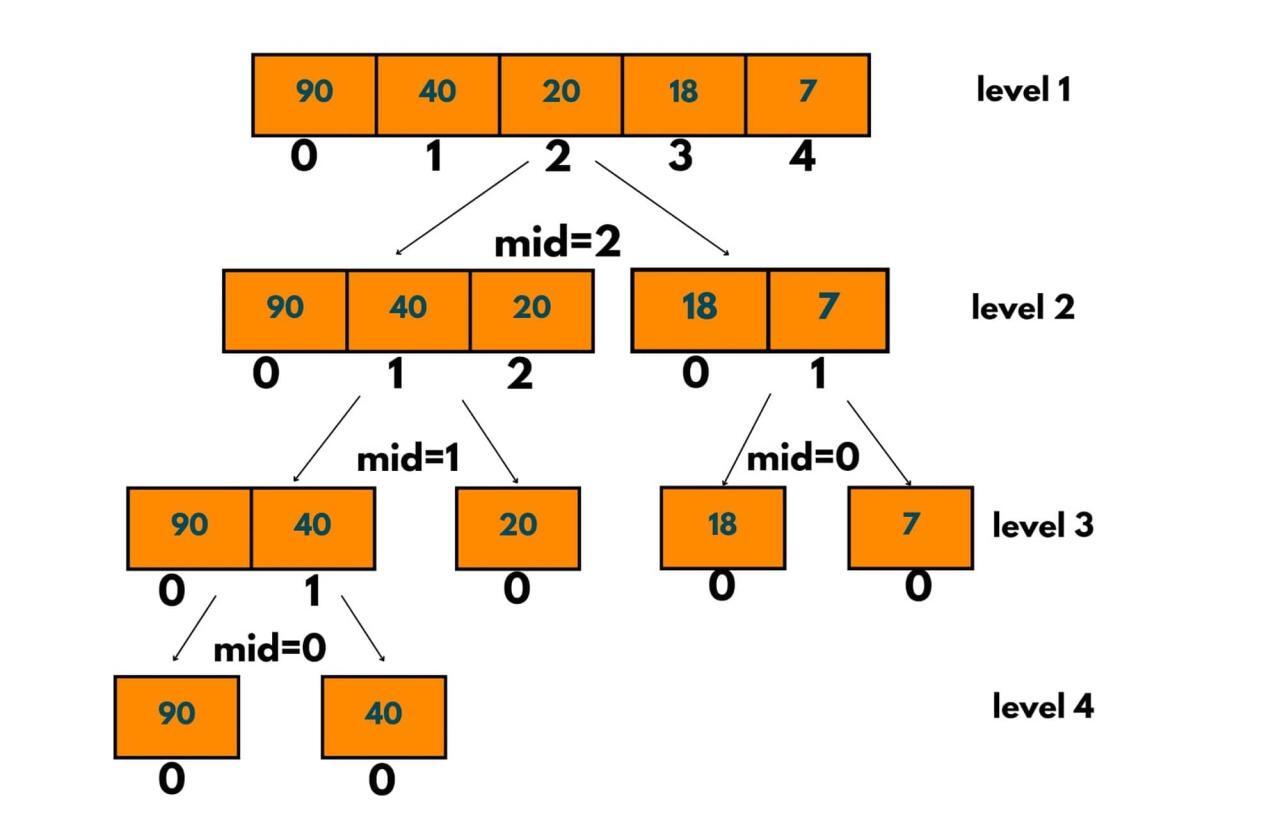
- Merge Sort: This divide-and-conquer algorithm recursively divides the input list into smaller sublists until each contains a single element. These sublists are then repeatedly merged to produce sorted sublists until the entire list is sorted. Merge sort is known for its efficiency, particularly when handling large datasets, often exhibiting a time complexity of O(n log n).
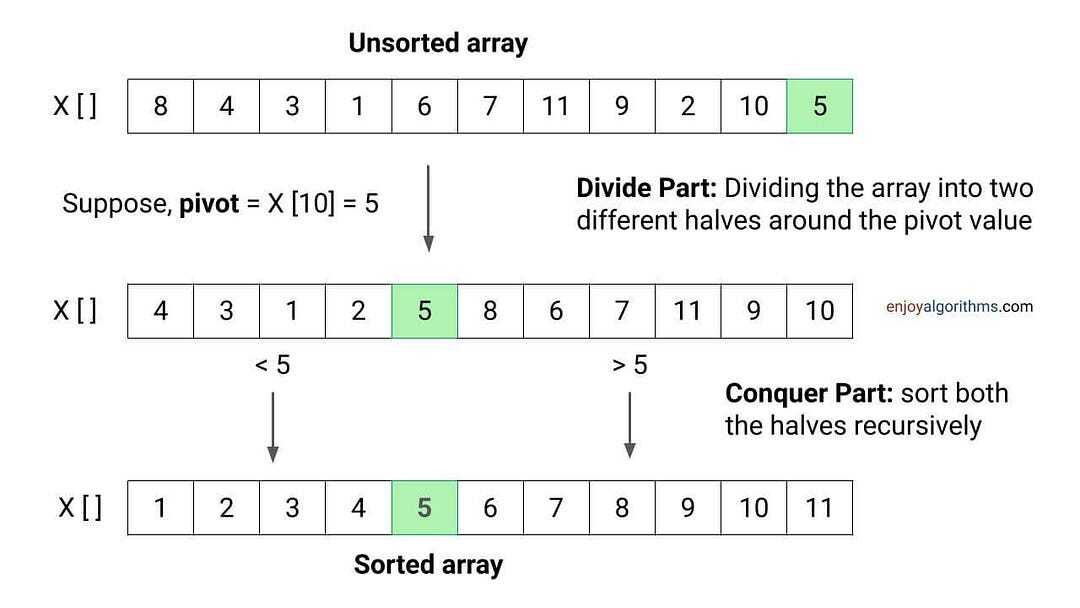
- Quick Sort: This algorithm is often considered among the fastest sorting methods for general-purpose use. It partitions the array into subarrays, selecting a pivot element and placing elements smaller than the pivot before it and elements larger after it. Like merge sort, it exhibits an average-case time complexity of O(n log n).
The choice of sorting algorithm depends on the specific requirements and characteristics of the data.
Efficiency Comparison
The efficiency of different sorting algorithms varies significantly with dataset size. For smaller datasets, the differences might be negligible, but for massive datasets, the performance disparities become substantial. Merge sort, with its logarithmic time complexity, generally outperforms bubble sort for large datasets. Quick sort also offers excellent performance in most cases.
Examples
- Names: Sorting a list of names (e.g., John Doe, Jane Smith, David Lee) will place them in alphabetical order based on the first name, and then the last name if the first names are identical.
- Addresses: Alphabetizing addresses (e.g., 123 Main Street, 456 Oak Avenue) would be based on the street name, then the house number.
- Product Listings: Product catalogs are commonly alphabetized by product name, allowing for easier searching.
Alphabetical Sorting Steps
| Step | Action |
|---|---|
| 1 | Input the data to be sorted (e.g., a list of names). |
| 2 | Define the sorting criteria (e.g., sort by last name then first name). |
| 3 | Choose a sorting algorithm (e.g., merge sort). |
| 4 | Apply the algorithm to the data, comparing elements based on the sorting criteria. |
| 5 | Output the sorted data. |
Numerical Sorting
Numerical sorting arranges data in ascending or descending order based on the numerical value of the data points. This process is crucial in various fields, from financial analysis to scientific research and inventory management, where ordered data facilitates efficient analysis, comparison, and decision-making. It is essential to understand how different types of numerical data, such as negative numbers, decimals, and large numbers, are handled during the sorting procedure.Numerical sorting extends beyond simple ascending/descending arrangements.
Different algorithms are employed, each with its own performance characteristics, making informed choices critical for optimizing processing time, especially when dealing with vast datasets. Understanding these algorithms and their strengths and weaknesses allows for tailoring the sorting approach to specific needs.
Numerical Sorting Process
The process of numerical sorting involves comparing numerical values and repositioning them according to the desired order (ascending or descending). For ascending order, the smallest value is placed first, followed by progressively larger values. Conversely, in descending order, the largest value is placed first, followed by successively smaller values.
Handling Different Numerical Types
Numerical sorting algorithms must account for various numerical formats. Negative numbers are treated as numerical values and are sorted accordingly within the overall numerical range. Decimals are handled similarly, preserving their relative positions based on their numerical value. Large numbers are managed without difficulty, as the sorting process is designed to accommodate values of any magnitude.
Examples of Numerical Sorting
Numerical sorting finds widespread application in diverse contexts. In financial data analysis, sorting stock prices or transaction amounts enables trend identification and risk assessment. Scientific data, such as experimental results or observations, often benefits from numerical sorting to facilitate pattern recognition and analysis. In inventory management, sorting items by quantity or price allows for efficient stock control and forecasting.
Numerical Sorting Algorithms
Various algorithms facilitate numerical sorting. Quick sort, known for its generally efficient performance, partitions the dataset recursively. Insertion sort, while not as performant for large datasets, is effective for smaller ones.
Comparison of Sorting Algorithms
Different sorting algorithms exhibit varying performance characteristics. Quick sort typically demonstrates faster average-case performance compared to insertion sort, but worst-case scenarios can occur with quick sort. Insertion sort, though slower for larger datasets, offers advantages in terms of simplicity and stability.
Steps for Numerical Sorting
| Step | Description |
|---|---|
| 1 | Define the dataset to be sorted. |
| 2 | Choose the sorting algorithm (e.g., quick sort, insertion sort). |
| 3 | Determine the desired order (ascending or descending). |
| 4 | Compare numerical values according to the chosen order. |
| 5 | Reposition elements in the dataset to maintain the correct order. |
| 6 | Repeat steps 4 and 5 until all elements are in the correct order. |
Mixed Data Sorting
Sorting data that combines different data types, such as strings and numbers, presents unique challenges compared to sorting data of a single type. Effective sorting of mixed data necessitates a clear understanding of the desired order and the handling of potential inconsistencies, such as null or missing values. This approach is crucial for maintaining data integrity and ensuring accurate results in applications ranging from customer relationship management (CRM) systems to financial reporting.Mixed data types necessitate careful consideration of the sorting priority.
For instance, when sorting a list of customer names (strings) alongside their order numbers (integers), one might prioritize names alphabetically and then numerically order the customer orders within each name group. This method ensures a logical sequence for the data. Correct handling of null or missing values is critical to avoid disrupting the sorting process.
Methods for Sorting Mixed Data
Different programming languages and tools offer various methods for sorting mixed data types. A common approach involves using custom comparison functions. These functions specify the rules for ordering different data types. For example, a comparison function might be defined to treat numerical values as lower priority than string values, ensuring the string values are sorted first.
Prioritizing Data Types
When sorting mixed data, prioritizing one data type over another is essential. For example, if you are sorting customer data that includes names (strings) and order amounts (numbers), you might prioritize names alphabetically and then order the amounts numerically for each name group. This method ensures a logical and understandable order.
Handling Null Values
Null or missing values can significantly impact the sorting process. It is crucial to establish a clear strategy for handling such values. Common strategies include placing null values at the beginning or end of the sorted list, or treating them as lower priority compared to non-null values. This systematic approach maintains data integrity and avoids unexpected results.
Real-World Scenarios
Mixed data sorting is frequently used in customer databases. For example, a database containing customer names, order dates, and order amounts needs to be sorted to identify customers who placed orders on specific dates and in a particular order amount range. This process would involve prioritizing names alphabetically and then sorting dates and amounts numerically for each name. This facilitates efficient data analysis and reporting.
Potential Challenges
Sorting mixed data can present challenges. One challenge is defining the appropriate order of priority among the various data types. Another challenge is handling missing or null values consistently to avoid disrupting the sorted order. Careful consideration and a well-defined sorting strategy are critical to achieving accurate results.
Examples of Mixed Data Sorting
| Mixed Data | Sorted Output (Prioritizing Strings) |
|---|---|
| Customer Name: John Doe, Order Amount: 100 | Customer Name: Alice Smith, Order Amount: 50 Customer Name: Bob Johnson, Order Amount: 150 Customer Name: John Doe, Order Amount: 100 |
| Customer Name: null, Order Amount: 200 | Customer Name: Alice Smith, Order Amount: 50 Customer Name: Bob Johnson, Order Amount: 150 Customer Name: John Doe, Order Amount: 100 Customer Name: null, Order Amount: 200 |
| Product Name: Apple, Product ID: 101 Product Name: Banana, Product ID: 102 Product Name: Orange, Product ID: 103 |
Product Name: Apple, Product ID: 101 Product Name: Banana, Product ID: 102 Product Name: Orange, Product ID: 103 |
Sorting with Specific Criteria
Data sorting extends beyond simple alphabetical or numerical order. Often, we need to arrange data based on more complex criteria, such as dates, times, or even custom rules. This refined approach enables a deeper understanding of the data, facilitating more targeted analysis and insights.Sorting data by multiple criteria allows for a more nuanced perspective. For instance, arranging customer data by purchase date and then by total spending reveals trends in purchasing behavior over time.
Likewise, product data sorted by price and then by category offers a clear view of pricing strategies within different product lines.
Sorting by Multiple Criteria
Sorting based on multiple criteria involves prioritizing fields. The initial sort order is applied to all data; the secondary sort is applied only to those items that are equal in the first field. This iterative approach allows for a layered and structured ordering.
- To sort by multiple criteria, the data needs to be organized into a tabular format, with each column representing a criterion. Software applications typically offer options for specifying the sort order (ascending or descending) for each criterion. This structured format is crucial for the proper application of the multi-criteria sorting algorithm.
- For example, if you want to sort customer data by purchase date (ascending) and then by the amount spent (descending), the software would first sort by purchase date, and then for any customers with the same purchase date, it would sort them by the amount spent in descending order.
Sorting by Date and Time
Sorting by date and time is crucial for tracking trends and identifying patterns. This is especially important in financial analysis, customer relationship management (CRM), and logistical settings. The sorting order will depend on the specific date and time format used.
- Data sorting by date often uses chronological order, placing the earliest dates first. The software will compare the dates using a predefined format.
- Sorting by time typically works similarly, ordering from the earliest time to the latest. The sorting process is highly dependent on the format of the time data. Time zones may also play a role.
Sorting by Custom Criteria
Custom sorting criteria can be implemented using custom functions. This approach allows for sorting based on criteria that are not directly supported by the default sorting options. This is particularly helpful when dealing with complex data types or unique criteria.
- A custom function can be written to compare values based on a specific rule. For instance, case-insensitive sorting can be achieved by converting all strings to lowercase before comparing them.
- Consider sorting customer names by last name first, then by first name. This is achieved through defining a custom comparison function that places the last name before the first name in the sorting order.
Example: Sorting Customer Data
| Customer ID | Customer Name | Purchase Date | Amount Spent |
|---|---|---|---|
| 101 | John Smith | 2023-10-26 | 150 |
| 102 | Jane Doe | 2023-10-27 | 200 |
| 103 | David Lee | 2023-10-26 | 100 |
The table above shows customer data. Sorting by Purchase Date (ascending) and then Amount Spent (descending) would result in a reordering of the table, with the customer with the earliest purchase date, and the highest amount spent, being at the top.
Data Structures for Sorting
Data structures play a crucial role in the efficiency of sorting algorithms. The way data is organized directly impacts how quickly and effectively it can be reordered. Different data structures offer varying trade-offs in terms of memory usage and processing speed. Understanding these trade-offs is vital for selecting the most appropriate approach for a given task.Choosing the right data structure for sorting is essential because it influences the performance of the sorting algorithm.
Algorithms optimized for specific structures can achieve significantly better results than those not tailored to the chosen structure. This often translates to reduced execution time and lower memory consumption.
Array-Based Sorting
Arrays are a fundamental data structure for sorting. Their contiguous memory allocation allows for fast random access, a key feature in many sorting algorithms. Direct access to elements enables efficient comparison and swapping during the sorting process.
- Efficiency: Array-based sorting algorithms, such as insertion sort and merge sort, often achieve good performance, especially when dealing with a significant amount of data. The ability to directly access elements through their index minimizes the time needed to compare and swap elements.
- Memory Usage: Arrays require a fixed amount of memory. The size of the array must be predetermined, and allocating too little space can lead to issues with overflow. Allocating too much space is wasteful.
- Algorithm Selection: The choice of algorithm often depends on the characteristics of the array. For example, merge sort is efficient for large arrays, while insertion sort might be more suitable for small or nearly sorted arrays.
Linked List-Based Sorting
Linked lists, in contrast to arrays, store elements in non-contiguous memory locations. Each element points to the next one in the sequence. This structure offers flexibility in terms of memory allocation but impacts the speed of access compared to arrays.
- Efficiency: Sorting linked lists can be more complex than array-based sorting. Algorithms like insertion sort and merge sort can be adapted for linked lists, but the lack of direct access can sometimes impact performance compared to array-based algorithms.
- Memory Usage: Linked lists are dynamically allocated, allowing for easy insertion and deletion of elements. This flexibility makes them suitable for situations where the size of the data is uncertain or may change frequently. However, they use slightly more memory than arrays to store the pointers between elements.
- Algorithm Selection: The choice of algorithm for linked lists depends on the specific needs of the application. For example, merge sort can be adapted to linked lists, while others may be more suitable for specific types of linked lists.
Comparison Table
| Data Structure | Advantages | Disadvantages |
|---|---|---|
| Array | Fast random access, simple implementation for many algorithms. | Fixed size, potentially wasting memory, less flexibility for dynamic data. |
| Linked List | Dynamic size, easy insertion/deletion, suitable for dynamic data. | Slower random access, more complex implementation for some algorithms. |
Tools and Techniques for Sorting
Data sorting is a crucial aspect of data management, enabling efficient analysis and retrieval of information. Various software tools offer powerful capabilities for sorting data in different formats, from simple spreadsheets to complex databases. Understanding these tools and their functionalities is essential for effectively managing and utilizing data.Effective data sorting relies on the appropriate selection of tools and techniques.
Choosing the right software and understanding its sorting capabilities can streamline the process and ensure accurate results. This section explores common software tools and their sorting features, illustrating how these tools can be employed to sort data.
Spreadsheet Software for Sorting
Spreadsheet software like Microsoft Excel, Google Sheets, and LibreOffice Calc are widely used for sorting data. These tools offer intuitive interfaces and versatile sorting capabilities. These applications provide powerful tools for arranging data in a meaningful way, facilitating the identification of patterns and trends.
- Sorting in Spreadsheet Software: Spreadsheet software allows sorting data based on one or more columns. This feature is commonly used for tasks such as ranking students based on scores, ordering products by price, or categorizing sales data by region. Users can sort data in ascending or descending order, applying the sort criteria to a specific range of cells within a spreadsheet.
- Example: Consider a spreadsheet containing sales data. To sort the data by sales amount in descending order, users would select the column containing the sales figures and utilize the sorting functionality within the spreadsheet software. This results in a list where the highest sales figures appear first, facilitating quick identification of top performers.
- Options for Sorting: Spreadsheet software commonly offers options for sorting by multiple columns. For instance, one can sort by region and then by sales amount to identify the highest-performing regions for specific product categories.
Database Management Systems (DBMS) for Sorting
Database management systems (DBMS) like MySQL, PostgreSQL, and Oracle provide robust data sorting capabilities. They handle large datasets efficiently, making them ideal for complex sorting tasks. These systems ensure data integrity and efficiency in sorting large quantities of information.
- Sorting in DBMS: DBMS utilize SQL (Structured Query Language) to define sorting criteria. Users specify the columns to sort by and the order (ascending or descending). This allows for sophisticated sorting based on multiple columns and complex conditions, enabling advanced data analysis.
- Example: A DBMS containing customer data can be queried to retrieve customers sorted by their purchase history, from lowest to highest spending amounts. This would help identify potential upselling or cross-selling opportunities.
- Features: DBMS often include features to sort data based on multiple criteria, enabling comprehensive analysis. This feature allows users to prioritize different aspects of the data, like sorting customers based on location, followed by their order frequency. This can be especially useful in analyzing customer trends and preferences.
Sorting Options Comparison
| Software Tool | Sorting Options | Features |
|---|---|---|
| Microsoft Excel | Single/Multiple columns, ascending/descending order | User-friendly interface, suitable for smaller datasets |
| MySQL | Multiple columns, complex conditions, handling large datasets | Efficient sorting for large databases, flexible query options |
| PostgreSQL | Multiple columns, complex conditions, advanced indexing options | Robust sorting capabilities, supports complex data structures |
Handling Large Datasets
Sorting extremely large datasets presents unique challenges, demanding specialized strategies and optimized approaches. Traditional sorting methods often become inefficient and impractical when dealing with massive volumes of data. This necessitates a shift towards techniques that can effectively manage and process these large datasets.Efficient algorithms and data structures are paramount for handling large datasets. Algorithms that minimize comparisons and data movements are critical for speed.
Data structures that facilitate quick access and manipulation of data are equally important. Approaches that consider the nature of the data and the available resources are crucial for success.
Strategies for Breaking Down Large Datasets
Techniques for breaking down large datasets into smaller, manageable parts are vital for effective sorting. This decomposition allows for parallel processing, enabling faster sorting times. Divide-and-conquer algorithms are particularly well-suited for this task. A dataset can be partitioned into smaller sub-datasets, each sorted independently, and then merged to form the complete sorted dataset.
- Data Partitioning: The process of dividing the dataset into smaller, more manageable subsets. This allows for parallel sorting on multiple processors or threads. Consider the characteristics of the data when partitioning, for instance, dividing data by ranges or specific categories.
- External Sorting: This approach is crucial when the dataset exceeds the capacity of RAM. Data is sorted in portions, written to external storage (like hard drives), and then merged. This strategy is vital for datasets too large to fit in memory.
Utilizing External Storage
External storage, such as hard drives, is essential for sorting large datasets that exceed the available RAM capacity. External sorting algorithms read portions of the data from the external storage, sort them in memory, and then write the sorted portions back to the external storage. This process is repeated until the entire dataset is sorted. The use of efficient disk access techniques is crucial to minimize the time spent reading and writing to disk.
- Disk-Based Sorting: This method leverages external storage to sort data that doesn’t fit in RAM. Algorithms like external merge sort are specifically designed for this task, reading data in blocks, sorting them, and writing the sorted blocks to the external storage. The blocks are then merged to produce the final sorted dataset.
- File Handling: Proper file management is essential when dealing with external storage. Techniques like buffering and optimized file access methods significantly influence the efficiency of external sorting algorithms.
Optimized Sorting Algorithms
Algorithms specifically designed for large datasets are essential for efficiency. These algorithms often employ strategies to minimize comparisons and data movements, leading to substantial performance gains. Examples include merge sort, which excels in external sorting scenarios due to its ability to efficiently merge sorted sub-datasets.
| Sorting Technique | Description | Strengths | Weaknesses |
|---|---|---|---|
| Merge Sort | Divides data into smaller segments, sorts them, and merges them back together. | Efficient for external sorting, stable. | Can be less efficient for smaller datasets in memory. |
| Quick Sort | Partitioning algorithm; good for in-memory sorting. | Generally fast for in-memory sorting. | Can be inefficient in the worst-case scenario (O(n2)). |
| Heap Sort | Uses a binary heap to sort data. | Stable, guaranteed O(n log n) time complexity. | Not as fast as Quick Sort for typical cases. |
| External Merge Sort | Sorts data in portions that fit in memory, merging them to create the complete sorted dataset. | Handles extremely large datasets efficiently. | Can be slower than in-memory sorting for small datasets. |
Final Summary
In conclusion, mastering data sorting, both alphabetically and numerically, empowers you to manage information efficiently and extract valuable insights. By understanding different sorting algorithms, data structures, and software tools, you can confidently handle diverse data types and sizes. This guide provides a practical and thorough approach, equipping you with the necessary knowledge to tackle sorting challenges in a variety of contexts.