Efficient data handling is crucial in various applications, from simple text processing to complex database management. This guide dives deep into the essential TRIM function, providing a clear understanding of its purpose and diverse applications. We’ll explore how removing extra spaces enhances data accuracy and consistency across different programming languages and scenarios.
Understanding how to effectively remove leading, trailing, and multiple spaces is a fundamental skill for anyone working with text data. This guide will walk you through practical examples and real-world applications of the TRIM function, equipping you with the knowledge and tools to handle various text formats effectively.
Introduction to TRIM Function
The TRIM function is a powerful tool in various data processing applications, specifically designed for string manipulation. Its primary purpose is to remove extra spaces from a text string. This is crucial for maintaining data consistency and accuracy, as inconsistencies in spacing can lead to errors in data analysis and processing. For example, a database storing customer names might contain entries with extra spaces before or after the name, potentially leading to issues when searching or sorting.
The TRIM function addresses these discrepancies, ensuring data integrity.
Importance of Removing Extra Spaces
Extra spaces, whether leading, trailing, or multiple, can negatively impact data integrity. Data inconsistency can result in inaccuracies in reports, analyses, and calculations. Imagine a database containing sales figures; extra spaces in the product names could cause mismatches when trying to identify specific products or sum their sales. Therefore, meticulous removal of extra spaces is essential for accurate and reliable data management.
Use of TRIM Function
The TRIM function efficiently removes leading, trailing, and extra spaces from a string. This ensures data consistency and eliminates potential errors during data processing. The function simplifies the process of standardizing data entry, making it easier to compare, sort, and analyze data. For instance, if you have a column of customer addresses, the TRIM function can standardize the format, removing unnecessary spaces and ensuring each address is consistently formatted.
Example of TRIM Function
Consider the following string:
” Hello, World! “
Applying the TRIM function to this string will yield the following result:
“Hello, World!”
This example demonstrates how TRIM removes both leading and trailing spaces, as well as extra spaces within the string. This standardization improves the clarity and accuracy of the data.
Types of Extra Spaces Handled by TRIM
- Leading Spaces: Spaces located at the beginning of a string. For example, if a user enters a name with multiple spaces before it, TRIM efficiently removes those leading spaces.
- Trailing Spaces: Spaces located at the end of a string. Similar to leading spaces, TRIM removes trailing spaces to ensure consistent formatting.
- Multiple Spaces: Consecutive spaces within a string. TRIM efficiently removes multiple spaces, leaving only a single space between words, if any.
The table below summarizes the different types of extra spaces and how the TRIM function addresses them:
| Type of Extra Space | Description | TRIM Function Action |
|---|---|---|
| Leading | Spaces at the beginning of a string | Removes all leading spaces |
| Trailing | Spaces at the end of a string | Removes all trailing spaces |
| Multiple | Consecutive spaces within a string | Reduces multiple spaces to a single space |
Different Implementations of TRIM Function
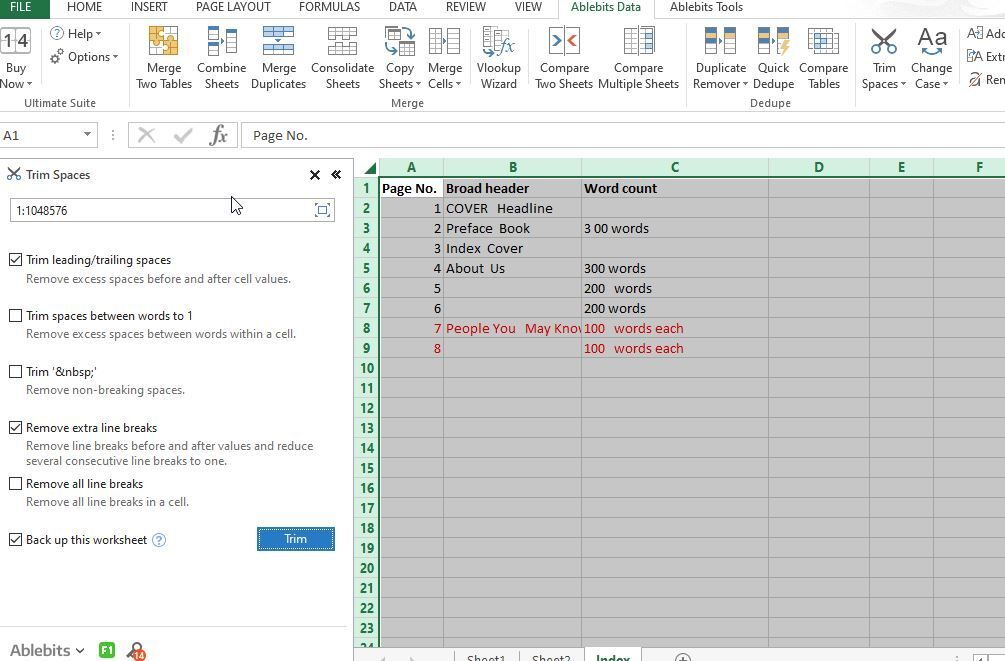
The TRIM function, crucial for data cleaning and manipulation, removes leading and trailing whitespace from a string. Its widespread use in various programming languages and database systems underscores its importance in ensuring data integrity and consistency. This section explores the diverse implementations of the TRIM function across different environments.The syntax and behavior of the TRIM function can vary significantly between programming languages and database systems.
Understanding these variations is essential for effectively using the function in different contexts. This section provides detailed information on the different implementations, emphasizing the practical applications of TRIM in various scenarios.
TRIM Function in Python
Python’s `strip()`, `lstrip()`, and `rstrip()` methods offer flexible ways to remove whitespace. `strip()` removes both leading and trailing whitespace. `lstrip()` removes only leading whitespace, and `rstrip()` removes only trailing whitespace. These methods are straightforward to use and are commonly integrated into string manipulation tasks.“`pythonmy_string = ” Hello, World! “trimmed_string = my_string.strip()print(trimmed_string) # Output: Hello, World!left_trimmed = my_string.lstrip()print(left_trimmed) # Output: Hello, World! right_trimmed = my_string.rstrip()print(right_trimmed) # Output: Hello, World!“`
TRIM Function in JavaScript
JavaScript’s `trim()` method is used for removing whitespace from both ends of a string. It’s a simple and efficient way to clean up strings, ensuring that leading and trailing spaces are not included in further processing.“`javascriptlet myString = ” Hello, world! “;let trimmedString = myString.trim();console.log(trimmedString); // Output: Hello, world!“`
TRIM Function in SQL
SQL’s TRIM function is a powerful tool for string manipulation within database queries. Different database systems (e.g., MySQL, PostgreSQL, SQL Server) might have slightly different syntaxes, but the core functionality remains the same: removing whitespace from the beginning and end of a string. These functions are essential for cleaning data imported into databases and are widely used in data processing and analysis tasks.
| Database System | Syntax |
|---|---|
| MySQL | TRIM(LEADING ' ' FROM string) TRIM(TRAILING ' ' FROM string) TRIM(' ' FROM string) |
| PostgreSQL | TRIM(LEADING ' ' FROM string) TRIM(TRAILING ' ' FROM string) TRIM(' ' FROM string) |
| SQL Server | LTRIM(string) RTRIM(string) |
TRIM Function for Removing Extra Spaces in Text Formats
The TRIM function’s utility extends beyond simple strings to encompass various text formats.
- CSV (Comma Separated Values): TRIM can be employed to eliminate extra spaces surrounding comma delimiters, ensuring accurate data extraction and parsing. Incorrect delimiters can result in inaccurate data entry.
- JSON (JavaScript Object Notation): In JSON data, TRIM is used to clean up whitespace within string values. This ensures consistent formatting and avoids issues during JSON parsing and data processing.
- Plain Text Files: TRIM is vital for pre-processing plain text files, such as log files or documents, removing extra spaces from lines to improve analysis and parsing efficiency. This is particularly useful for extracting key information or s.
Comparison of TRIM Function Behavior
The behavior of TRIM functions varies slightly depending on the context. String manipulation functions often operate on strings directly, while database queries leverage TRIM within a broader context of data retrieval and manipulation.
TRIM Function Use Cases
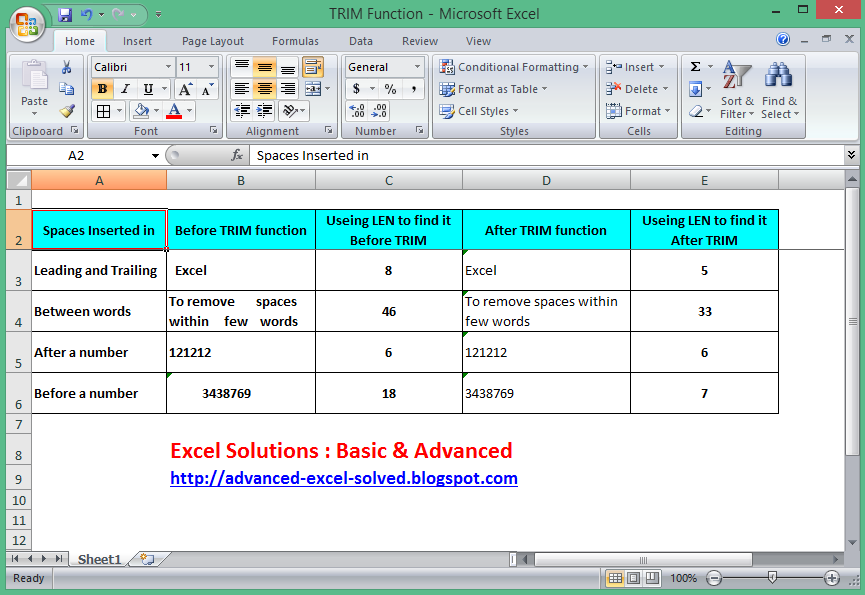
The TRIM function, crucial for data cleaning and manipulation, proves invaluable in numerous scenarios where accurate data is paramount. Its ability to remove extraneous whitespace from strings safeguards against errors and inconsistencies, particularly in applications handling user input or external data sources. Properly implemented TRIM ensures data integrity and reliable processing.Data integrity is often compromised by inconsistencies in whitespace.
Unnecessary spaces can lead to errors in comparison, sorting, and other data manipulation tasks. TRIM functions prevent these issues, ensuring data consistency and accuracy.
Critical Data Integrity Scenarios
TRIM is indispensable for maintaining data integrity in various applications. Data input validation is a prime example. Users often input data with extra leading or trailing spaces, which can cause problems if the application assumes a specific format. By using TRIM, you ensure consistent data entry and avoid errors in validation and subsequent processing steps. Data import processes, where external data sources might contain unexpected whitespace, are also highly susceptible to issues.
TRIM acts as a vital filter to remove extraneous whitespace, guaranteeing data consistency and accuracy during the import phase.
Issues Caused by Incorrect Spacing
Incorrect spacing in software applications can lead to a multitude of problems. Consider a scenario where user input is required for a search function. If the input field does not properly trim the input string, a search query with extra leading spaces might not return the expected results. Similarly, if a database query doesn’t handle extra spaces appropriately, it might fail to retrieve the desired records, resulting in inaccurate or incomplete data.
Incorrect spacing can also affect data normalization and reporting, creating misleading information and impacting decision-making processes.
TRIM in Different Applications
The need for TRIM functionality spans across various application types.
- Web Forms: Web forms frequently collect user data. TRIM is essential for ensuring that the data submitted is consistent and free from errors, improving the accuracy and reliability of the form processing. For example, a form requiring a username or password should ensure that the submitted data is correctly parsed, preventing errors due to unexpected leading or trailing spaces.
- Database Interactions: Database queries are another area where TRIM is critical. Database systems may have specific limitations or assumptions regarding whitespace. TRIM ensures that data is handled consistently and accurately across database operations. For example, comparing two strings with different whitespace characters might lead to incorrect matches if TRIM is not used to standardize the input.
- File Processing: Data imported from files, such as CSV or text files, can contain inconsistent whitespace. TRIM is vital for removing extra spaces, leading to accurate data handling. For example, when importing customer data, TRIM ensures consistent formatting of the data within the database.
Combining TRIM with Other String Functions
TRIM can be effectively combined with other string functions for advanced data cleaning. This combination significantly enhances the ability to handle complex data manipulation tasks. For example, you might use TRIM to remove leading and trailing spaces and then use the `LOWER` function to standardize text casing, resulting in consistent data across different inputs. A combination of TRIM, `REPLACE`, and `SUBSTRING` might be necessary for data cleaning in specific situations, like removing specific character sequences and then extracting relevant data from a larger string.
Examples of Combined Data Manipulation
Consider an e-commerce platform handling customer orders. TRIM can be combined with other string functions to validate and standardize order information. For instance, to extract and validate the customer’s email address from the order details, the `FIND` function can locate the email address within the string. Then, `TRIM` can be used to remove extra spaces, and finally, a regular expression check can validate the email format, ensuring data accuracy and preventing errors in order processing.
Another example involves handling product descriptions. The `REPLACE` function can remove unwanted characters, and `TRIM` can remove any extra spaces before storing the description in the database. This meticulous process guarantees data integrity and prevents potential inconsistencies in product listings.
Advanced TRIM Techniques

The TRIM function, while effective for removing leading and trailing spaces, often falls short when dealing with more intricate whitespace scenarios. This section delves into advanced techniques, demonstrating how to handle non-standard whitespace characters, complex patterns, and limitations. It also compares TRIM with alternative functions for optimal whitespace management.Understanding the limitations of TRIM is crucial to selecting the most appropriate method for a given task.
This section provides practical examples and comparisons to ensure a comprehensive understanding of advanced whitespace removal strategies.
Handling Non-Standard Whitespace Characters
TRIM primarily targets standard space characters. To effectively remove tabs, newlines, and other non-standard whitespace, alternative methods or functions are necessary. For instance, using regular expressions or string manipulation functions within programming languages can be leveraged.
- Removing Tabs: A regular expression, like `/\t/g`, can replace all tab characters with an empty string. This approach can be generalized to handle various whitespace characters.
- Removing Newlines: Similarly, a regular expression like `/\n/g` can remove all newline characters. Consider the context of the text; in some cases, newline characters are intentional and part of the data structure.
- Combined Whitespace Removal: For situations involving multiple types of whitespace, combining regular expressions or string functions allows for more comprehensive handling.
Managing Complex Space Patterns
Real-world text often contains complex patterns of extra spaces, including multiple spaces, embedded spaces, and unusual combinations. TRIM alone may not address these effectively.
- Multiple Spaces: If a text string contains multiple consecutive spaces, TRIM only removes leading and trailing spaces. To eliminate all multiple spaces, a regular expression like `/\s+/g` (replacing one or more whitespace characters) can be used to replace all sequences of multiple spaces with a single space.
- Embedded Spaces: When spaces are embedded within a word or phrase, the TRIM function will not remove them. More sophisticated string manipulation techniques or regular expressions are required for such cases.
- Different Text Formats: The presence of various text formats (e.g., HTML, XML, JSON) can introduce unique whitespace patterns. Appropriate handling methods should be tailored to the format to avoid unintended consequences.
Limitations of TRIM
The TRIM function is limited in its ability to handle complex whitespace issues.
- Single Character Removal: TRIM only removes spaces, not other characters. Additional functions are needed to remove specific characters like hyphens, underscores, or any other non-space characters.
- Embedded Whitespace: TRIM will not remove spaces embedded within the text. Other string manipulation methods or regular expressions are necessary to handle embedded spaces effectively.
- Non-Text Data: TRIM is a string function and not applicable to non-text data types like numbers or dates.
Alternative Methods for Complex Removal
For intricate whitespace removal tasks, alternative methods are more appropriate. These include regular expressions for complex pattern matching and custom string functions within specific programming languages.
- Regular Expressions: Regular expressions provide powerful tools for complex pattern matching and replacement, allowing for precise control over whitespace removal.
- String Functions (Language Specific): Programming languages offer specialized string functions for specific tasks. These can be particularly useful for tasks involving character-by-character manipulation.
- Custom Scripts: In situations requiring a tailored solution, custom scripts are beneficial for complex whitespace manipulation. This enables targeted approaches and precise handling of various patterns and characters.
Comparison with Similar Functions
Comparing TRIM with other functions like `REPLACE` or `REGEXP_REPLACE` reveals their strengths and weaknesses in handling whitespace.
| Function | Description | Strengths | Weaknesses |
|---|---|---|---|
| TRIM | Removes leading and trailing spaces | Simple and fast for basic tasks | Ineffective for complex patterns |
| REPLACE | Replaces a specified substring with another | Useful for replacing specific sequences | Not optimal for complex whitespace removal |
| REGEXP_REPLACE | Replaces substrings matching a regular expression | Highly versatile for complex patterns | Can be more complex to use |
Troubleshooting and Error Handling
Troubleshooting the TRIM function is crucial for ensuring data integrity and avoiding unexpected results. Proper error handling within applications utilizing TRIM can prevent data corruption and application crashes. This section details potential errors, common issues, and strategies for effective troubleshooting.Understanding the potential pitfalls of the TRIM function and the circumstances in which it might fail is vital to building robust applications.
A well-designed troubleshooting guide will help users diagnose and resolve problems efficiently, leading to more reliable and predictable outcomes.
Potential Errors
The TRIM function, while generally reliable, can encounter issues under specific circumstances. These issues are often related to the nature of the input data or the context in which the function is used.
- Incorrect Input Data Types: TRIM functions expect specific data types as input. If the function receives data that does not match the expected type, it might fail to produce the intended output or throw an error. For example, passing a non-string value to a string-based TRIM function may lead to unexpected behavior or an error. Validating the data type before applying the TRIM function is crucial.
- Null or Empty String Input: When dealing with potentially null or empty strings, it’s important to account for these edge cases. TRIM functions should gracefully handle these situations, either returning an empty string or the original value (depending on the desired behavior). Failure to do so could lead to unexpected results or crashes in the application.
- Data Encoding Issues: TRIM functions might not function as expected when dealing with data encoded in formats that are not supported. Data corruption or malformed characters can also cause issues. Careful data encoding and validation are necessary to avoid problems.
Common Issues and Solutions
Several common issues can arise during the implementation of TRIM functions. Addressing these problems requires a methodical approach.
- Incorrect Character Removal: If the function does not remove all leading and trailing spaces, the intended result might not be achieved. This is often due to incorrect function implementation or inadequate input validation. Thorough testing and debugging are necessary to verify that the TRIM function removes all unnecessary spaces.
- Unexpected Output: If the output of the TRIM function is unexpected, it’s essential to examine the input data carefully. The data might contain non-printable characters, unusual whitespace characters, or other unforeseen elements that cause the function to produce unexpected results. Carefully inspect the input and output for these types of anomalies.
- Performance Issues: In some cases, applying TRIM to a large dataset can impact application performance. Optimizing the code and utilizing appropriate data structures and algorithms can help to mitigate performance issues. Consider using batch processing or optimizing the function’s implementation if processing large volumes of data.
Troubleshooting Guide
This guide provides a structured approach to resolving issues related to the TRIM function.
- Identify the Problem: Carefully examine the input data, the expected output, and the actual output to pinpoint the source of the error. Review the input data and look for unexpected characters or unusual whitespace.
- Isolate the Code: Isolate the section of code containing the TRIM function. This will help narrow down the potential causes of the error.
- Check Input Data: Verify the type, length, and content of the input data to ensure it conforms to the expected format. Check for null or empty values. Carefully examine the input for unusual characters.
- Test with Different Inputs: Test the TRIM function with various input data, including edge cases (such as empty strings or strings with unusual whitespace). Thorough testing is essential.
- Consult Documentation: Review the documentation for the specific implementation of the TRIM function to understand its limitations and expected behavior.
- Debug and Correct: Correct any identified errors or inconsistencies in the code. Implement error handling mechanisms to manage unexpected situations.
Error Messages and Solutions
Different implementations of TRIM functions may produce unique error messages. Understanding these messages is essential for resolving issues.
| Error Message | Possible Cause | Solution |
|---|---|---|
| “Invalid input type” | Incorrect data type passed to the function. | Ensure the input data conforms to the expected type. |
| “Null or empty string error” | The input string is null or empty. | Implement error handling to gracefully handle null or empty strings, returning an empty string or a default value. |
| “Character encoding error” | The input string contains unsupported characters or encoding issues. | Validate the character encoding of the input string and ensure it aligns with the expected format. |
Examples and Practical Applications
The TRIM function, a fundamental tool in data manipulation, finds widespread use in various applications, particularly in data cleaning and preparation tasks. Its ability to remove leading and trailing spaces, and extra spaces within a string, significantly enhances data quality and reliability. Understanding its practical applications is crucial for anyone working with textual data.
Illustrative Examples
The following table demonstrates the TRIM function in action across different input strings. It showcases the effectiveness of TRIM in removing extraneous spaces, leading to more consistent and manageable data.
| Input String | Output String (after TRIM) |
|---|---|
| ” Hello, world! “ | “Hello, world!” |
| “Example string with multiple spaces” | “Example string with multiple spaces” |
| “Leading spaces” | “Leading spaces” |
| “Trailing spaces “ | “Trailing spaces” |
| ” Extra spaces in the middle” | “Extra spaces in the middle” |
| “” | “” |
Real-World Scenario: Data Cleaning from a File
A common application of TRIM involves cleaning data extracted from a file. Consider a CSV file containing customer names with inconsistent spacing. Applying TRIM to the “Name” column ensures each name is stored with a consistent format, eliminating potential errors in subsequent data analysis or reporting.
Scenarios for TRIM Application
The TRIM function is invaluable in numerous scenarios involving text manipulation and data processing. Its use can be categorized as follows:
- Data Entry Validation: TRIM can be used to validate data entry by removing extra spaces, ensuring uniformity and preventing issues in database storage and retrieval.
- Data Analysis and Reporting: Removing leading/trailing/extra spaces from text fields ensures accurate analysis and reporting. This is crucial for tasks like calculating statistics or creating summaries from data.
- Database Management: Maintaining consistent data formats within a database is vital for efficient querying and reporting. TRIM is an important tool for data hygiene in this context.
- Web Application Development: In web forms and user input, TRIM helps to prevent errors by removing unwanted spaces entered by users. This ensures data is clean and usable for processing.
- Text Processing Automation: TRIM can be integrated into scripts and automation processes to ensure text data is consistently formatted before further processing.
Code Examples (Python)
This example uses Python to demonstrate the TRIM function.“`pythonimport redef clean_data(data): “”” This function cleans the data by removing leading and trailing spaces and extra spaces in between. “”” cleaned_data = re.sub(r’\s+’, ‘ ‘, data).strip() return cleaned_data# Sample Data (a list of strings)sample_data = [” Customer 1 “, “Customer 2″, ” Customer 3 “, ” Extra spaces “]# Cleaning the data using the functioncleaned_sample_data = [clean_data(item) for item in sample_data]# Displaying the resultsfor i, item in enumerate(cleaned_sample_data): print(f”Original Data i + 1: sample_data[i]”) print(f”Cleaned Data i + 1: item”)“`This code snippet demonstrates the usage of regular expressions to remove extra spaces and `strip()` to handle leading and trailing spaces.
This approach is robust and applicable to various scenarios involving data cleaning.
Final Conclusion
In conclusion, the TRIM function is a powerful tool for maintaining data integrity and consistency. This guide has highlighted its versatility across different programming languages and applications, demonstrating its crucial role in data cleaning and manipulation. By mastering the techniques presented, you’ll be well-equipped to handle various text formats and complex spacing issues effectively.