Gantt charts are powerful project management tools that provide a visual representation of tasks, timelines, and dependencies. This guide delves into the intricacies of creating effective Gantt charts, from basic design principles to advanced resource allocation and risk management. Whether you’re a seasoned project manager or a newcomer to the field, this comprehensive resource will equip you with the knowledge and skills needed to harness the full potential of Gantt charts.
We will cover essential aspects like defining project tasks, estimating durations, visualizing dependencies, and effectively allocating resources. Furthermore, you will learn how to interpret the chart for project progress tracking and identify potential delays or bottlenecks. This guide includes practical examples, detailed explanations, and step-by-step instructions, ensuring a clear and actionable learning experience.
Introduction to Gantt Charts
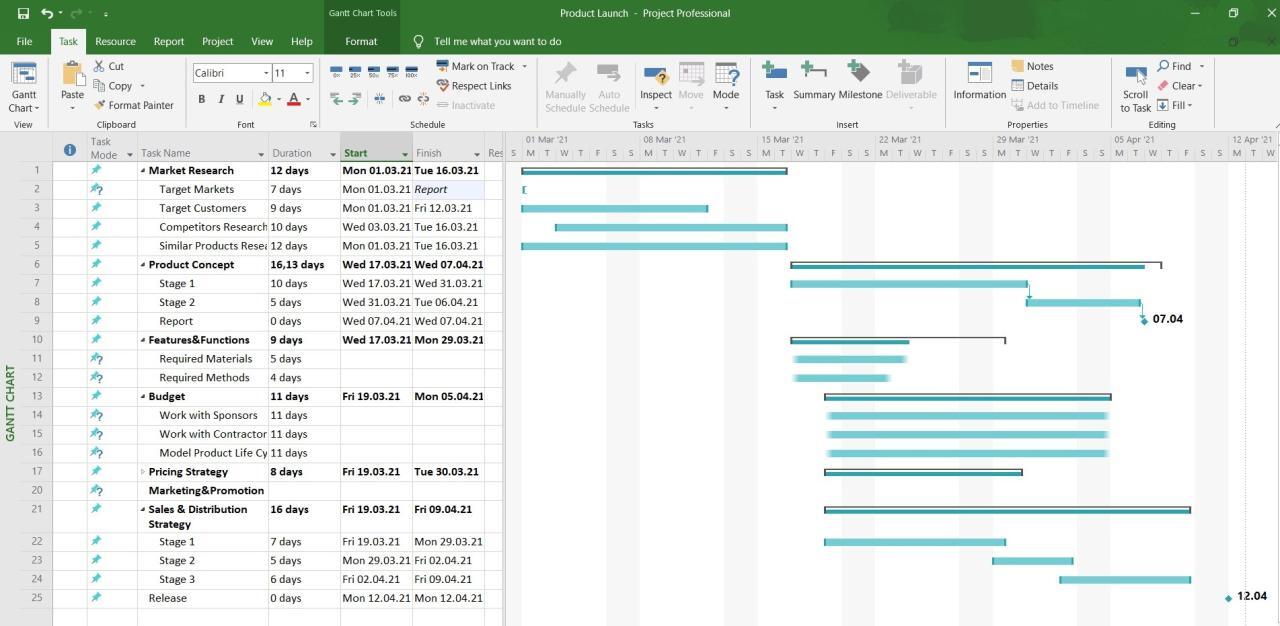
Gantt charts are a vital tool in project management, offering a visual representation of project timelines and tasks. They help project managers and teams visualize the entire project lifecycle, from initiation to completion, enabling better planning, scheduling, and resource allocation. This clarity promotes efficient workflow and facilitates proactive identification of potential delays or bottlenecks.A well-constructed Gantt chart provides a comprehensive overview of the project, allowing stakeholders to readily understand the project’s scope, duration, and dependencies.
This transparency fosters better communication and collaboration among team members and stakeholders.
Key Components of a Gantt Chart
Gantt charts are built upon several key components that work together to create a comprehensive project roadmap. Understanding these components is crucial for effective project planning and execution.
- Tasks: These represent the individual activities or milestones required to complete a project. Each task is assigned a specific description and duration.
- Timelines: Gantt charts visually depict the start and end dates of each task, along with the duration needed for completion. This allows for a clear understanding of the project’s schedule.
- Dependencies: These illustrate the relationships between tasks. Some tasks might rely on the completion of others before they can begin. Properly identifying dependencies is essential for maintaining a realistic and achievable project schedule.
Types of Gantt Charts
Different types of Gantt charts cater to various project needs.
- Simple Gantt Charts: These charts provide a basic overview of project tasks, their start and end dates, and durations. They are ideal for projects with a limited number of tasks and straightforward dependencies. They are best used for initial planning and communication.
- Complex Gantt Charts: These charts are more detailed, encompassing a greater number of tasks, sub-tasks, and dependencies. They are well-suited for large and complex projects with multiple interconnected activities. The ability to represent these intricate relationships makes them invaluable for managing large-scale projects.
- Resource-Loaded Gantt Charts: These charts extend the functionality of simple Gantt charts by incorporating resource allocation. They display which resources (people, equipment, materials) are assigned to each task and when. This feature is extremely helpful for effectively managing resources and avoiding over-allocation.
Example of a Simple Gantt Chart
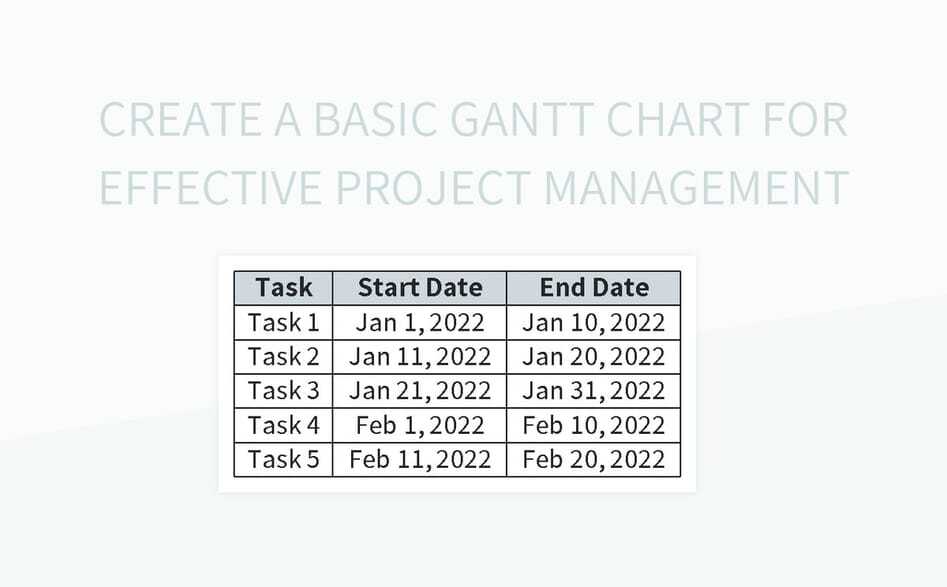
A basic Gantt chart can be represented using a tabular structure, such as a table in HTML. This simple format facilitates a clear visualization of task scheduling.
| Task Name | Start Date | End Date | Duration |
|---|---|---|---|
| Project Initiation | 2024-01-15 | 2024-01-22 | 7 days |
| Requirements Gathering | 2024-01-23 | 2024-02-05 | 13 days |
| Design | 2024-02-06 | 2024-02-20 | 15 days |
Creating a Gantt Chart
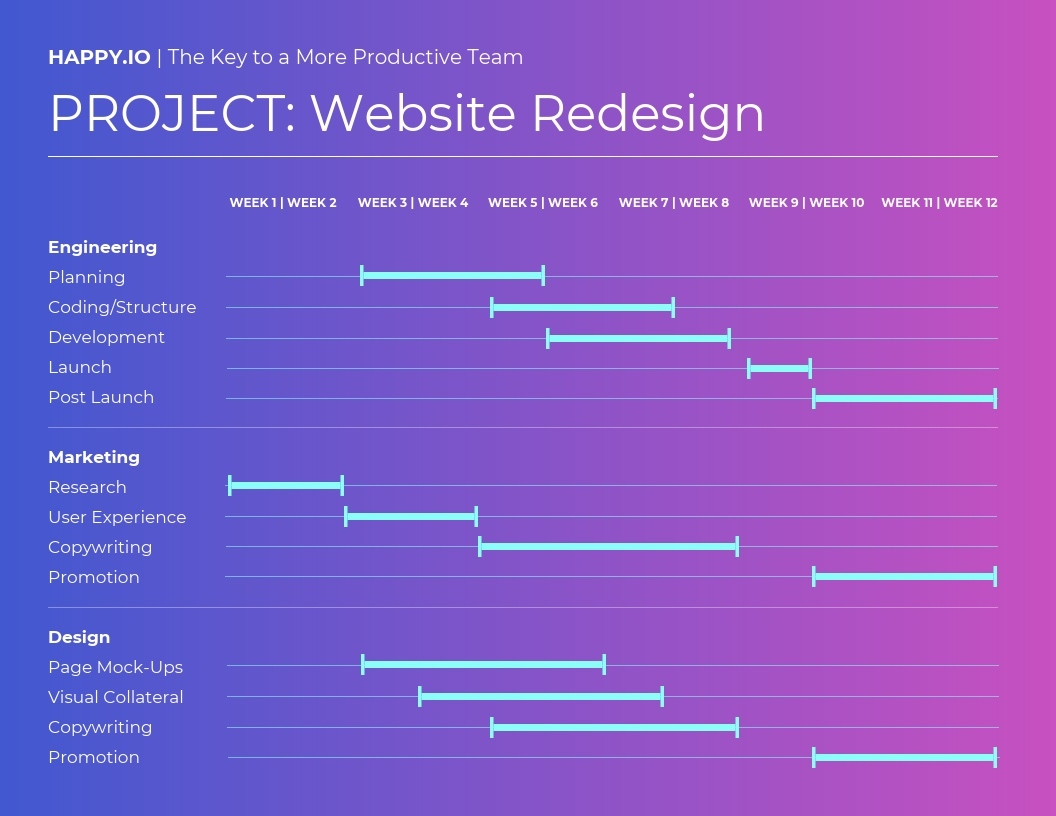
A Gantt chart is a powerful visual tool for project management. It provides a clear overview of project tasks, their durations, and dependencies, enabling effective scheduling and tracking. Creating a Gantt chart from scratch involves several key steps, each contributing to a comprehensive project plan. Careful attention to detail in these steps is crucial for accurate planning and successful project execution.Creating a Gantt chart is a process that requires a structured approach.
The steps involve defining tasks, estimating durations, and visualizing the project timeline with dependencies clearly illustrated. The resulting chart serves as a roadmap, enabling project managers to monitor progress and proactively address potential delays or roadblocks.
Defining Project Tasks and Dependencies
To begin, it is essential to meticulously define all project tasks. This involves breaking down the overall project into smaller, manageable components. A well-defined task should be specific, measurable, achievable, relevant, and time-bound (SMART). Each task should be clearly articulated, leaving no room for ambiguity. Further, identifying dependencies between tasks is critical.
Some tasks might rely on the completion of others before they can commence. For example, in software development, the design phase must precede the coding phase. This dependency is crucial to accurately scheduling tasks.
Estimating Task Durations
Accurate estimation of task durations is paramount to creating a realistic project schedule. Several factors influence task duration, including the complexity of the task, the resources allocated, and any potential obstacles. Effective estimation often involves considering past project data, if available, or seeking input from experienced team members.
Factors to Consider When Estimating Task Durations
- Task complexity: A complex task requiring multiple steps and diverse expertise will naturally take longer than a simple, straightforward task.
- Resource availability: Adequate resources, including personnel and equipment, are essential to complete a task within the estimated timeframe.
- Potential risks: Anticipate potential risks, such as equipment malfunctions or personnel shortages, that could impact the duration of a task. For instance, a sudden equipment breakdown might significantly delay the testing phase of a project.
- Dependencies: Tasks with dependencies must be scheduled with the completion of the preceding task in mind. This helps avoid scheduling conflicts and ensures a smooth project flow.
- Historical data: If past project data is available, using it as a benchmark can provide valuable insights and aid in making more informed estimates.
Examples of Tasks and Dependencies in a Project
Consider a project to launch a new mobile application. Tasks might include:
- Task 1: Design UI/UX – Duration: 2 weeks
- Task 2: Develop Android App – Duration: 3 weeks
- Task 3: Develop iOS App – Duration: 3 weeks
- Task 4: Testing – Duration: 1 week
- Task 5: Marketing Campaign – Duration: 2 weeks
Task 2 and Task 3 depend on Task 1’s completion, while Task 5 depends on the completion of Task 4.
Gantt Chart Table Structure
The following table demonstrates how a Gantt chart visually represents tasks, durations, and dependencies.
| Task | Start Date | End Date | Duration | Dependencies |
|---|---|---|---|---|
| Design UI/UX | 2024-08-20 | 2024-08-31 | 12 days | None |
| Develop Android App | 2024-09-01 | 2024-09-28 | 28 days | Design UI/UX |
| Develop iOS App | 2024-09-01 | 2024-09-28 | 28 days | Design UI/UX |
| Testing | 2024-09-29 | 2024-10-05 | 7 days | Android App, iOS App |
| Marketing Campaign | 2024-10-06 | 2024-10-18 | 12 days | Testing |
Note how dependencies are explicitly shown. The start date of a dependent task is dependent on the end date of the task it depends on. This visual representation is crucial for effective project management.
Using Gantt Chart Software
Gantt charts are powerful tools, but their effectiveness is significantly enhanced when using dedicated software. Software solutions provide features that streamline the creation, management, and sharing of Gantt charts, making project planning and execution more efficient. They often integrate with other project management tools, providing a holistic view of project progress.Software tools automate many of the repetitive tasks associated with manual Gantt chart creation, such as calculating durations, updating dependencies, and generating reports.
This automation reduces errors and frees up project managers to focus on strategic decision-making.
Popular Gantt Chart Software Tools
Several software tools are available to create and manage Gantt charts. Some of the most popular choices include Microsoft Project, Asana, Trello, and others. Each tool offers a unique set of features and benefits, catering to different project management needs.
Features and Benefits of Using Software Tools
Gantt chart software offers numerous advantages over manual methods. These tools typically provide features like:
- Automated calculations: Software automatically calculates task durations, dependencies, and resource allocation, minimizing errors and saving time.
- Collaboration and sharing: Many tools allow multiple team members to view and update the Gantt chart simultaneously, facilitating collaboration and communication.
- Integration with other tools: Some software seamlessly integrates with project management software, task management systems, or calendars, creating a holistic project view.
- Reporting and visualization: Software generates reports and visualizations that provide insights into project progress, potential delays, and resource utilization.
- Customization: The ability to customize chart views, task details, and presentation formats ensures the chart effectively represents the specific project needs.
Creating a Gantt Chart in Asana
Asana, a popular project management tool, provides a user-friendly interface for creating Gantt charts. While not a dedicated Gantt chart tool in the same vein as Microsoft Project, Asana offers Gantt chart-like functionality.
- Create a project: Begin by creating a project in Asana to hold all your tasks.
- Add tasks: Under the project, add tasks, defining their names, descriptions, and estimated durations. Asana allows you to link tasks to each other, reflecting dependencies.
- Set deadlines: Assign a start and due date for each task to clearly define the timeline.
- View as Gantt chart: Asana’s interface offers a Gantt chart view. This allows you to visualize task dependencies and project timelines.
Managing Tasks and Deadlines
Within Asana, you can manage tasks and deadlines effectively. You can easily modify task durations, update deadlines, and rearrange tasks within the Gantt chart view. Asana provides alerts and notifications to keep you informed about approaching deadlines. This facilitates proactive management of potential delays.
Sample Gantt Chart
The following table provides a simplified example of a Gantt chart within Asana. Note that the visual representation in Asana will differ based on the project’s complexity.
| Task | Start Date | End Date | Duration |
|---|---|---|---|
| Project Initiation | 2024-01-15 | 2024-01-22 | 7 days |
| Requirements Gathering | 2024-01-23 | 2024-02-05 | 14 days |
| Design | 2024-02-06 | 2024-02-26 | 21 days |
| Development | 2024-02-27 | 2024-03-15 | 19 days |
| Testing | 2024-03-16 | 2024-03-22 | 7 days |
Complex Project Representation
Consider a project involving the development of a mobile application. This project has multiple tasks and subtasks. The Gantt chart would visually represent the project’s timeline, showing the dependencies between tasks and subtasks, such as:
- UI Design: Includes subtasks like screen design, interaction design, and style guide development.
- Backend Development: Includes subtasks like API design, database development, and server setup.
- Testing: Includes subtasks like unit testing, integration testing, and user acceptance testing.
A well-structured Gantt chart for this project would clearly illustrate the interdependencies and estimated time required for each subtask, allowing for a complete project overview.
Understanding Timelines and Dependencies
Accurately representing timelines and understanding task dependencies are crucial for successful project management. A well-defined timeline, coupled with a clear understanding of how tasks interconnect, enables project managers to anticipate potential delays, allocate resources effectively, and ultimately, deliver projects on time and within budget. This section will delve into the intricacies of representing timelines and the significance of task dependencies within a Gantt chart.Representing project timelines accurately requires a precise estimation of the duration for each task.
This involves considering factors like resource availability, potential challenges, and historical data from similar projects. A realistic assessment of task durations is fundamental to constructing a Gantt chart that provides a trustworthy representation of the project schedule.
Representing Task Timelines
Accurate timeline representation is paramount to project success. Consider the project’s critical path, identifying tasks that, if delayed, will directly impact the entire project timeline. Tasks with tight deadlines should be highlighted for proactive management. Consider using a standardized format for inputting durations, such as days or hours, to maintain consistency and facilitate accurate calculations. Moreover, the use of milestones helps to mark significant project phases and serves as visual checkpoints.
Regular monitoring of progress against the timeline will allow for proactive adjustments and prevent potential delays.
Understanding Task Dependencies
Understanding task dependencies is essential for managing projects effectively. Dependencies represent the sequential relationships between tasks, indicating that one task cannot begin until another is completed. Recognizing these dependencies enables project managers to sequence tasks logically, preventing conflicts and ensuring that the project progresses in a coordinated manner. A robust understanding of dependencies allows for more accurate scheduling and resource allocation, ultimately leading to a more efficient and successful project.
Visualizing Dependencies on a Gantt Chart
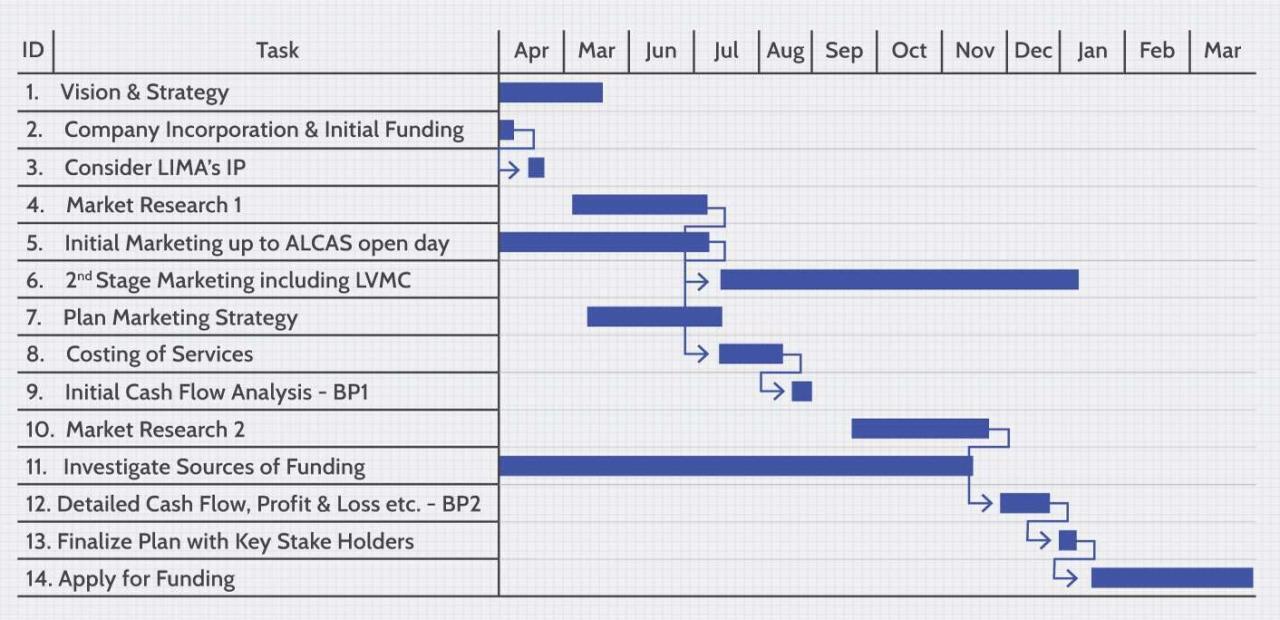
Gantt charts visually represent task dependencies through arrows or connectors. These visual aids clearly illustrate the precedence relationships between tasks. Dependencies are represented by connecting lines or arrows between tasks on the chart, visually indicating the sequence. The direction of the arrow shows the dependency flow, with the arrow pointing from the dependent task to the task it depends upon.
Examples of Project Dependencies
Let’s illustrate with some examples. In a software development project, the design phase must precede the coding phase. In construction, foundation work must be completed before the walls can be erected. These examples highlight the importance of recognizing these interdependencies.
- Software Development Project: The design phase depends on the requirements gathering phase; coding depends on design; testing depends on coding. This sequence is essential for delivering a functional software product.
- Construction Project: Foundation work must be completed before framing can begin. Plumbing and electrical installations depend on the framing phase. The sequence is critical for the structural integrity of the building.
Types of Task Dependencies
Several types of task dependencies can exist in a project. Understanding these different types is vital for constructing an accurate Gantt chart.
- Finish-to-Start (FS): A task cannot start until another task is finished. This is the most common type of dependency.
- Finish-to-Finish (FF): A task cannot finish until another task is finished. This type of dependency is less common.
- Start-to-Start (SS): A task cannot start until another task starts.
- Start-to-Finish (SF): A task cannot finish until another task starts.
Gantt Chart with Task Dependencies
The following table demonstrates a Gantt chart with various task dependencies. Note the arrows that visually depict the sequence and dependencies between tasks.
| Task | Start Date | End Date | Dependencies |
|---|---|---|---|
| Requirements Gathering | 2024-01-15 | 2024-01-29 | – |
| Design | 2024-01-30 | 2024-02-12 | Requirements Gathering (FS) |
| Coding | 2024-02-13 | 2024-03-05 | Design (FS) |
| Testing | 2024-03-06 | 2024-03-20 | Coding (FS) |
Resource Allocation and Management
Effective project management hinges on the careful allocation and management of resources. Proper resource planning ensures projects stay on track, within budget, and ultimately deliver successful outcomes. This involves not only assigning tasks to individuals but also considering the availability, skills, and capacity of each resource. This crucial step allows for accurate scheduling and prevents bottlenecks or delays.
Importance of Resource Allocation
Resource allocation is fundamental to project success. It ensures that the right people with the right skills are assigned to the right tasks at the right time. This optimized assignment minimizes delays and maximizes efficiency, contributing directly to project timelines and budget adherence. By anticipating resource needs and availability, project managers can proactively address potential conflicts and maintain a smooth workflow.
Incorporating Resource Allocation into a Gantt Chart
A Gantt chart, by its visual nature, is ideally suited for incorporating resource allocation. Specific individuals or teams can be assigned to particular tasks and timeframes. This visual representation allows for easy identification of potential resource conflicts and over-allocation. By highlighting resource availability against task duration, managers can proactively address potential constraints and optimize resource utilization.
Examples of Resource Allocation Scenarios
Consider a software development project. The project might require a team of developers, a project manager, and quality assurance testers. Developers would be allocated to specific coding tasks, the project manager to overall project management, and testers to quality assurance testing. Another example: a construction project might need electricians, plumbers, and carpenters assigned to different phases of the building process, ensuring a cohesive team and timely completion of the project.
These examples demonstrate the need for a comprehensive resource allocation strategy across various project types.
Managing Resources Effectively Using a Gantt Chart
Effective resource management involves proactively identifying potential resource conflicts and developing strategies to resolve them. The Gantt chart facilitates this by visually displaying resource allocation across different tasks and timeframes. By analyzing the chart, managers can quickly identify overlapping tasks or potential bottlenecks, and then allocate resources accordingly. This proactive approach allows for a flexible and responsive project management process.
Resource Allocation Table
This table demonstrates a sample resource allocation for a hypothetical project. Note that realistic projects would involve significantly more detail.
| Task | Description | Resource | Duration (days) |
|---|---|---|---|
| Project Initiation | Defining project scope and objectives | Project Manager | 5 |
| Requirement Gathering | Gathering and documenting user requirements | Analyst, Client | 10 |
| Design | Creating system design documents | Developer | 15 |
| Development | Implementing system functionality | Developer 1, Developer 2 | 20 |
| Testing | Testing the system for functionality and performance | Tester | 10 |
| Deployment | Deploying the system to production | Operations Team | 5 |
Interpreting Gantt Charts
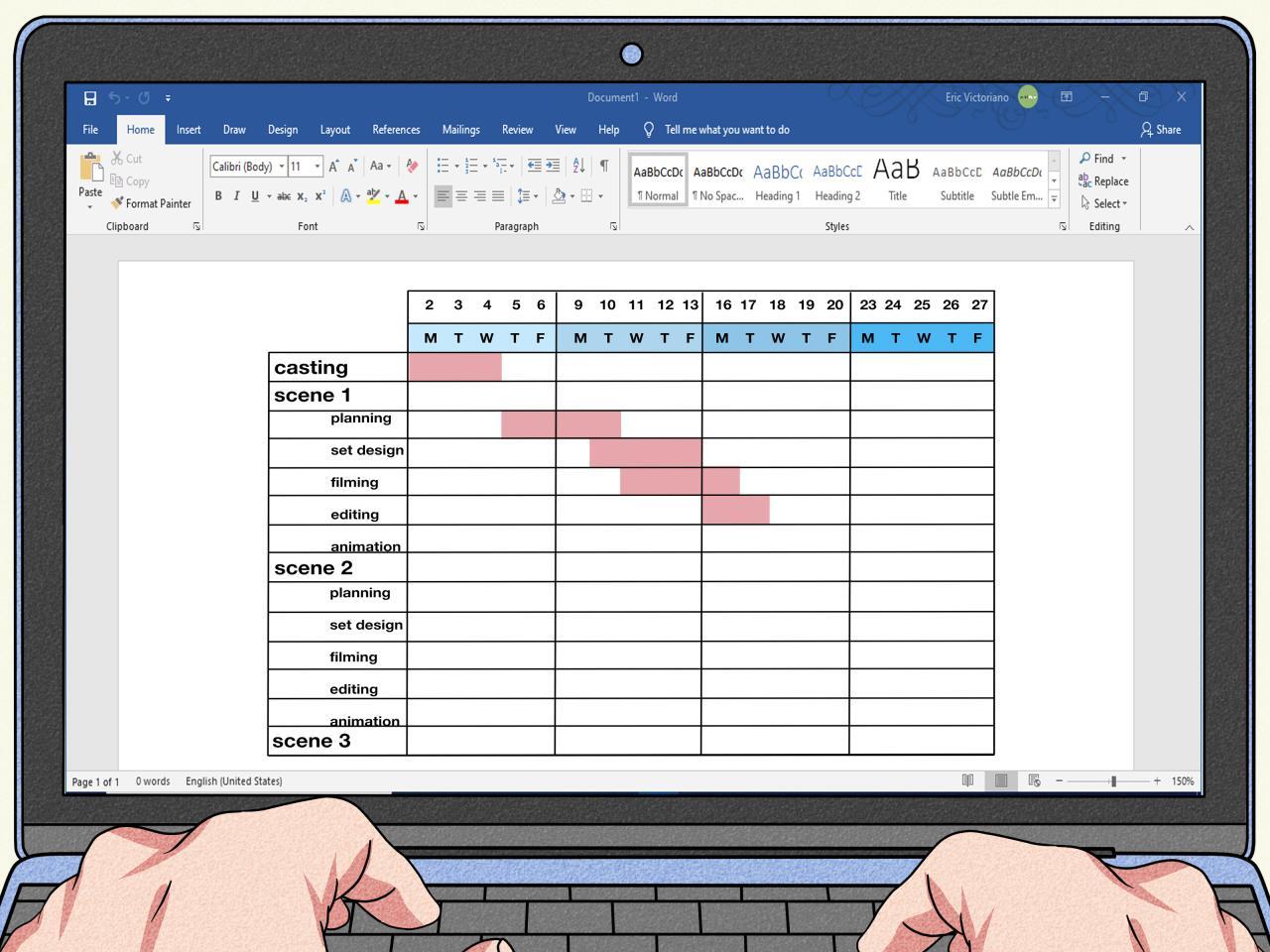
Gantt charts, while powerful tools for project visualization, are most effective when understood thoroughly. Proper interpretation allows project managers to proactively address potential issues, optimize resource allocation, and ensure timely project completion. This section delves into the key takeaways from a Gantt chart, highlighting techniques for identifying risks and delays, and tracking progress.Effective interpretation of a Gantt chart enables project managers to gain a comprehensive understanding of the project’s timeline, dependencies, and resource allocation.
This empowers them to make informed decisions, ensuring project success.
Key Takeaways from a Gantt Chart
Gantt charts provide a visual representation of project timelines, task dependencies, and resource allocation. Key takeaways include the overall project duration, critical path identification, task dependencies, and resource allocation. By understanding these elements, project managers can identify potential issues early and implement corrective actions.
Interpreting Information from a Gantt Chart
Several methods can be used to extract information from a Gantt chart. Visual inspection is crucial. Observing the relative lengths of tasks and their sequencing helps identify potential bottlenecks or areas requiring closer monitoring. Comparing the planned schedule to the actual progress provides insight into variances. Analyzing task dependencies is equally important; if one task is delayed, it can impact downstream tasks, leading to cascading effects.
Identifying Potential Delays and Bottlenecks
Identifying potential delays and bottlenecks in a project using a Gantt chart is a straightforward process. Tasks that overlap or have critical dependencies should be scrutinized. Tasks with tight deadlines or those reliant on external factors are more prone to delays. Examining the critical path, the sequence of tasks that determines the project’s overall duration, is vital.
If a task on the critical path is delayed, the entire project timeline will be affected.
Tracking Progress and Identifying Risks
Tracking progress against the Gantt chart is a continuous process. Comparing the planned start and finish dates of tasks with their actual progress is essential. Any deviations from the planned schedule should be noted and investigated. By regularly reviewing the Gantt chart, project managers can identify emerging risks early. This allows them to proactively implement mitigation strategies.
Scenario: Spotting Potential Risks
Consider a project involving the development of a new software application. The Gantt chart shows a critical path where the database design (Task A) precedes the user interface development (Task B). If Task A takes longer than anticipated due to unforeseen complexity in the database schema, it will delay Task B and potentially the entire project. This scenario highlights the importance of proactive risk management and contingency planning.
Tracking Progress in a Gantt Chart
A Gantt chart’s effectiveness lies in its ability to visualize project progress. This table demonstrates how progress can be tracked, highlighting completed tasks.
| Task | Planned Start | Planned End | Actual Status |
|---|---|---|---|
| Database Design | 2024-01-15 | 2024-02-01 | Completed |
| UI Development | 2024-02-01 | 2024-03-15 | In Progress |
| Testing | 2024-03-15 | 2024-03-29 | Not Started |
| Deployment | 2024-03-29 | 2024-04-05 | Not Started |
The table utilizes visual cues (“Completed”, “In Progress”, “Not Started”) to illustrate the current status of tasks. This aids in quickly assessing the project’s overall progress.
Best Practices for Gantt Chart Use
Gantt charts are powerful tools for project visualization and management. Adhering to best practices ensures these charts remain effective throughout the project lifecycle, facilitating better communication, resource allocation, and ultimately, project success. Following these guidelines helps project managers and teams extract the maximum value from these visual representations.Effective Gantt chart use involves more than just creating a chart; it necessitates a thoughtful approach to design, maintenance, and interpretation.
The best practices Artikeld below provide a framework for optimizing Gantt chart functionality.
Creating and Using Gantt Charts Effectively
Effective Gantt chart design goes beyond simply plotting tasks on a timeline. It involves careful consideration of visual clarity and intuitive representation. A well-designed chart allows for easy understanding of task dependencies, durations, and deadlines.
- Clear Task Definition: Each task should be clearly defined and unambiguous, avoiding vague descriptions. This ensures that everyone involved understands the scope of each task and prevents misinterpretations during execution.
- Realistic Task Durations: Accurately estimating task durations is crucial for a realistic project timeline. Underestimating durations can lead to delays, while overestimating can create unnecessary buffers.
- Appropriate Level of Detail: Balance the level of detail in the chart with the overall project complexity. Too much detail can clutter the chart, while too little can obscure crucial dependencies. The goal is to provide enough information without overwhelming the viewer.
Maintaining and Updating Gantt Charts
Maintaining a Gantt chart as a project progresses is vital for accurate tracking and proactive adjustments. Regular updates reflect changes in task completion, resource allocation, and any necessary schedule modifications.
- Regular Updates: Implement a system for regular updates to the Gantt chart. This could involve daily, weekly, or bi-weekly reviews, depending on the project’s complexity and pace.
- Version Control: Maintain versions of the Gantt chart, capturing previous iterations. This provides a historical record of project progress and allows for comparison over time.
- Change Management: Develop a process for managing changes to the Gantt chart. This process should include approval procedures for any modifications to task durations, dependencies, or deadlines.
Ensuring Accuracy and Clarity
Accuracy and clarity are paramount for the effectiveness of a Gantt chart. A well-structured chart minimizes misinterpretations and ensures everyone involved understands the project’s current status and upcoming milestones.
- Data Validation: Implement a system for validating the data used in the Gantt chart. Ensure that all task durations, dependencies, and resource allocations are accurate and up-to-date.
- Clear Visual Cues: Utilize visual cues like colors, shapes, and annotations to highlight critical paths, deadlines, and potential risks. These visual cues enhance the readability and comprehension of the chart.
- Consistent Formatting: Maintain a consistent formatting style throughout the Gantt chart. This ensures a professional and easy-to-understand representation of the project.
Making Gantt Charts Readable and Understandable
Readability and understandability are essential for effective communication. A clear and concise Gantt chart allows stakeholders to easily grasp the project’s progress, potential issues, and upcoming deadlines.
- Appropriate Scales: Use appropriate scales for time and task durations to avoid distortion and provide a comprehensive overview of the project’s timeline.
- Logical Grouping: Group related tasks logically to improve readability. This helps to identify dependencies and visualize the overall project structure.
- Font Sizes and Colors: Choose appropriate font sizes and colors to ensure readability, clarity, and differentiation between tasks, milestones, and deadlines.
Comparison of Project Management Software Tools
Different project management software tools offer varying functionalities and features. Choosing the right tool depends on the specific needs of the project and the team.
| Software Tool | Benefits | Drawbacks | Pricing |
|---|---|---|---|
| Asana | User-friendly interface, collaborative features, customizable workflows. | Limited reporting capabilities, may not be suitable for complex projects. | Free/Paid |
| Jira | Robust issue tracking, agile project management capabilities, highly customizable. | Steeper learning curve, may be overkill for simpler projects. | Free/Paid |
| Monday.com | Versatile platform for various project types, strong visual features, adaptable workflows. | Can be complex to set up for specific workflows, not ideal for projects with strict regulatory compliance. | Free/Paid |
| Trello | Simple, visual interface, good for visualizing tasks and progress. | Limited features for complex projects, less robust reporting. | Free/Paid |
Closing Notes
In conclusion, this guide has explored the multifaceted world of Gantt charts, from foundational concepts to advanced applications. By mastering the techniques discussed, you can effectively visualize project timelines, manage resources, and ultimately, achieve successful project outcomes. Remember that a well-structured Gantt chart serves as a crucial tool for effective project planning and execution.