Nested IF functions are powerful tools for handling complex logic in various programming environments. This guide provides a thorough exploration of their creation, from fundamental concepts to advanced optimization techniques. Understanding how to construct these functions effectively can streamline your code and enhance the efficiency of your applications.
This comprehensive guide will delve into the intricacies of nested IF statements, demonstrating their practical applications across diverse domains, including financial modeling and customer service applications. We will explore the critical factors influencing the performance of nested IF structures, offering actionable strategies to mitigate potential complexities and enhance overall efficiency.
Introduction to Nested IF Functions

Nested IF functions are a powerful tool in programming and spreadsheet applications for handling complex logic. They allow you to create conditional statements within other conditional statements, enabling intricate decision-making processes. This approach becomes increasingly useful as the conditions and potential outcomes become more multifaceted. By structuring conditions in this way, you can create a flow of logic that accurately reflects the required decision-making.The fundamental concept revolves around testing multiple conditions, each depending on the outcome of the previous condition.
This cascading structure allows for a precise response based on various factors. Nested IF functions excel in situations where a single IF statement cannot encapsulate all the required logic.
Syntax and Structure of Nested IF Statements
Different programming languages employ slightly varied syntax for nested IF statements. However, the core principle remains consistent: testing a condition and executing a block of code only if the condition is true, while potentially triggering another condition within that block.
- JavaScript: A nested IF statement in JavaScript uses the
ifandelse ifs. For example,if (condition1) statement1; else if (condition2) statement2; else statement3; - Python: Python uses a similar structure, utilizing the
if,elif(else if), andelses. Example:if condition1: statement1; elif condition2: statement2; else: statement3; - Excel: In Excel, nested IF functions are expressed using the
IFfunction itself. The general structure resembles=IF(condition1, value_if_true, IF(condition2, value_if_true2, value_if_false2))
Purpose and Use Cases
Nested IF functions are indispensable in scenarios requiring multiple layers of conditional logic. These functions are often crucial for complex decision-making processes, such as grading systems, loan applications, or automated decision systems. They provide a way to account for varying conditions and outcomes.
- Grade Calculation: A grading system might use nested IF statements to assign letter grades based on numerical scores. For example, an A grade could be given if the score is above 90, and a B if it’s between 80 and 90, and so on.
- Loan Approval: A loan application might use nested IF statements to assess the applicant’s creditworthiness and other factors before approving the loan. Conditions could include credit score, income, and debt-to-income ratio.
- Automated Decisions: In a manufacturing process, nested IF statements can determine the next step based on various factors, such as material availability, machine status, and production targets.
Difference from Simple IF Statements
Simple IF statements evaluate a single condition. Nested IF statements, in contrast, allow for a cascading evaluation of multiple conditions. This hierarchical structure allows for more granular control over the decision-making process.
Example of a Nested IF Function
Consider a simple example to illustrate a nested IF function in Excel.
| Sales Amount | Commission Rate |
|---|---|
| 0-1000 | 5% |
| 1001-5000 | 10% |
| 5001-10000 | 15% |
| Above 10000 | 20% |
“`=IF(A1 <=1000, A1*0.05, IF(A1<=5000, A1*0.1, IF(A1<=10000, A1*0.15, A1*0.2))) ``` This formula calculates the commission based on sales amounts (in cell A1). The first IF statement checks if the sales amount is less than or equal to 1000. If true, it calculates the commission at 5%. Otherwise, it moves to the second IF statement to check if the sales amount is less than or equal to 5000, and so on. This example demonstrates how a nested IF statement allows for precise commission calculation based on different sales ranges.
Understanding the Logic
Nested IF functions are powerful tools for handling complex logic in spreadsheets or programming languages. They allow for the evaluation of multiple conditions in a structured way, enabling the creation of sophisticated decision-making processes. Understanding how these functions evaluate conditions and the importance of proper structuring is crucial for creating robust and maintainable code.Nested IF functions evaluate conditions sequentially, one after the other.
Each IF statement checks a condition, and if that condition is true, the corresponding action is performed. If the condition is false, the function proceeds to the next nested IF statement. This cascading effect allows for multiple layers of decision-making, making them essential for scenarios with intricate criteria.
Handling Multiple Conditions
Nested IF functions excel at handling multiple conditions that need to be evaluated in a specific order. For instance, a function might need to assess various factors like sales volume, product type, and customer tier to determine the appropriate discount. Each condition is tested sequentially, and the outcome depends on the combination of conditions met. This methodical approach ensures that the correct decision is made based on the cumulative fulfillment of all specified criteria.
Importance of Indentation and Structuring
Proper indentation and structuring are critical for readability and maintainability, especially when dealing with nested IF statements. Indentation clearly visualizes the hierarchical relationships between conditions, making the code easier to follow and debug. A well-structured nested IF function, with consistent indentation, clearly defines which conditions relate to which actions, reducing the risk of errors. Visual clarity aids in maintaining the code over time, ensuring that modifications and additions are easily implemented without causing unintended consequences.
Evaluation of Conditions
Nested IF statements evaluate conditions from top to bottom, sequentially. The first IF statement checks its condition. If it’s true, the corresponding action is performed, and the rest of the nested structure is skipped. If it’s false, the function moves to the next IF statement. This process continues until a true condition is met or all conditions are evaluated as false.
The order of conditions is vital, as the subsequent conditions are only evaluated if the preceding ones are false.
Comparison to Other Conditional Structures
Nested IF functions differ from other conditional structures like SWITCH statements. SWITCH statements are generally more efficient for handling multiple, mutually exclusive conditions. Nested IFs, however, are more versatile and suitable for situations with overlapping or dependent conditions. For example, if a discount depends on multiple criteria (e.g., sales volume and customer type), nested IFs can elegantly manage these interdependencies, while a SWITCH statement might struggle with this type of combinatorial logic.
Scenarios Requiring Nested IF Functions
Nested IF functions are necessary in numerous scenarios where complex decision-making processes are required. For instance, in a grading system, a student’s final grade might depend on several factors like exam scores, assignments, and class participation. Each factor could be associated with specific weights and thresholds. Nested IF functions can effectively calculate the final grade based on these weighted criteria.
Another scenario involves determining loan eligibility based on multiple financial factors, such as credit score, income, and debt-to-income ratio. Each factor contributes to the overall assessment, requiring a nested IF structure to evaluate all aspects accurately.
Creating Effective Nested IF Structures
Nested IF statements, while powerful for handling complex logic, can quickly become difficult to read and maintain if not structured carefully. A well-designed nested IF structure clarifies the decision-making process and minimizes the risk of errors. This section provides a comprehensive guide to building such structures, highlighting best practices and common pitfalls.Effective nested IF statements require a clear understanding of the logic flow.
Each IF condition should contribute to a progressively refined assessment of the situation, ultimately leading to the correct outcome. Proper indentation and comments are essential for maintaining readability and understanding, especially in intricate scenarios.
Designing Logical Flow
Understanding the order of operations within nested IFs is crucial. The logic should follow a clear and sequential pattern, guiding the program through different possibilities. Each nested IF should address a specific condition that is dependent on the previous ones. This sequential structure enhances the clarity and maintainability of the code. A well-structured nested IF statement ensures that the program systematically evaluates conditions in a logical manner.
Avoiding Common Pitfalls
Several common errors can arise when constructing nested IF statements. One prevalent issue is the overuse of nesting, which can lead to overly complex and difficult-to-follow code. Consider alternatives like Boolean logic or switch statements if possible. Another pitfall is the improper handling of conditions. Ensuring each nested IF is correctly evaluating the expected criteria is critical to preventing unexpected results.
Thorough testing is vital to catch any potential issues.
Nested IF Structure Example
Consider a scenario where a student’s final grade depends on both their midterm and final exam scores, along with class participation. The following example demonstrates a nested IF structure to determine the grade:“`Function calculateGrade(midtermScore, finalScore, participation) if (midtermScore >= 90) grade = “A”; else if (midtermScore >= 80) if (finalScore >= 90) grade = “B+”; else grade = “B”; else if (midtermScore >= 70) if (finalScore >= 80 && participation >= 90) grade = “C+”; else grade = “C”; else grade = “F”; return grade;“`This example demonstrates a typical nested IF structure.
The outer IF statements check the midterm score, and the inner IFs consider the final exam score and participation grade.
Alternatives to Nested IFs
While nested IFs are powerful, there are often alternatives that offer improved readability and maintainability. For example, Boolean logic can be used to consolidate multiple conditions into a single expression. This is beneficial when multiple criteria need to be satisfied. Using a switch statement, or a series of chained ‘else if’ statements, is also helpful for handling a series of discrete cases.
The best approach depends on the specific complexity of the logic. Careful consideration of the specific problem to be solved and the potential for future maintenance will inform the most effective structure.
Trade-offs
Nested IFs can be complex and less readable compared to other approaches, especially when dealing with many conditions. However, they are sometimes necessary when different conditions need to be evaluated sequentially. This is especially true when conditions are mutually dependent, such as the previous example with grade calculation. The choice between nested IFs and other structures should be based on the specific requirements of the task, balancing readability and complexity.
Practical Applications
Nested IF functions, while seemingly complex, offer powerful tools for handling intricate decision-making processes. Their ability to chain multiple conditions allows for nuanced evaluations and outputs, significantly enhancing the functionality of spreadsheets, databases, and applications. This section will demonstrate the versatility of nested IF functions in diverse scenarios, from financial modeling to customer service.
Decision-Making Processes
Nested IF functions excel in situations requiring multiple layers of conditions. Consider a scenario where a company awards bonuses based on performance metrics. A simple IF statement might check for meeting a sales target. A nested IF can further refine this, considering additional factors like years of service and exceeding specific sales thresholds. This layered approach creates a more accurate and comprehensive evaluation system.
For instance, an employee meeting the target receives a bonus, but the bonus amount varies depending on years of service. If they haven’t met the target, no bonus is awarded. This sophisticated system ensures fair compensation based on a variety of factors.
Financial Modeling
Nested IF functions are invaluable in financial modeling. Imagine calculating loan interest rates. A basic IF statement could determine if the borrower has a good credit score. A nested IF can incorporate other factors such as loan amount, duration, and the current market interest rates to create a more accurate prediction. The loan interest rate can vary depending on several factors.
This sophisticated modeling can improve predictions and decision-making. For example, a loan exceeding a certain amount might attract a higher interest rate, which is determined by a nested IF structure.
Customer Service Application
In customer service applications, nested IF functions streamline responses to various customer inquiries. Consider a customer support system for a product with multiple features. A series of nested IF statements can direct customers to the correct help article or support agent based on their specific issue and the product version they’re using. This approach ensures accurate and timely resolution of customer queries.
For example, if a customer reports a problem with a specific feature, a nested IF can check the feature version, then direct the user to the correct troubleshooting document.
Use Cases Table
| Use Case | Description | Nested IF Structure Example (Conceptual) ||—|—|—|| Loan Qualification | Determine loan eligibility based on credit score, income, and debt-to-income ratio. | `=IF(CreditScore>700, IF(DebtToIncomeRatio <0.3, "Eligible", "Not Eligible"), "Not Eligible")` | | Product Pricing | Dynamically adjust product prices based on quantity ordered, customer type, and product features. | `=IF(QuantityOrdered>100, IF(CustomerType=”VIP”, Price*0.9, Price*0.95), Price)` || Grade Calculation | Assign letter grades based on numerical scores, considering different grading scales and policies. | `=IF(Score>=90, “A”, IF(Score>=80, “B”, IF(Score>=70, “C”, “D”)))` || Inventory Management | Determine reorder points for inventory items based on sales history, lead times, and safety stock levels. | `=IF(Sales>Threshold, IF(LeadTime>Days, ReorderPoint+SafetyStock, ReorderPoint), ReorderPoint)` |
Comprehensive Case Study
A company wants to calculate employee bonuses based on performance metrics. The bonus structure is tiered, depending on sales, years of service, and whether the employee has any outstanding performance reviews. The nested IF structure can handle the complex conditions involved in such a calculation. The formula would dynamically adjust the bonus amount according to the different tiers and factors.
For instance, if an employee has exceeded their sales target by 15%, has 5 years of service, and has no outstanding performance reviews, the nested IF function can calculate a larger bonus amount compared to an employee with fewer years of service. This approach is crucial for equitable and transparent compensation decisions.
Avoiding Complexity
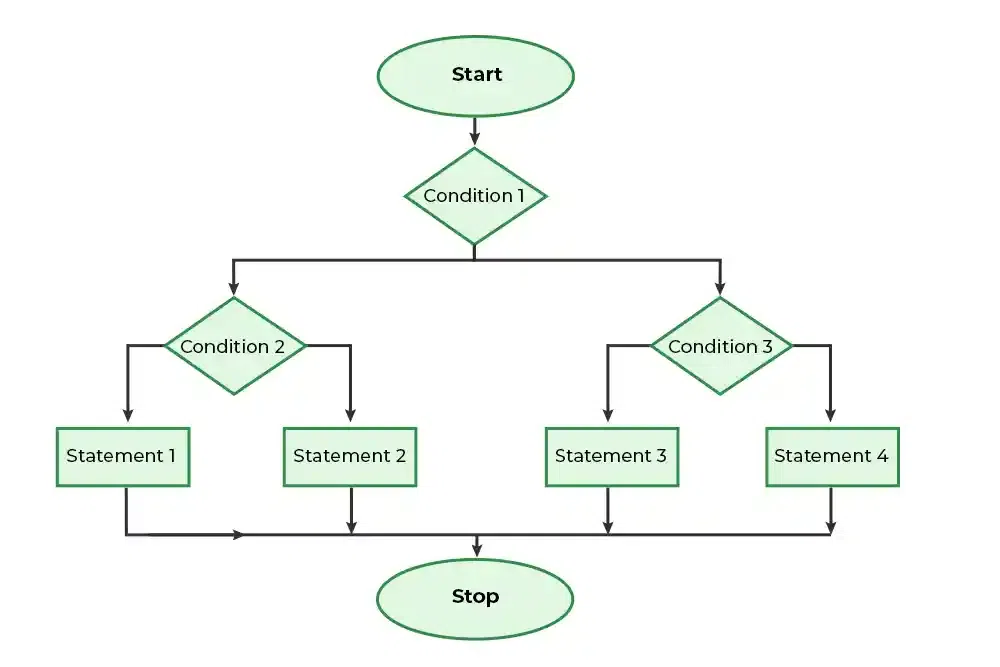
Nested IF statements, while capable of handling complex logic, can quickly become convoluted and difficult to maintain. This section details strategies to simplify these structures, enhancing readability and reducing the risk of errors. Understanding these techniques is crucial for creating robust and efficient code.Simplifying complex nested IF statements often involves breaking down the overall logic into smaller, more manageable parts.
This decomposition allows for a clearer understanding of each condition and its relationship to the others. Furthermore, it promotes modularity, making the code easier to test and debug.
Strategies for Simplification
Decomposing complex logic into smaller, manageable IF statements is a fundamental strategy for simplifying nested IF structures. This approach enhances readability and reduces the risk of errors. Breaking down a single, complex condition into several smaller, simpler ones leads to a more organized and understandable code structure.
- Modularization: Divide the complex logic into smaller, self-contained functions or procedures. Each function can handle a specific part of the overall logic, thereby isolating the complexity. This not only improves readability but also facilitates code reuse.
- Use of Intermediate Variables: Introduce intermediate variables to hold the results of intermediate calculations or conditions. This can significantly reduce the nesting depth and improve the clarity of the code.
- Boolean Variables: Employ boolean variables to represent the outcome of individual conditions. This simplifies the logic and allows for a more streamlined approach to controlling the flow of the program.
- Conditional Operators (AND, OR, NOT): Utilize logical operators like AND, OR, and NOT to combine conditions, thus reducing the need for nested IF statements. This often creates a more concise and understandable structure. Consider a condition like (x > 5) AND (y < 10). This can be more efficient than nesting IF statements to check these conditions individually.
Alternative Conditional Statements
Several alternative conditional statements can improve clarity and efficiency, particularly when dealing with multiple conditions. These statements often lead to more concise and maintainable code.
- Switch Statements: When dealing with multiple cases based on a single variable, switch statements can be a more elegant and readable alternative to nested IF statements. This is especially useful when dealing with a fixed set of possible values.
- Case Statements: Similar to switch statements, case statements offer a structured approach to handling different scenarios based on the value of a variable. This allows for clear differentiation between various outcomes.
- Lookup Tables: For complex conditions involving a large number of potential values, a lookup table can drastically reduce the complexity of the code. This involves pre-calculating results for various inputs and storing them in a table. When a particular input is needed, the table is queried, which is significantly faster than evaluating the conditions repeatedly.
Example: Simplifying a Complex Scenario
Imagine a scenario where a discount is applied based on multiple factors: purchase amount, customer type, and item category. A deeply nested IF structure could be unwieldy.
A complex nested IF statement example:“`if (amount > 100) if (customerType == “VIP”) if (category == “Electronics”) discount = 0.2; else discount = 0.1; else discount = 0.05; else discount = 0.0;“`
A simplified solution using intermediate variables and a switch statement:“`boolean isVIP = (customerType == “VIP”);double baseDiscount = 0.0;if (amount > 100) switch (category) case “Electronics”: baseDiscount = isVIP ? 0.2 : 0.1; break; default: baseDiscount = isVIP ?
0.15 : 0.05; discount = baseDiscount;“`This revised approach significantly reduces nesting, making the logic easier to understand and maintain.
Handling Errors and Edge Cases
Nested IF functions, while powerful for complex logic, can be vulnerable to errors if not carefully designed. Proper error handling is crucial for ensuring the robustness and reliability of these structures, especially when dealing with user input or external data that might not conform to expectations. This section focuses on strategies to anticipate and mitigate potential problems, making nested IF functions more resilient to unexpected inputs.
Error Handling Strategies
Robust nested IF structures incorporate mechanisms to identify and manage potential errors. This often involves checking for invalid input types, values outside predefined ranges, or missing data. By anticipating these scenarios and implementing appropriate responses, the program can prevent unexpected behavior or crashes.
Handling Invalid Input Data
Consider a scenario where a nested IF function calculates a discount based on purchase amount and customer type. If the user enters a non-numeric value for the purchase amount, the function might produce an error. To prevent this, an initial check can verify the input’s data type.
- Implement a validation step to ensure the purchase amount is a number. If it’s not, display an appropriate error message and potentially prompt the user to re-enter the value. This is a fundamental aspect of building resilient code.
- Employ a try-catch block in programming languages that support it. If an error occurs during a calculation within the nested IFs, the catch block can handle the exception gracefully, preventing the program from crashing.
- Use conditional statements to check for specific error conditions. For instance, if a customer type is not recognized, a default value can be assigned or an error message can be displayed.
Best Practices for Anticipating Edge Cases
Thorough testing is essential to identify edge cases and potential errors in nested IF structures.
- Test with various input values, including boundary conditions (minimum and maximum values), null values, and invalid data types. This comprehensive approach helps to ensure the function operates correctly under a wide range of conditions.
- Consider edge cases like extremely large or small input values. These extreme values can sometimes reveal unexpected behavior or errors in calculations that might not be apparent with typical inputs.
- Validate user input thoroughly. Input validation helps prevent unexpected data from disrupting the nested IF functions.
- Implement input sanitization procedures to prevent malicious input from causing errors or security vulnerabilities. This step is crucial in applications where user input is processed.
Creating Robust Nested IF Structures
Robust nested IF structures should be designed with error handling and edge case considerations in mind.
- Use modular design. Break down complex nested IF structures into smaller, more manageable modules. This makes the code easier to understand, test, and maintain, enhancing the overall robustness of the system.
- Prioritize clarity and readability. Well-commented code helps others (and yourself) understand the logic, which is crucial for identifying and fixing potential issues.
- Employ defensive programming techniques. These techniques involve proactively checking for potential errors and handling them gracefully. This approach ensures the program’s stability.
- Thoroughly test and debug the nested IF structures. Testing with various input values and scenarios, including edge cases, helps identify and resolve potential issues before the system goes live.
Optimizing Nested IF Statements
Nested IF statements, while powerful for complex logic, can become cumbersome and impact performance. Efficient optimization strategies are crucial to maintain code clarity and execution speed, particularly in applications handling substantial data volumes. Properly structured nested IFs are key to achieving desired results without compromising performance.
Performance Improvement Strategies
Optimizing nested IF statements involves several key strategies. Understanding the order of conditions and employing conditional expressions and lookup tables can significantly improve performance. The focus is on reducing unnecessary evaluations and leveraging data structures for quicker access to information.
Impact of Condition Order
The order in which conditions are evaluated within nested IF statements significantly influences execution speed. Conditions that are more likely to evaluate to false should be placed higher in the structure. This prioritization avoids unnecessary checks, reducing processing time. For instance, if a condition involves a large dataset, placing a filter on a subset of the data early in the nested structure prevents unnecessary calculations on the entire dataset.
Conditional Expressions
Conditional expressions provide a concise and often more efficient alternative to nested IF statements. These expressions directly embed the conditional logic within the statement itself. This reduces the nesting level and often results in a more readable and maintainable code structure. For example, a nested IF statement like:
if (condition1) if (condition2) result = value1; else result = value2; else result = value3;
can be optimized using a conditional expression as follows:
result = (condition1 && condition2) ? value1 : (condition1) ? value2 : value3;
This approach directly maps the logic to a single statement, improving readability and potentially reducing execution time.
Lookup Tables
Lookup tables offer an effective method for reducing the complexity of nested IF statements, particularly when dealing with a large number of possible conditions. By pre-calculating and storing results in a table, the program can access the appropriate value directly without executing multiple conditional checks. This technique is especially beneficial when the same calculations are repeated for similar input values.
Consider the following example:
if (input == 1) result = value1; else if (input == 2) result = value2; else if (input == 3) result = value3;
A lookup table can be implemented to directly return the appropriate value based on the input, eliminating the need for nested conditional checks.
Comparison of Optimization Techniques
The effectiveness of different optimization techniques depends on the specific structure of the nested IF statements and the nature of the conditions involved. Conditional expressions generally offer better readability and a streamlined code structure. Lookup tables are most effective when the same calculations are repeatedly performed on similar input values. Evaluating the expected frequency of operations and the size of the input data is critical when deciding the optimal optimization technique.
Illustrative Examples

Nested IF functions, while powerful for complex logic, can become challenging to manage if not structured effectively. This section provides practical examples, demonstrating the application of nested IFs in various scenarios and programming languages, alongside visual aids for a clear understanding of their logic flow. Understanding these examples will help in developing and debugging your own nested IF structures.
Multiple Nested IF Statements in Action
Nested IF statements provide a structured approach to handle situations with multiple conditions. Consider a simple example: evaluating student grades. A student receives an ‘A’ if their score is 90 or above, a ‘B’ if it’s between 80 and 89, a ‘C’ if it’s between 70 and 79, and a ‘D’ otherwise.“`function getGrade(score) if (score >= 90) return “A”; else if (score >= 80) return “B”; else if (score >= 70) return “C”; else return “D”; “`This example demonstrates a concise nested IF structure, achieved through `else if` statements, making the logic clearer.
Nested IFs in Different Programming Languages
The structure of nested IFs remains consistent across various programming languages, though the syntax might differ slightly. This table showcases nested IF statements in common languages:
| Programming Language | Nested IF Example |
|---|---|
| Python | “`pythondef check_age(age): if age >= 18: if age >= 65: return “Senior Citizen” else: return “Adult” else: return “Minor”“` |
| JavaScript | “`javascriptfunction checkStatus(age, isStudent) if (age >= 18) if (isStudent) return “Student”; else return “Adult”; else return “Minor”; “` |
| C++ | “`C++#include |
Nested IFs in a Gaming Context
In a 2D side-scrolling game, a character can perform different actions based on player input and the character’s current state. For example, if the player presses the “jump” button, the character jumps. However, if the character is already in the air, the player input is ignored. This logic can be implemented using nested IF statements.“`if (input == “jump”) if (isJumping) // ignore input else // initiate jump animation and set isJumping to true “`
Visual Representation of Nested IF Logic Flow
A flowchart visually represents the execution path of nested IF statements. The flowchart for the student grade example shows how the program evaluates conditions and selects the appropriate output based on the student’s score.[Imagine a simple flowchart here. It would start with a box labeled “Input Score”. Then, it would have a series of diamond-shaped decision boxes, each testing a condition (score >= 90, score >= 80, score >= 70).
Each path through the flowchart would lead to a box labeled with the appropriate grade output (“A”, “B”, “C”, or “D”).]
Examples with Varying Complexity
Complex scenarios can be handled effectively with nested IF structures. For example, determining eligibility for a loan involves several conditions, such as income, credit score, and loan amount. A more intricate example is calculating a discount for a customer based on their purchase history and membership status. The more conditions involved, the more nested IFs may be required.
These examples highlight the capability of nested IF structures to handle multifaceted situations.
Closure

In conclusion, mastering nested IF functions empowers you to tackle intricate decision-making processes with precision and elegance. This guide has provided a comprehensive roadmap, equipping you with the knowledge and techniques necessary to craft robust and optimized nested IF structures. By understanding the various use cases, optimization strategies, and error handling techniques, you can confidently apply these functions to solve complex problems across a wide range of applications.