Data accuracy is paramount in analysis. Duplicate rows can skew results and introduce errors. This comprehensive guide provides a step-by-step approach to effectively identify and remove duplicate rows from your dataset, ensuring reliable insights. We’ll explore various methods, from basic SQL queries to advanced Python techniques, and cover crucial considerations for data integrity.
This guide covers a range of scenarios, from simple datasets to complex, multi-table environments. We’ll delve into handling duplicates with differing data types, emphasizing best practices to avoid losing critical information during the removal process. We’ll also demonstrate how to validate your data after removal, ensuring accuracy and reliability.
Introduction to Duplicate Rows
Duplicate rows in a dataset represent identical entries, repeating the same information multiple times. These redundant data points can significantly impact the accuracy and efficiency of data analysis. Understanding and addressing duplicate rows is crucial for obtaining reliable insights from your data.The presence of duplicate rows can lead to skewed results in statistical analyses, as the repeated information artificially inflates the dataset’s size and potentially distorts calculations.
Furthermore, duplicate data often wastes storage space and processing time during analysis, which can be a critical concern for large datasets. Consistent and reliable data is paramount for any meaningful analytical process.
Definition of Duplicate Rows
Duplicate rows are data entries that share the exact same values across all columns. In other words, each row’s attributes match another row’s attribute values in their entirety. This can occur in various datasets, such as customer databases, transaction logs, or survey responses.
Potential Issues Caused by Duplicate Rows
Duplicate rows in a dataset can introduce significant complications during data analysis. They can lead to:
- Inaccurate Results: Statistical calculations, such as averages or counts, might be distorted due to the inflated representation of repeated data points.
- Increased Computational Cost: Processing datasets with duplicates requires more computational resources and time than processing a dataset with unique rows.
- Misleading Insights: Analysis performed on a dataset with duplicates may yield inaccurate conclusions and perspectives, which could lead to faulty decisions.
- Wasted Storage Space: Storing redundant data occupies more storage space than necessary.
Common Scenarios of Duplicate Rows
Duplicate rows frequently arise in various situations:
- Data Entry Errors: Manual data entry often introduces mistakes, leading to repeated rows.
- Data Import/Export Issues: Data imported from different sources or exported to new formats may contain duplicate entries.
- Database Design Flaws: Poor database design, particularly in relational databases, may allow for the creation of redundant rows.
- Data Aggregation: Combining data from multiple sources might result in the replication of certain records.
Importance of Removing Duplicates
Removing duplicate rows is essential for ensuring accurate data analysis and preventing skewed results. By eliminating redundant entries, data analysts can gain more reliable insights from the dataset, reducing the risk of misinterpretations and supporting informed decision-making.
Example Table with Duplicate Rows
The following table illustrates a dataset containing duplicate rows:
| ID | Name | Age |
|---|---|---|
| 1 | Alice | 30 |
| 2 | Bob | 25 |
| 1 | Alice | 30 |
| 3 | Charlie | 35 |
| 2 | Bob | 25 |
In this example, rows with ID 1 and ID 2 are duplicated. Removing these duplicates will yield a more accurate and efficient dataset for analysis.
Methods for Identifying Duplicate Rows
Identifying duplicate rows is a crucial step in data cleaning and analysis. Duplicate entries can skew results, lead to errors in reporting, and consume unnecessary storage space. Efficient methods for detecting these duplicates are essential for maintaining data integrity and enabling accurate insights.Various techniques exist for pinpointing duplicate rows, ranging from simple spreadsheet functions to sophisticated SQL queries and Python libraries.
Choosing the right method depends on factors such as the size of the dataset, the structure of the data, and the specific criteria for identifying duplicates.
SQL Methods for Duplicate Detection
SQL provides robust tools for identifying duplicate rows based on specific columns or a combination of columns. SQL queries can be tailored to locate duplicates efficiently, even in large datasets.
SELECT column1, column2, COUNT(*)FROM your_tableGROUP BY column1, column2HAVING COUNT(*) > 1;
This SQL query, for instance, identifies rows with duplicate values in ‘column1’ and ‘column2’. It groups rows by these columns and counts their occurrences. Rows with a count greater than 1 are flagged as duplicates. Adjusting the `column1`, `column2` and table names will allow you to adapt this query to your specific data structure.
Python Methods for Duplicate Detection
Python libraries, particularly Pandas, offer efficient ways to detect duplicates in dataframes. These methods allow for flexibility in specifying the columns used for duplicate identification.
- Pandas’ `duplicated()` method is a straightforward way to find duplicates based on all columns of a DataFrame. This method returns a boolean Series indicating whether each row is a duplicate. For example, `df.duplicated()`. This is useful for quickly identifying all duplicates.
- Pandas’ `drop_duplicates()` method provides another option for removing duplicate rows. This method can be combined with specific columns for duplicate identification using the `subset` parameter, enabling precise duplicate detection. For instance, `df.drop_duplicates(subset=[‘column1’, ‘column2’])`. This allows you to choose which columns should be considered for duplicate identification.
- Custom functions within Pandas can be used to apply complex duplicate detection logic. This approach is particularly useful when custom criteria are needed, such as identifying duplicates based on the values of multiple columns and also based on specific criteria.
Spreadsheet Software Methods for Duplicate Detection
Spreadsheet software often provides built-in features for detecting duplicate values. These tools typically offer simple-to-use functions for highlighting or filtering duplicate rows, facilitating quick identification.
- Spreadsheet software like Microsoft Excel or Google Sheets often have tools to highlight duplicates based on specific columns. These tools can be highly useful for smaller datasets. Users can use conditional formatting to mark duplicates.
- Filtering features in spreadsheet software can be used to isolate rows that meet specific criteria. This approach enables you to isolate rows that are duplicates based on your requirements.
Comparison of Methods
| Method | Pros | Cons |
|---|---|---|
| SQL | Efficient for large datasets, robust query language, well-suited for complex criteria. | Requires SQL knowledge, might not be the easiest for simple cases. |
| Python (Pandas) | Flexible, easy to integrate with other Python libraries, suitable for diverse data analysis tasks. | Can be less efficient for extremely large datasets compared to optimized SQL queries. |
| Spreadsheet Software | Easy to use for smaller datasets, user-friendly interface. | Limited scalability for very large datasets, often less flexible in handling complex criteria. |
Techniques for Removing Duplicate Rows
Removing duplicate rows from datasets is a crucial step in data preprocessing. Efficiently identifying and eliminating these redundant entries ensures data integrity and improves the accuracy of subsequent analyses. Various techniques exist for this task, ranging from simple SQL commands to sophisticated Python libraries. This section will detail methods for removing duplicates in SQL, Python (using pandas), and spreadsheet software.
Removing Duplicates in SQL
SQL provides several ways to eliminate duplicate rows. A common approach involves using the `DISTINCT` , which selects only unique rows. Another method leverages the `GROUP BY` clause. This clause groups rows with identical values in specified columns, and `aggregate functions` (e.g., `COUNT`, `SUM`) can then be applied to each group. In cases where `DISTINCT` is not suitable, `GROUP BY` offers more flexibility by allowing further analysis of the grouped data.
Removing Duplicates in Python (Pandas)
Python’s pandas library is widely used for data manipulation and analysis. It offers a straightforward way to handle duplicate rows. The `drop_duplicates()` method is a powerful tool for this purpose. This method allows for specifying columns to consider when identifying duplicates, providing a high degree of control over the process.
Using pandas `drop_duplicates()`
The `drop_duplicates()` function in pandas allows precise control over which columns are used to identify duplicates. The `subset` parameter specifies the columns to check for duplicates, enabling selective removal based on specific criteria.
- Example:
- “`python
import pandas as pd
# Sample DataFrame
data = ‘ID’: [1, 2, 2, 3, 4, 4], ‘Name’: [‘Alice’, ‘Bob’, ‘Bob’, ‘Charlie’, ‘David’, ‘David’], ‘Age’: [25, 30, 30, 22, 28, 28]
df = pd.DataFrame(data)
# Remove duplicates based on ‘ID’ and ‘Name’ columns
df_no_duplicates = df.drop_duplicates(subset=[‘ID’, ‘Name’])
print(df_no_duplicates)
“` - This code snippet demonstrates removing duplicates based on both ‘ID’ and ‘Name’ columns. Adjusting the `subset` parameter allows targeting specific columns. For instance, if you want to remove only duplicates based on the ‘ID’ column, you’d use `df.drop_duplicates(subset=[‘ID’])`.
Removing Duplicates in Spreadsheet Software (Excel/Google Sheets)
Spreadsheet software like Excel and Google Sheets provide built-in tools for removing duplicate rows. These tools streamline the process, offering an accessible alternative to programming.
Removing Duplicates in Excel
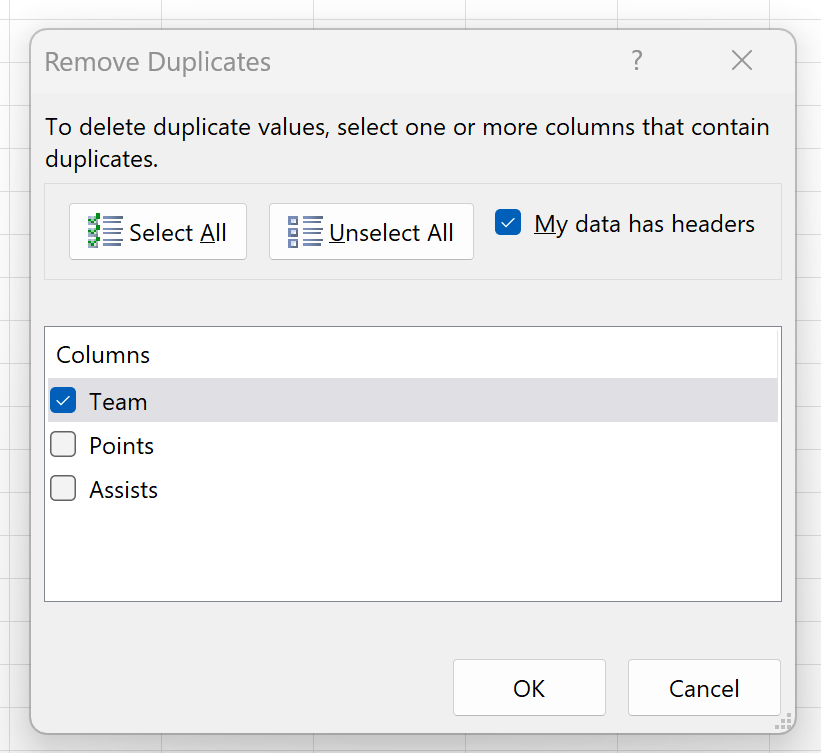
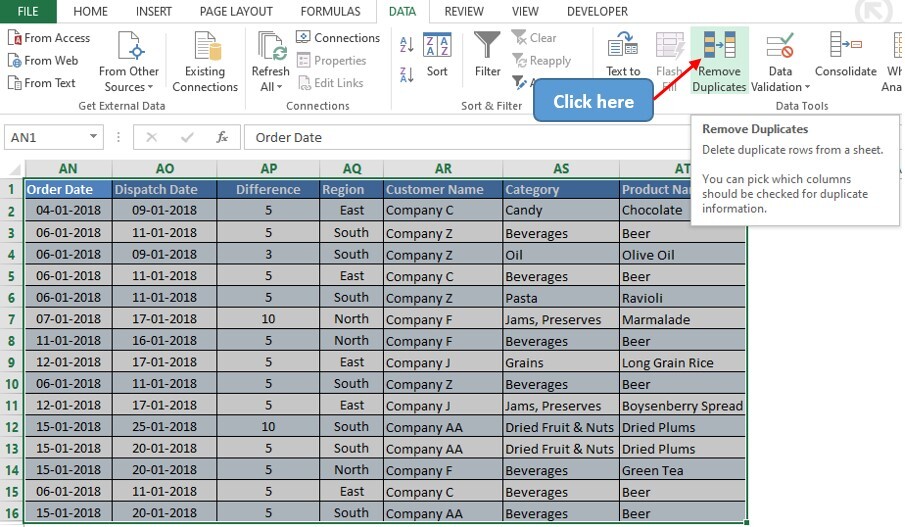
A step-by-step procedure for removing duplicates in Excel:
- Select the data range containing the rows you want to check for duplicates.
- Go to the “Data” tab in the Excel ribbon.
- Click on “Remove Duplicates”.
- A dialog box will appear. Select the columns you want to consider when identifying duplicates.
- Click “OK”.
- Excel will display a new dataset with duplicate rows removed.
Note: This procedure ensures the data in the selected columns remains consistent.
Handling Duplicate Rows with Different Data Types

Identifying and removing duplicate rows becomes more complex when columns contain different data types. This often arises in real-world datasets where data is imported from various sources or has been transformed through different processes. Such inconsistencies can lead to inaccurate duplicate detection if not addressed appropriately. This section explores strategies for managing duplicates with varying data types within columns.Data integrity and consistency are paramount when dealing with duplicate rows.
The methods employed must effectively handle the differences in data types to ensure accurate identification and removal of duplicates. This includes strategies for comparing numerical and textual data, as well as other data types that may be present in a dataset.
Handling Differences in Column Data Types
Different data types within columns can confound duplicate detection. For instance, a column representing dates might contain dates in different formats (e.g., ‘2024-10-27’ vs. ‘October 27, 2024’), or a column for prices might include both numeric and character representations (e.g., ‘$10.00’ vs. 10.00). These discrepancies require careful handling to ensure accurate identification.
Addressing Duplicate Rows with Different Data Types in the Same Column
Consider a column containing both numeric and textual representations of the same data. For example, a ‘Price’ column might have entries like 10.99, 25.50, ‘$15.00’, and ‘€20.00’. To accurately identify duplicates, the data must be standardized to a single format. In this case, converting all price values to a consistent numeric format (e.g., USD) would be necessary before comparison.
Data Examples with Different Data Types in Columns
A table containing customer information could have a column for ‘Age’ with numeric values and another column for ‘City’ with textual data. Another example is a dataset with sales figures where ‘Revenue’ is expressed both as numeric values (e.g., 1200.50) and as text values in currency formats (e.g., ‘$1200.50’).
Techniques for Handling Discrepancies in Data Types for Duplicate Identification
Several techniques can address discrepancies in data types for duplicate identification:
- Data Type Conversion: Converting all values within a column to a common data type (e.g., numeric values, dates, or strings). This allows for consistent comparison and duplicate identification. For example, converting all date formats to a standardized format (e.g., YYYY-MM-DD). Or converting all currency values to a single currency.
- Data Cleaning and Normalization: Standardizing data formats (e.g., currency symbols, date formats). This ensures that data values are in a comparable format. For instance, removing currency symbols from price values and ensuring that all date values are formatted in YYYY-MM-DD. Also, handling inconsistencies in capitalization or formatting of textual data.
- Using Regular Expressions (Regex): Employing regular expressions to extract relevant information from strings and convert it into a comparable format. This is particularly useful when dealing with complex data structures like currency values with various symbols or formats.
Comparison of Methods for Different Data Type Scenarios
This table summarizes the methods for handling different data type scenarios in duplicate rows.
| Data Type Scenario | Method | Description |
|---|---|---|
| Numeric vs. Textual (Currency) | Data Type Conversion | Convert text representations (e.g., ‘$10.00’) to numeric values (e.g., 10.00) before comparison. |
| Different Date Formats | Data Cleaning and Normalization | Convert different date formats to a standard format (e.g., YYYY-MM-DD) for comparison. |
| Mixed Numeric and Textual in a Single Column | Data Type Conversion or Regular Expressions | Choose the appropriate method based on the nature of the data. If numeric values are embedded in text, regular expressions can extract them. Otherwise, convert the column to a single type. |
Considerations for Data Integrity
Maintaining data integrity is paramount during the process of removing duplicate rows. Errors in this step can lead to inaccurate analyses, flawed decision-making, and ultimately, a compromised understanding of the data. Careful consideration of potential pitfalls and proactive strategies are crucial for ensuring the quality and reliability of the cleaned dataset.
Importance of Data Integrity During Duplicate Removal
Data integrity, in the context of duplicate removal, refers to the accuracy, completeness, and consistency of the data after the process. Maintaining this integrity ensures that the resulting dataset accurately reflects the underlying reality and is fit for its intended purpose. Compromising data integrity during duplicate removal can lead to a loss of valuable insights and ultimately, hinder informed decision-making.
Preserving Relevant Information
A crucial aspect of maintaining data integrity is preserving the essential information embedded within duplicate rows. Simply deleting all but one instance of a duplicate can result in the loss of critical details. For example, consider a sales database where several rows represent the same customer purchase, but each row contains different timestamps. Deleting all but one row could mask the temporal aspect of the data.
Strategies for Preserving Information
Various strategies exist to avoid losing critical information during duplicate removal. One approach is to use a summarization method. This method involves creating a summary row that incorporates the relevant information from all duplicate rows. For instance, instead of deleting duplicate customer orders, the summary row could include the total quantity ordered and the sum of the order amounts.
Another approach is to use a unique identifier, or key, which distinguishes each row uniquely. This key allows for the tracking of each record.
Potential Pitfalls of Incorrect Duplicate Removal
Incorrectly removing duplicate rows can lead to significant issues. For instance, a customer might have multiple accounts, each with slightly different order histories. If all but one account is deleted, the complete order history for that customer is lost. Another pitfall is inadvertently deleting data that is intended to be preserved. An example of this is accidentally deleting rows that contain important supplementary information about each row.
Careful analysis and consideration of the context of the data are crucial.
Strategies to Avoid Losing Crucial Information
To mitigate these pitfalls, it is essential to meticulously examine the data and identify the features that distinguish each row. A detailed understanding of the data’s structure and intended use is critical. If possible, preserving all duplicate rows in a separate archive, with an indication of the original row’s unique identifiers, can allow for future investigation and potential data restoration.
Best Practices for Data Integrity
| Best Practice | Description |
|---|---|
| Thorough Data Analysis | Understand the data structure, intended use, and potential implications of removing duplicates. |
| Selective Deletion | Retain relevant information, such as timestamps or transaction IDs, to avoid losing crucial details. |
| Duplicate Identification Verification | Ensure that the chosen criteria accurately identify duplicates and that the criteria for duplicates is correctly interpreted. |
| Data Summarization | Employ summarization techniques for relevant information from duplicate rows to create a concise and comprehensive record. |
| Preservation of a Backup | Create a backup copy of the original data before initiating the duplicate removal process. |
| Comprehensive Documentation | Document the rationale for duplicate removal, including the criteria used and the methods employed. |
Example Scenarios and Use Cases
Removing duplicate rows from datasets is a critical step in data analysis and management across various domains. This process ensures data integrity and facilitates accurate insights. Practical application of duplicate removal techniques is essential for reliable analysis and reporting. Understanding real-world examples provides valuable context for effective implementation in diverse data environments.
Customer Database Example
A customer database often contains redundant entries due to various reasons, such as typos, data entry errors, or multiple interactions from the same customer. Removing these duplicates ensures a clean and accurate view of customer information, enabling more effective marketing campaigns and personalized customer service.
- Consider a customer database with multiple entries for the same customer, perhaps due to different purchase channels or different entry dates. Duplicate entries can inflate customer counts, distort sales figures, and lead to misdirected marketing efforts. Removing these duplicates provides a precise and reliable customer base.
- Duplicate removal in a customer database can be achieved by identifying and removing identical records based on unique identifiers such as customer ID or email address. This process allows for a more accurate customer segmentation and targeted marketing.
Product Inventory System Example
Duplicate entries in a product inventory system can lead to inefficiencies in stock management, ordering, and reporting. These duplicates might arise from human errors, system glitches, or merging of similar products. Removing duplicates ensures accurate inventory tracking and minimizes potential discrepancies in stock levels.
- In an inventory system, multiple listings for the same product (with variations in spelling or slightly different descriptions) can lead to confusion. This can result in overstocking or understocking of certain items, which can negatively affect profitability. Removing duplicate listings ensures accuracy and optimizes inventory management.
- A consistent approach to data cleaning and duplicate removal in an inventory system ensures that the system reflects the true state of stock. This reduces the likelihood of errors and enhances the accuracy of reports and analyses, improving decision-making processes.
Financial Data Analysis Example
Duplicate entries in financial data, such as transactions or customer records, can significantly impact financial analysis. Such errors may arise from data entry mistakes, system malfunctions, or merging of similar financial events. Removing duplicates is vital for precise calculations and accurate financial reporting.
- A financial dataset with duplicate transaction records for the same purchase could distort profit calculations, mislead financial reporting, and create an inaccurate financial picture. Duplicate removal safeguards against such misinterpretations, allowing for a clearer and more reliable understanding of financial trends and patterns.
- Financial institutions use duplicate removal techniques in their data analysis to detect fraudulent activities or anomalies. Duplicate records might indicate suspicious transactions, which are important to highlight to avoid losses and safeguard the financial system.
Data Validation and Error Handling
Post-duplicate removal, rigorous data validation is crucial to ensure the integrity and accuracy of the remaining data. Inaccurate or inconsistent data can lead to flawed analyses and incorrect conclusions. Therefore, meticulous validation steps are essential to maintaining data quality.
Importance of Data Validation After Removal
Ensuring data accuracy and reliability after duplicate removal is paramount. Errors that might have been masked by duplicates now become evident. Inconsistencies in data fields, such as mismatched values or missing data points, can have significant consequences if not addressed. Validating the data helps to identify and rectify these issues, ensuring that the remaining data is reliable and suitable for further analysis.
Techniques for Identifying and Resolving Errors
Data validation techniques help to uncover inconsistencies and discrepancies after the duplicate removal process. These methods can include comparing the remaining data to source records, checking for data type consistency, and examining for missing or illogical values. Automated scripts and checks can efficiently pinpoint inconsistencies and facilitate error resolution. Resolving errors often involves data correction, imputation, or the exclusion of problematic rows.
Strategies for Validating Data Accuracy
Validating data accuracy involves a multi-faceted approach. Firstly, comparing the cleansed dataset to original source data can reveal discrepancies. Secondly, validating data types and formats ensures that the data conforms to expected standards. Thirdly, scrutinizing data for outliers and unusual values is important. A combination of automated and manual checks can help identify and resolve inconsistencies in a comprehensive manner.
Error Handling Methods for Duplicate Removal
Robust error handling is crucial during the duplicate removal process. This involves implementing error trapping mechanisms to catch and manage potential issues, such as missing values, data type mismatches, or inconsistencies. The error handling strategy should clearly define how to manage each type of error, whether to skip the problematic row, flag it for manual review, or implement an imputation strategy.
Data Validation Steps
| Step | Description | Example |
|---|---|---|
| 1. Source Data Comparison | Compare the cleaned data to the original source records. | Check if customer names and addresses match between the cleaned data and the original customer database. |
| 2. Data Type Validation | Verify data types match expected types (e.g., numeric, string, date). | Ensure that customer ages are numeric values and not strings. |
| 3. Missing Value Identification | Identify and handle missing values (e.g., imputation, removal). | If a customer’s address is missing, decide whether to impute it from other records or remove the record entirely. |
| 4. Outlier Detection | Detect and investigate outliers that don’t conform to expected ranges. | Identify unusually high customer spending amounts. |
| 5. Format Consistency Check | Ensure consistent formatting (e.g., date formats). | Verify that all dates are in YYYY-MM-DD format. |
| 6. Validation Rule Application | Apply specific business rules to validate data (e.g., age restrictions). | Ensure customer ages meet minimum requirements. |
| 7. Data Quality Reporting | Generate reports to track and analyze data quality issues. | Create reports detailing the number of errors detected and their types. |
Epilogue
In conclusion, this guide has provided a thorough overview of techniques for removing duplicate rows from your data. By understanding the different methods, from basic SQL queries to advanced Python libraries, and considering the crucial aspects of data integrity, you can confidently manage your data, ensuring accurate analysis and valuable insights. Remember to validate your data after removal to maintain its integrity.