Sparklines, tiny charts embedded within cells, offer a powerful way to quickly visualize trends in data. They provide a concise yet insightful view of patterns, making complex information accessible and actionable. This guide will walk you through the fundamentals of using sparklines to effectively represent data trends, from basic implementation to advanced customization and analysis techniques.
Whether you’re tracking sales figures, monitoring inventory levels, or analyzing stock prices, understanding how to utilize sparklines in spreadsheets will dramatically enhance your ability to interpret and communicate data. This guide will cover various spreadsheet applications, data input methods, customization options, and trend analysis, enabling you to make data-driven decisions with greater confidence.
Introduction to Sparklines
Sparklines are miniature charts embedded within a cell of a spreadsheet or other data presentation tool. They offer a concise visual representation of trends within data sets, enabling users to quickly grasp patterns and insights without needing to navigate complex charts or graphs. Their compact nature makes them ideal for displaying numerous data points simultaneously, providing a comprehensive overview of the overall trend.These compact visualizations are particularly useful for quickly identifying significant shifts, peaks, and valleys in data series.
They are a powerful tool for summarizing large amounts of information in a clear and accessible manner.
Types of Sparklines
Sparklines are available in various formats, each suited for specific types of data and trends. Common types include:
- Line Sparklines: These sparklines are the most common type and effectively depict trends over time. They use a line to connect data points, highlighting fluctuations and overall direction. They are ideal for showing how a value changes over a period.
- Column Sparklines: Column sparklines present data as a series of columns, useful for displaying values at discrete intervals. They are often employed when comparing values across categories or time periods. The height of each column represents the value at that point.
- Win/Loss Sparklines: These sparklines are designed to show success/failure outcomes, often used for sports scores, sales data, or other binary results. A simple up-arrow represents success, and a down-arrow denotes failure.
Benefits of Sparklines for Trend Analysis
Sparklines offer several advantages for trend analysis in spreadsheets:
- Conciseness: Sparklines efficiently display trends within a single cell, minimizing visual clutter and maximizing space utilization in a spreadsheet.
- Clarity: The visual representation of trends makes it easier to spot significant changes and patterns in data, allowing for a quicker comprehension of the information.
- Overview: Multiple sparklines can be used to display various data sets simultaneously, providing a comprehensive overview of different aspects of the data.
- Efficiency: Users can quickly scan rows of data and identify key trends, which significantly improves the speed and efficiency of data analysis.
Sparklines vs. Traditional Charts
Sparklines differ from traditional charts and graphs in their purpose and presentation.
- Space Efficiency: Sparklines are designed for compactness, fitting trends into a single cell, while traditional charts require dedicated space.
- Focus on Trend: Sparklines prioritize the overall trend, while traditional charts might focus on detailed values or comparisons.
- Visualization Method: Sparklines use a concise visual representation within a single cell, whereas traditional charts employ more complex graphical elements to display data.
Example of Sparkline in a Spreadsheet
This table demonstrates how a sparkline can be used to display sales data over time.
| Date | Sales | Sparkline |
|---|---|---|
| 2023-01-01 | 100 | 📈📈📈📈📈 |
| 2023-01-02 | 120 | 📈📈📈📈📈📈 |
| 2023-01-03 | 110 | 📈📈📈📈📈 |
| 2023-01-04 | 90 | 📈📈📈📈 |
| 2023-01-05 | 150 | 📈📈📈📈📈📈📈 |
Note: The sparkline examples in the table use a simplified representation (upward arrows). A spreadsheet program would generate a more sophisticated line graph within the cell.
Implementing Sparklines in Spreadsheets

Sparklines are a powerful tool for quickly visualizing trends within data sets, often integrated directly into spreadsheet software. Their compact nature allows for the display of multiple trends within a single worksheet, enabling a more comprehensive overview of the data. This section will detail the process of incorporating sparklines into various spreadsheet programs, including data input, insertion techniques, and the different types of sparklines available.Spreadsheet software, such as Google Sheets and Microsoft Excel, provide a convenient way to incorporate sparklines.
These tools simplify the process of visualizing data trends by providing built-in features to create and customize sparklines. The following sections elaborate on the specifics of using sparklines within these popular spreadsheet applications.
Spreadsheet Software Support for Sparklines
Various spreadsheet programs support sparklines, enabling users to visually represent trends within their data. Google Sheets and Microsoft Excel are two prominent examples, offering comprehensive sparkline functionalities. Both platforms allow for the creation of various sparkline types, tailoring the visualization to the specific needs of the data.
Data Input for Sparklines
Sparklines require a designated range of cells containing numerical data. The data range will be used to generate the sparkline graph. This data should be numerical values, such as sales figures, stock prices, or daily temperatures. The numerical data’s sequence directly influences the trend line’s shape within the sparkline. The selection of the data range is critical to ensure the sparkline accurately reflects the intended trends.
Inserting a Sparkline in a Spreadsheet
The process for inserting a sparkline is generally straightforward in most spreadsheet programs. Users select the cells containing the data they want to visualize. Then, they utilize the dedicated sparkline tool within the spreadsheet’s menu or toolbar. The specific steps may vary slightly between different spreadsheet programs.
Steps for Inserting a Sparkline
- Select the cell where you want the sparkline to appear. This is crucial because the sparkline will be placed in this cell.
- In the spreadsheet’s toolbar or menu, locate the sparkline tool. This usually involves a dedicated sparkline icon or a sparkline option within a chart or graph section.
- Highlight the range of cells containing the numerical data to be used for the sparkline.
- Click the sparkline tool, and the sparkline will be inserted into the designated cell, reflecting the trends in the selected data range.
Different Sparkline Types and Options
Spreadsheet software offers various sparkline types, each suited to different types of data and visualization needs. These types include line, column, and win/loss sparklines. Each type offers options for customizing the visualization, allowing for a more precise and informative presentation of the data.
Sparkline Types in a Spreadsheet
| Sparkline Type | Description | Suitability |
|---|---|---|
| Line | Displays trends over time. | Ideal for showing growth or decline patterns in data. |
| Column | Represents values in a comparative manner. | Suitable for highlighting peaks and valleys or comparing data points. |
| Win/Loss | Visualizes success/failure scenarios. | Useful for tracking project outcomes, sports results, or any binary data. |
Example: A line sparkline can effectively illustrate the monthly sales performance of a product, highlighting periods of growth and decline. A column sparkline can contrast sales figures between different product categories, emphasizing the highest and lowest performing segments.
Sparkline Data Input and Formatting
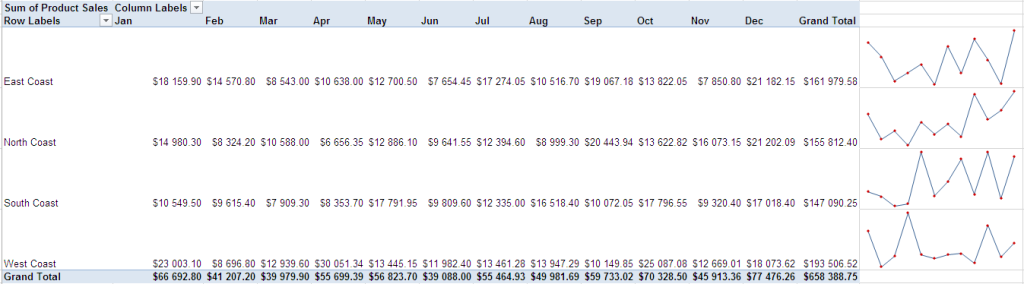
Effective sparklines rely on meticulously prepared data. The structure and format of the data directly impact the accuracy and clarity of the trend visualization. Proper formatting ensures that the sparkline accurately reflects the underlying data, allowing users to quickly grasp essential trends.
Data Structure for Sparklines
Sparklines excel at displaying trends over time. Consequently, the data must be structured to reflect this temporal aspect. The most common structure involves a series of numerical values representing the data points along the trend. These values should be in a consistent format (e.g., all integers or all decimals) for optimal interpretation. A crucial aspect is the order of data points; they should correspond to the chronological order of the events they represent.
Preparing Data for Optimal Visualization
For a sparkline to effectively illustrate trends, the underlying data must be meticulously prepared. Data cleaning is essential. Missing values, outliers, or inconsistencies must be addressed. If missing values are present, appropriate strategies, such as interpolation or removal, should be considered. Outliers that don’t reflect the overall trend should be examined and potentially adjusted or removed.
Data consistency across the dataset is paramount. The units of measurement should be uniform throughout.
Data Accuracy and Consistency
Data accuracy and consistency are paramount for reliable sparkline visualizations. Inaccurate data will lead to misleading sparklines, making it impossible to identify trends or patterns correctly. Consistency in the format and units of measurement is crucial. Ensure the data source is trustworthy and the values are correctly recorded. If there are any errors in the original data, address them before creating the sparkline.
Suitable and Unsuitable Data Sets
Suitable data sets for sparklines are those that represent trends over time. For instance, monthly sales figures, daily stock prices, or weekly website traffic are all well-suited for sparkline visualization. Unsuitable data sets include data with too many categories, data lacking a clear temporal element, or data that is highly cyclical and doesn’t have a clear trend. Consider the context of the data and whether a sparkline is the most appropriate visualization method.
For example, if the data has many categories, a bar chart or a pie chart might be a better choice.
Comparison of Data Input Formats
| Format | Description | Suitability for Sparklines | Example |
|---|---|---|---|
| Sequential Numerical Values | A series of numbers representing data points ordered chronologically. | Excellent | [10, 12, 15, 18, 20] |
| Date-Value Pairs | Each data point includes a date and a corresponding value. | Excellent | [(‘2024-01-01’, 10), (‘2024-01-02’, 12), (‘2024-01-03’, 15)] |
| Spreadsheet Columns | Data organized in columns, where one column represents the date/time and another represents the corresponding value. | Excellent | A spreadsheet with columns ‘Date’ and ‘Sales’. |
| Non-Numerical Data | Data that cannot be directly interpreted numerically (e.g., text). | Unsuitable | [Low, Medium, High] |
Customizing Sparklines
Sparklines, those tiny graphical representations of data within a cell, are more than just visual aids; they can be powerful tools for highlighting trends and patterns. Customizing their appearance allows for better emphasis and clarity, making them even more effective in communicating insights. This section delves into various customization options, enabling you to tailor sparklines to suit your specific needs and data.Effective visualization is crucial for conveying information concisely and compellingly.
Sparklines, by nature, are designed to be compact. However, customizing their appearance can significantly enhance their communicative power. This section details methods to modify sparklines’ aesthetics, adjust data ranges, and modify data point representations to emphasize key trends and patterns.
Sparkline Color Customization
Sparklines can be visually enhanced by altering their color. Changing the color of the line, or the markers, can improve readability and visual appeal. This often involves selecting a color that contrasts effectively with the background and other elements on the spreadsheet. Different colors can highlight different aspects of the data or trends. For instance, a positive trend might be represented by a green line, while a negative trend is shown in red.
Sparkline Line Style Customization
The line style used in a sparkline can further improve its readability and emphasize specific aspects of the data. A solid line might be sufficient for simple trends, but a dashed or dotted line can be useful for highlighting more complex patterns or seasonal variations. Selecting the appropriate line style allows for better distinction between different sparklines on the same sheet.
A thicker line might also emphasize a significant trend.
Sparkline Marker Customization
Adding markers to sparklines can provide further emphasis on individual data points. Markers can be circles, squares, triangles, or other shapes. Different marker styles can highlight specific data points or significant events in the data series. Markers can be used to highlight unusual highs or lows, or to draw attention to certain time periods. Markers can also be used to denote specific events that correlate to data changes.
Sparkline Range Customization
Adjusting the range of a sparkline can highlight specific trends or patterns. By modifying the minimum and maximum values, you can zoom in on the part of the data that is most important or insightful. This allows you to emphasize specific variations and minimize the impact of outliers that might obscure the primary trend. For example, if a sparkline is displaying sales figures, adjusting the range could focus on the recent growth rather than the overall sales history.
Example Table of Customized Sparklines
| Sparkline Type | Color | Line Style | Markers | Range | Description |
|---|---|---|---|---|---|
| Sales Trend | Green | Solid | None | Last 6 Months | Highlighting recent sales growth |
| Project Progress | Blue | Dashed | Circles every 10% | Full Project Timeline | Showcasing progress milestones |
| Website Traffic | Red | Dotted | Squares at peak/trough | Last 30 Days | Emphasizing fluctuations in traffic |
Sparkline Trends and Analysis
Sparklines, despite their compact nature, offer valuable insights into data trends. By quickly visualizing changes over time, they facilitate a deeper understanding of patterns, anomalies, and key performance indicators (KPIs). This section delves into interpreting these trends and extracting meaningful conclusions.Effective use of sparklines involves recognizing and interpreting various trend patterns. Identifying anomalies and highlighting KPIs are further benefits.
Understanding these elements allows for proactive decision-making based on data-driven insights.
Interpreting Sparkline Trends
Sparklines effectively visualize data trends, enabling rapid pattern identification. Recognizing increasing, decreasing, or fluctuating patterns is crucial for understanding the data’s behavior. This includes discerning subtle changes and identifying any significant deviations from the general trend.
Identifying Patterns
Consistent patterns within sparklines can indicate underlying trends. For example, a consistently increasing sparkline might signify positive growth, while a decreasing sparkline could indicate a decline. Fluctuating sparklines may suggest unstable conditions or periodic variations. Understanding these patterns aids in forecasting future behavior and developing strategies accordingly.
Spotting Anomalies and Unusual Fluctuations
Sparklines can highlight unexpected changes or anomalies in data. These unusual fluctuations might signify critical events, errors in data collection, or other noteworthy occurrences. Identifying these anomalies allows for further investigation and the potential for corrective actions.
Highlighting Key Performance Indicators (KPIs)
Sparklines can effectively highlight key performance indicators (KPIs) within a broader dataset. Visualizing KPIs in a concise format allows for rapid assessment of performance. By placing sparklines adjacent to relevant data, decision-makers can quickly grasp the overall performance trend and identify areas needing attention.
Examples of Sparkline Trends
| Trend | Description | Sparkline Example (Data: Monthly Sales Figures) |
|---|---|---|
| Increasing | A positive upward trend over time. | 📈 (Example: Sales figures consistently rising each month) |
| Decreasing | A negative downward trend over time. | 📉 (Example: Sales figures consistently falling each month) |
| Fluctuating | A trend with significant variations or oscillations. | ↕️ (Example: Sales figures exhibiting unpredictable highs and lows each month) |
| Flat | A trend with no significant change over time. | — (Example: Sales figures remaining roughly constant each month) |
In the table above, the sparkline examples use simple graphical representations (📈, 📉, ↕️, —) to illustrate the different trend patterns. The data used for these sparklines is hypothetical monthly sales figures. Real-world sparklines would utilize specific data points and corresponding visualizations to illustrate their trends.
Practical Applications of Sparklines
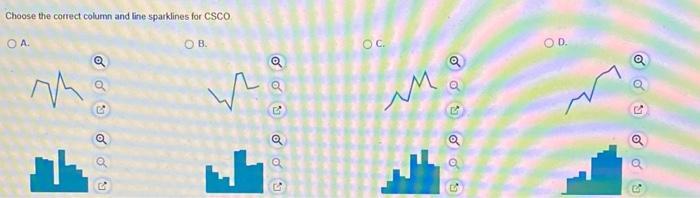
Sparklines are incredibly useful tools for quickly visualizing trends within data. Their compact nature allows for a comprehensive overview of key performance indicators (KPIs) without overwhelming the viewer with extensive charts. This concise presentation style is especially beneficial in situations where rapid data comprehension is crucial for informed decision-making.
Sales Tracking
Sparklines are invaluable for tracking sales trends over time. Representing daily, weekly, or monthly sales figures with sparklines allows for an immediate visual assessment of sales patterns. For instance, a sales representative can quickly scan a dashboard displaying sparklines for each product line to identify any sudden drops or increases in sales. This allows for prompt responses to changing market conditions, such as adjusting marketing strategies or identifying potential product issues.
By highlighting trends, sparklines can help sales teams proactively address potential problems and optimize their strategies.
Inventory Management
Visualizing inventory levels with sparklines provides a straightforward method for monitoring stock fluctuations. A business can monitor daily, weekly, or monthly inventory levels and identify any unexpected surges or declines. Sparklines can easily highlight periods of low stock, allowing for timely reordering to avoid stockouts and lost sales opportunities. This allows for proactive management of inventory levels, reducing risks associated with overstocking or understocking.
Project Management
Sparklines can be employed to track progress on various project tasks. By visualizing the completion rate of tasks over time, project managers can easily spot bottlenecks and potential delays. This real-time monitoring allows for timely intervention and resource allocation to keep projects on schedule. Sparklines also help communicate project status clearly to stakeholders, fostering transparency and collaboration.
Financial Analysis
Sparklines are extremely useful in financial analysis. For example, tracking daily stock prices over a given period allows for an immediate visual assessment of the stock’s volatility and performance. This is invaluable for investment decisions, as it facilitates a quick understanding of the overall market trends and the company’s performance. This quick overview of financial data can assist investors and financial analysts in making well-informed decisions.
Customer Relationship Management (CRM)
Sparklines can be used to track customer engagement metrics. For example, tracking customer satisfaction scores or the number of customer support tickets over time can provide insights into customer behavior. Visualizing these metrics with sparklines enables quick identification of trends and potential issues, allowing businesses to tailor their customer service strategies to address these concerns. This leads to enhanced customer satisfaction and improved business relationships.
Summary Table of Sparkline Applications
| Scenario | Sparkline Application | Benefit |
|---|---|---|
| Sales Tracking | Visualize daily, weekly, or monthly sales figures. | Quickly identify trends, adjust strategies, and address potential issues. |
| Inventory Management | Monitor daily, weekly, or monthly inventory levels. | Identify stock fluctuations, avoid stockouts, and optimize inventory management. |
| Project Management | Track task completion rates over time. | Identify bottlenecks, intervene proactively, and maintain project schedules. |
| Financial Analysis | Track stock prices or financial data. | Assess volatility, understand market trends, and make informed investment decisions. |
| Customer Relationship Management (CRM) | Track customer engagement metrics (e.g., satisfaction scores, support tickets). | Identify trends, tailor customer service strategies, and enhance customer satisfaction. |
Advanced Sparkline Techniques

Sparklines, while simple in their visual representation, offer powerful opportunities for enhancing data analysis when combined with other visualization tools and techniques. This section delves into sophisticated strategies for maximizing their impact within a larger data context. Mastering these advanced techniques allows users to uncover deeper insights and present data more effectively.Leveraging sparklines effectively goes beyond individual data points.
Combining sparklines with other chart types creates a more comprehensive view of the data, providing both high-level trends and detailed insights. This integration empowers users to not only observe the overall trajectory of a metric but also drill down into specific segments or time periods for a more nuanced understanding. Dashboard integration allows for real-time monitoring of key performance indicators, making it easier to spot patterns and address potential issues promptly.
Combining Sparklines with Other Charts
Sparklines can be effectively integrated into various chart types to provide supplementary trend information. For instance, a bar chart showcasing sales figures across different regions can be accompanied by sparklines that illustrate the sales trend for each region over a specified time period. This approach allows for a comparison of the overall sales performance against the specific regional trends.
The combination of visual representations provides a richer understanding of the data, enabling a more comprehensive interpretation.
Using Sparklines for Multiple Data Sets
In situations involving multiple data sets, sparklines can be a valuable tool for side-by-side comparison. For example, comparing the stock performance of different companies over time can be easily visualized using a series of sparklines displayed alongside a line graph of the overall market index. This side-by-side comparison highlights individual company performance against the broader market trend.
Incorporating Sparklines into Dashboards and Reports
Sparklines excel at adding contextual information to dashboards and reports. On a dashboard displaying key performance indicators (KPIs), sparklines can provide a quick visual of recent trends for each KPI, making it easy to grasp the overall health of the system at a glance. In reports, sparklines can illustrate trends within individual data segments, enhancing the overall narrative and providing a more engaging visual experience.
A well-placed sparkline can instantly highlight critical information, turning a potentially lengthy report into a more easily digestible format.
Optimizing Sparkline Design for Maximum Impact
The effective use of sparklines hinges on their visual design. Using appropriate colors, line styles, and scales is crucial. Choosing colors that contrast effectively and stand out from the background is essential. Line styles should be clear and easily distinguishable, while scales should be chosen carefully to avoid distorting the data.
Sparkline Integration into Larger Data Visualization Contexts
Sparklines are particularly effective when incorporated into larger data visualization projects. For example, in a project analyzing customer demographics, a scatter plot displaying customer locations could be accompanied by sparklines showcasing the sales trends in each region. This combination of charts offers a more comprehensive view, facilitating a deeper understanding of the relationship between customer location and sales performance.
Effective Combination of Sparklines with Other Chart Types
| Chart Type | Sparkline Application | Description |
|---|---|---|
| Bar Chart | Highlighting trends within individual categories. | Illustrates overall performance alongside specific category trends. |
| Line Chart | Providing detailed trend insights for specific data points. | Adds a deeper layer of analysis to the overall line chart trend. |
| Scatter Plot | Displaying trends for individual data points. | Highlights the relationship between variables alongside trend insights. |
| Pie Chart | Illustrating the trend of individual segments. | Offers a breakdown of trends within the various segments. |
Outcome Summary

In conclusion, sparklines are invaluable tools for anyone working with data. This comprehensive guide has explored the various aspects of implementing, customizing, and analyzing sparklines, empowering you to effectively visualize trends and patterns within your data. By understanding the different types of sparklines, data input requirements, and customization options, you can leverage this powerful technique to present data insights in a clear and engaging manner, leading to more informed decisions.