Mastering the TODAY and NOW functions is crucial for anyone working with dates and times in various applications, from simple data entry to complex financial modeling. This guide provides a comprehensive overview of these essential functions, exploring their practical applications, formatting options, and integration with other features. We’ll delve into the nuances of handling time zones and daylight savings, ensuring accurate results in diverse scenarios.
Understanding the differences between TODAY and NOW is fundamental. TODAY returns the current date, while NOW captures the current date and time. This document elucidates the syntax and use cases for each function across different programming languages, including Excel, SQL, and JavaScript. Furthermore, this guide will help you navigate the intricacies of formatting, time zones, and potential errors, empowering you to use these functions effectively.
Introduction to TODAY and NOW Functions
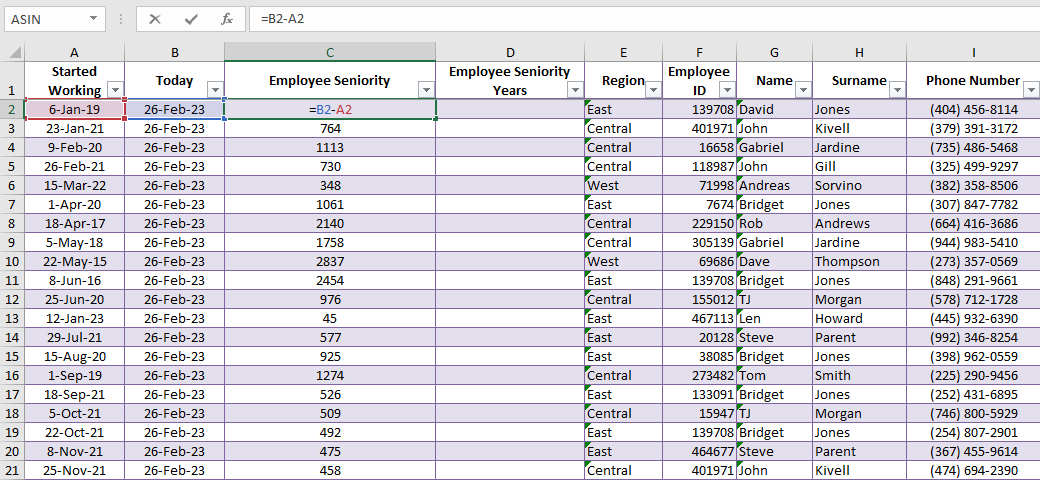
The TODAY and NOW functions are essential tools in various software applications for obtaining current date and time information. They automatically update with the current system time, eliminating the need for manual input and ensuring data accuracy. These functions are invaluable in tracking events, calculating durations, and generating reports that require real-time data.These functions are broadly applicable in many scenarios, from creating time-stamped records in databases to generating reports with current dates and times.
They simplify data management and provide a consistent method for capturing real-time information within applications.
General Use Cases
The TODAY and NOW functions are widely used in a variety of contexts. They are instrumental in creating reports, tracking events, calculating durations, and generating records that need up-to-date information. For instance, a sales report might use TODAY to display the report’s date, while a database might utilize NOW to record the exact time a new entry is added.
Their automatic updates eliminate manual data entry, preventing errors and ensuring data accuracy.
Differences in Data Types and Outputs
The TODAY and NOW functions, while both crucial for retrieving current information, differ in the type of data they return. TODAY functions specifically return the current date, typically formatted as year, month, and day. In contrast, NOW functions return the current date and time, providing both the date and the precise time, often down to seconds or milliseconds.
This difference is critical in scenarios requiring precise time tracking. For example, in a financial application, recording a transaction date requires TODAY, while recording the exact transaction time necessitates NOW.
Syntax Across Programming Languages
The syntax for TODAY and NOW functions varies across programming languages. Understanding these variations is crucial for proper implementation. Below is a table showcasing common syntax for these functions in different programming environments.
| Application | TODAY Function | NOW Function |
|---|---|---|
| Microsoft Excel | =TODAY() | =NOW() |
| SQL (e.g., MySQL, PostgreSQL) | CURDATE() | NOW() or CURRENT_TIMESTAMP |
| JavaScript | new Date().toDateString() | new Date().toLocaleString() |
Note: The exact syntax and available functions might vary slightly depending on the specific database system or programming library used.
Comparison Table
This table compares the TODAY and NOW functions across various software applications.
| Feature | TODAY | NOW |
|---|---|---|
| Data Returned | Date (Year, Month, Day) | Date and Time (Year, Month, Day, Hour, Minute, Second, Millisecond) |
| Use Cases | Reporting, date-based calculations, record creation | Precise time-stamping, transaction logging, tracking events |
| Examples (Excel) | =TODAY() returns 2024-10-27 (or equivalent date format) | =NOW() returns 2024-10-27 10:30:00 (or equivalent time format) |
Practical Applications of TODAY and NOW

The TODAY and NOW functions in various software applications are invaluable tools for managing dates and times. They automate the recording of timestamps, ensuring accuracy and consistency in data entry and record-keeping. Their ability to dynamically update with the current date and time eliminates manual input errors and streamlines numerous tasks across different fields.Leveraging these functions significantly improves data integrity and efficiency.
By automatically capturing timestamps, applications can generate precise records for various purposes, from financial transactions to document creation. The automatic update feature further ensures that records are always current and up-to-date.
Displaying Current Date in Various Formats
The TODAY function, as expected, returns the current date. However, this date can be formatted in various ways to suit specific needs. Different software platforms offer various options for date formatting, from the standard date display to more customized presentations.For example, in spreadsheet software, you might use the `TEXT` function in conjunction with `TODAY` to display the date in a specific format like “Month DD, YYYY.” Alternatively, you could use date formatting options available in the software to achieve the desired presentation.
Displaying Current Date and Time
The NOW function is designed to return the current date and time. This feature allows for the precise recording of events or actions. The returned value usually incorporates both the date and time components.For instance, a spreadsheet application might display the current date and time as “YYYY-MM-DD HH:MM:SS.” The precise format is dependent on the application’s settings.
Date-Stamped Documents
Using TODAY and NOW in creating date-stamped documents is a straightforward process. The function outputs the current date and time, which is then integrated into the document.| Task | TODAY Function Example (Format) | NOW Function Example (Format) ||—————————————|——————————–|——————————-|| Create a document with a creation date | TODAY() | NOW() || Add a timestamp to a document | TEXT(TODAY(),”mmmm d, yyyy”) | NOW() || Create a financial record | TODAY() | NOW() |
Data Entry Forms
Implementing TODAY and NOW in data entry forms automatically logs data entry timestamps. The automated timestamping feature ensures data integrity and simplifies tracking data entry activities. This is particularly helpful in applications requiring detailed audit trails.In a data entry form, you would typically insert the TODAY or NOW function directly into the timestamp field. This ensures the correct date and time are recorded each time a new entry is made.
Financial Applications
The TODAY and NOW functions are instrumental in financial applications for recording transaction dates. They provide an accurate and efficient way to log transaction timestamps. By automating this process, financial applications can maintain an accurate record of transactions.Using the TODAY function, you can record the transaction date, while NOW allows recording the precise time of the transaction. These functions prevent manual errors and ensure consistent and accurate record-keeping.
Formatting Options for Dates and Times
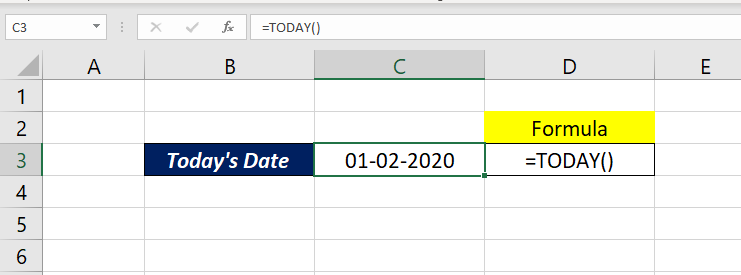
Formatting dates and times derived from the TODAY and NOW functions allows for greater flexibility in displaying information. Proper formatting ensures data is presented clearly and understandably, especially within reports, dashboards, and other applications. Consistent formatting enhances data readability and improves the overall user experience.Different software applications and locales require specific date and time formats. Customizing the output of these functions ensures compatibility and user-friendliness across diverse contexts.
Understanding these options allows users to tailor the presentation of dates and times to meet their specific needs.
Customizing Date and Time Formats
Various formatting options are available for adjusting the presentation of dates and times produced by the TODAY and NOW functions. These options enable users to display dates and times in a manner that is both informative and aesthetically pleasing. Specific formats can be chosen to align with user preferences or the requirements of the application.
Date and Time Formats Across Software
Different software platforms support varying date and time formats. Microsoft Excel, for example, often utilizes a format code system to specify the appearance of dates and times. Other applications may utilize different approaches for configuring the visual representation of date and time values. Understanding the specific formatting guidelines for the software in use is crucial for effective presentation.
For instance, the date format ‘mm/dd/yyyy’ is common in some regions, while ‘dd/mm/yyyy’ is used in others.
Locale-Specific Formatting
The output of TODAY and NOW functions can be tailored to reflect the conventions of different locales or regions. By understanding the specific date and time formatting standards for a given region, users can create displays that align with local customs and expectations. This customization ensures the data is presented in a manner that is clear and easily understood by the target audience.
For example, in some regions, the date might be formatted as “dd/mm/yyyy,” while in others it might be “mm/dd/yyyy.”
Formatting for Reports and Dashboards
Consistent formatting is vital for reports and dashboards. When presenting data in reports or dashboards, maintaining a standardized format for dates and times improves the readability and understandability of the information. For instance, using a consistent format for dates across all charts and tables within a report allows for a seamless user experience. This uniformity ensures that the dates and times are easily interpreted and provide a clear picture of the presented data.
Example of Supported Date/Time Formats
| Software/Platform | Date Format Examples | Time Format Examples |
|---|---|---|
| Microsoft Excel | yyyy-mm-dd, mm/dd/yyyy, dd/mm/yyyy | hh:mm:ss, hh:mm AM/PM |
| Google Sheets | yyyy-mm-dd, mm/dd/yyyy, dd/mm/yyyy | hh:mm:ss, hh:mm AM/PM |
| Tableau | yyyy-mm-dd, mm/dd/yyyy, dd/mm/yyyy | hh:mm:ss, hh:mm AM/PM |
| Power BI | yyyy-mm-dd, mm/dd/yyyy, dd/mm/yyyy | hh:mm:ss, hh:mm AM/PM |
Note that the specific formats supported may vary depending on the software version and configuration. Consult the software’s documentation for the most up-to-date information.
Handling Time Zones and Daylight Savings
The NOW function, while providing the current date and time, is inherently tied to the system’s local time zone. This means that the output can vary significantly if the system’s location differs from the desired time zone. Understanding this nuance is crucial for accurate time-based calculations and data representation across different regions. Daylight Saving Time (DST) further complicates the picture, as it introduces shifts in the local time.Time zones and daylight saving time (DST) adjustments are critical factors to consider when working with the NOW function, especially in applications requiring accurate time information across various geographic locations.
The NOW function inherently reflects the local time zone of the system where it’s executed. This means that if you need the current time in a different time zone, you must perform explicit conversions.
Impact of Time Zones on NOW
The NOW function directly reflects the system’s local time zone. If your application needs to display or calculate times in a different time zone, you need to adjust the output of NOW accordingly. This is particularly important for global businesses or applications dealing with data from various geographical locations.
Impact of Daylight Saving Time (DST) on NOW
Daylight Saving Time (DST) introduces a periodic shift in local time. The NOW function, by default, incorporates these DST transitions. However, if your application requires time consistency across DST transitions, you need to account for these shifts. For example, if you’re working with historical data or scheduling events across different time zones that observe DST, you need to compensate for the time difference during DST periods.
Adjusting for Specific Time Zones
Various programming languages and libraries provide functions to convert between time zones. These functions typically take the current date and time (obtained from NOW) and the target time zone as input. The output is a date and time object representing the equivalent time in the specified time zone, adjusting for DST. This is crucial for maintaining data accuracy in applications that need to display or calculate time-dependent information in various time zones.
Examples of such functions are often found in libraries such as `pytz` (Python), `java.time.ZoneId` (Java), and similar libraries in other programming languages. These functions handle the complexities of time zone conversions, including DST transitions, making them vital for applications with global scope.
Example of Handling Time Zone Variations
Consider an application that needs to record events in New York and London simultaneously. The NOW function in New York would return a different value than the NOW function in London, even if executed at the same instant. To address this, the application should utilize time zone conversion functions to translate the local times into a standardized time zone, like Coordinated Universal Time (UTC).
This approach ensures consistent data representation and avoids potential errors in comparisons or calculations involving events occurring in different time zones.
Accounting for Daylight Saving Time
The effect of Daylight Saving Time (DST) on NOW function outputs is the shift of local time forward or backward. Applications needing consistent time representation must use time zone conversion libraries. These libraries account for DST transitions and produce accurate date and time representations in the desired time zone, regardless of the current DST status. This is essential for applications like scheduling tools or financial systems where accurate time calculations are critical, even across DST boundaries.
Using NOW to Display in a Specific Time Zone
To display the date and time in a specific time zone, combine the NOW function with a time zone conversion function. This approach ensures that the displayed time accurately reflects the time in the specified location, taking into account the current DST status. For instance, an application displaying event schedules globally would use a time zone conversion function to present the time in each participant’s local time zone.
This ensures clarity and avoids confusion caused by differences in local time.
Integration with Other Functions and Features
The TODAY and NOW functions, while powerful on their own, become even more valuable when integrated with other spreadsheet or database functions. Combining them with date/time calculations, sorting, filtering, and string manipulation significantly enhances data analysis and reporting capabilities. This section explores these powerful integrations.
Combining with Date/Time Functions
Date and time functions, such as `DATE`, `TIME`, `YEAR`, `MONTH`, `DAY`, `HOUR`, `MINUTE`, and `SECOND`, work seamlessly with `TODAY` and `NOW`. For instance, extracting the year from the current date, you can use `YEAR(TODAY())`. This allows for dynamic updates and calculations based on the current date and time. Similarly, you can combine `NOW()` with `HOUR()` or `MINUTE()` to perform analysis tied to the specific time of day.
Calculations Involving Dates and Times
Calculations involving dates and times are straightforward with `TODAY` and `NOW`. For instance, calculating the number of days until a future date can be accomplished by subtracting the current date from the future date. `=A1-TODAY()` calculates the number of days between the date in cell A1 and the current date. Similarly, time differences can be calculated using the `NOW()` function.
To find the elapsed time between two time stamps, subtract one `NOW()` function from the other, and then format the result to display the elapsed time in the desired units (e.g., hours, minutes, seconds).
Calculating Time Differences
Calculating time differences involves subtracting one timestamp from another. For example, to find the time elapsed between two events recorded in cells B1 (start time) and C1 (end time), you can use a formula like `=C1-B1`. The result will be a duration. Format this result to display the difference in days, hours, minutes, or seconds as needed. To illustrate, `=TEXT(C1-B1,”h:mm:ss”)` will display the difference as hours, minutes, and seconds.
Using with Sorting and Filtering
Sorting and filtering data often benefits from the dynamic nature of `TODAY` and `NOW`. For instance, sorting data by the date or time of entry allows for a structured view of recent or past events. To filter data based on the current date or time, you can use the criteria to isolate specific entries. For example, filtering sales records for orders placed within the last 30 days can be accomplished by using a filter with `TODAY()` and a comparison operator.
This allows for analysis of recent sales trends or performance.
Using with String Functions
Combining `TODAY` and `NOW` with string functions allows for the creation of formatted date/time strings. For example, to display the current date in a specific format (e.g., “October 26, 2023”), you can use the `TEXT` function with `TODAY()` and a custom format string. This is useful for generating reports or labels. Similarly, you can use string functions to extract parts of the date and time returned by `NOW` for further processing and analysis.
The `TEXT` function is a powerful tool for converting date/time values into strings in a variety of formats.
Error Handling and Troubleshooting
Proper error handling is crucial when working with functions like TODAY and NOW, as unexpected results can arise from various factors. Understanding potential issues and their resolutions ensures accurate data manipulation and avoids potential complications in applications using these functions. This section details common errors, their causes, and troubleshooting steps.Accurate date and time management is essential in various applications, including financial reporting, scheduling, and data analysis.
A comprehensive understanding of how TODAY and NOW functions interact with other software elements and potential issues is crucial to ensure dependable data handling and avoid unexpected outputs.
Potential Errors When Using TODAY and NOW
Incorrect date and time formats, software compatibility issues, and time zone discrepancies are common problems. These can result in incorrect data representation or cause the functions to return unexpected values. Understanding the causes and effects of these errors is key to preventing them in your applications.
Examples of Common Errors and Their Causes
- Incorrect Date/Time Formats: If the software’s settings or user input are not consistent with the expected date and time format, the function may return an error or an unexpected value. For example, if the software expects “YYYY-MM-DD” format and receives “DD/MM/YYYY”, the result might be misinterpreted or an error message displayed. This highlights the importance of verifying data input formats.
- Time Zone Discrepancies: Different software or operating systems might use different time zones. If the time zone settings are not properly handled, the NOW function might return a date and time that is incorrect in the user’s intended time zone. This can be a particular problem when data is exchanged between systems or individuals in different locations. Data consistency is crucial in applications that rely on precise timestamps.
- Software Compatibility Issues: Differences in the way different software applications handle date and time formats can lead to problems. If the expected format for a date is not recognized by the software, the TODAY or NOW function might produce an error. This emphasizes the importance of cross-software compatibility testing for robust application design.
Troubleshooting Date and Time Formatting or Zone Issues
- Verify Data Input Format: Double-check the format of the date and time values being entered or used in the application. Use the software’s built-in tools to validate the format and adjust as necessary.
- Adjust Time Zone Settings: Ensure that the time zone settings within the software or operating system are correctly configured. Incorrect settings can cause incorrect date and time outputs from the NOW function. Verify the correct time zone settings within the system.
- Consult Documentation: Refer to the software’s documentation for detailed instructions on handling date and time formats and time zone issues. The documentation often provides solutions and examples for specific problems.
Error Messages and Interpretation
| Software | Error Message | Interpretation |
|---|---|---|
| Microsoft Excel | #VALUE! | The input data is in an incorrect format, or there is an incompatibility issue with the TODAY/NOW function. |
| Google Sheets | Error: Invalid date | The date or time input is not in a recognizable format. |
| MySQL | Incorrect datetime value: | The provided value is not in a supported datetime format. |
These examples show how different software platforms present error messages. Learning to interpret these messages is essential for effective troubleshooting.
Preventing Common Errors
- Data Validation: Implement data validation checks to ensure that date and time inputs conform to the expected formats.
- Testing in Different Environments: Test the TODAY and NOW functions in various environments, including different software versions and operating systems, to identify potential compatibility issues.
- Thorough Documentation: Document the date and time formats used in your application to avoid confusion and ensure consistency across different parts of the system.
Security Considerations
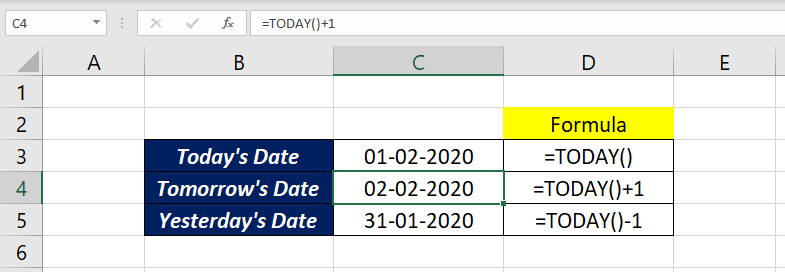
Using the TODAY and NOW functions in applications handling sensitive data requires careful consideration of security implications. Automatic timestamping, while convenient, can introduce vulnerabilities if not implemented with appropriate safeguards. Understanding these risks and implementing mitigation strategies is crucial to maintaining data integrity and confidentiality.
Potential Vulnerabilities
Automatic timestamping, while seemingly innocuous, can be exploited. A malicious actor could potentially modify timestamps to alter the record of events, potentially creating false audit trails or manipulating historical data. For example, an attacker might alter a transaction timestamp to make it appear as if a fraudulent transaction occurred earlier than it actually did. Furthermore, if the timestamps are not properly synchronized across multiple systems, inconsistencies can arise, leading to confusion and difficulties in data reconciliation.
Mitigation Strategies
Robust security measures are essential to mitigate the risks associated with using TODAY and NOW functions in sensitive systems. Implementing secure timestamping practices can greatly reduce the likelihood of manipulation.
- Data Validation and Verification: Thoroughly validating data input and output is paramount. This includes checking for anomalies in timestamps and comparing them to other relevant data points to ensure consistency and prevent manipulation. For example, a transaction timestamp should align with the time frame of the user’s access and the system’s operational hours.
- Auditing and Logging: Implement comprehensive audit trails that meticulously record all changes to timestamps. This audit trail should include details such as the user who made the change, the time of the change, and the reason for the change. This allows for a detailed analysis of the history of a data point. This is critical for forensic investigations or data recovery in case of a security breach.
- Secure Timestamp Generation: Employ a secure mechanism for generating timestamps, preferably one that is not easily predictable or reversible. This could involve incorporating a unique identifier into the timestamp, which would make it harder to tamper with without detection. For instance, combining the system’s unique ID with the timestamp in a hashed format.
Preventing Data Manipulation
Data manipulation through timestamp modification is a significant security concern. Implementing strict access controls and using robust authentication mechanisms can effectively deter unauthorized access.
- Access Control: Restrict access to sensitive data and the functions that modify timestamps to only authorized personnel. This includes user roles and permissions, which dictate the level of access to data and functionality.
- Data Encryption: Encrypting data, including timestamps, can significantly enhance data security. Encryption renders the data unintelligible to unauthorized individuals, even if they were able to modify the timestamps.
Best Practices
Adhering to established best practices can significantly improve the security of applications using TODAY and NOW functions. Regular security audits and vulnerability assessments are crucial.
- Regular Security Audits: Conduct periodic security audits to identify and address potential vulnerabilities in the system’s use of timestamping mechanisms. These audits should assess the effectiveness of access controls and the robustness of the audit trails. This helps proactively identify weaknesses in the system’s security posture.
- Security Awareness Training: Provide training to all personnel on security best practices related to timestamping and data handling. This includes awareness of potential threats and the importance of adhering to security protocols.
Examples and Use Cases in Different Applications
The TODAY and NOW functions, fundamental to data management and manipulation, offer diverse applications across various software platforms. Understanding their use in different contexts allows for efficient data handling, automating tasks, and producing dynamic results. These functions empower users to create adaptable and responsive systems, making them valuable tools in various domains.
Spreadsheet Applications (Excel, Google Sheets)
Spreadsheet software like Excel and Google Sheets frequently utilize TODAY and NOW to create dynamic reports and track changes over time. For example, a sales report might automatically include the date the report was generated. The NOW function can be used to record the exact time a transaction occurred, providing valuable insights into sales patterns.
- Generating Reports with Dynamic Dates: A simple example involves creating a sales summary sheet. The TODAY function can automatically populate a cell with the current date, ensuring reports always reflect the most up-to-date information. Similarly, the NOW function can record the time the report was generated, providing a timestamp for each record.
- Tracking Project Progress: Project managers can use these functions to track deadlines and record the time spent on tasks. The TODAY function can update project timelines in real-time, while NOW can record the exact time a task was completed.
- Calculating Time Intervals: The combination of NOW and other functions allows for easy calculation of time intervals. For example, you can calculate the time taken to complete a specific task by subtracting the start time (recorded with NOW) from the end time (also recorded with NOW).
Database Applications (SQL)
In SQL databases, TODAY and NOW (or equivalent functions) are crucial for managing records with timestamps. They enable the recording of creation dates, modification dates, and other important timestamps. This functionality is essential for auditing and maintaining accurate records.
- Creating Audit Logs: When data is modified or inserted into a database, the NOW function can record the precise time of the action. This creates an audit trail that tracks changes over time, assisting with data integrity and accountability.
- Setting Default Values: The TODAY function can be used as a default value for columns in a table, automatically populating records with the current date. Similarly, NOW can be used to automatically populate timestamps, ensuring that crucial data is always current.
- Filtering and Sorting Data: Databases can filter data based on timestamps, allowing users to isolate records created or modified within specific time ranges. For instance, you can query for all records created within the last month using TODAY and the appropriate date functions.
Web Development
Web applications leverage TODAY and NOW functions to display dynamic content, manage user interactions, and track events. For instance, a blog might display posts sorted by date using the TODAY function.
- Displaying Current Date and Time: Web pages can dynamically display the current date and time using the NOW function. This is common in applications that require real-time information, such as online calendars or clocks.
- Tracking User Activity: Web applications can record the time a user logs in or performs specific actions using the NOW function. This information is vital for analyzing user behavior and improving the user experience.
- Generating Unique IDs: Combining NOW with other functions can generate unique identifiers for database entries or web elements. This practice ensures that each record or element has a unique identifier, preventing data conflicts and enabling effective management.
Business Use Cases
The following table demonstrates diverse business scenarios where TODAY and NOW functions are beneficial.
| Business Scenario | Application | Example |
|---|---|---|
| Sales Tracking | Spreadsheet | Automatically record the date and time of each sale. |
| Project Management | Spreadsheet/Database | Track project start and end dates, task completion times. |
| Inventory Management | Database | Record the date items were added or removed from inventory. |
| Customer Relationship Management (CRM) | Database | Log customer interactions with timestamps. |
Project Management Applications
Project management applications utilize TODAY and NOW to schedule tasks, track progress, and generate reports. The TODAY function is crucial for setting deadlines and ensuring projects stay on schedule, while NOW tracks the time spent on individual tasks.
- Setting Deadlines: Projects often have deadlines. Using the TODAY function allows you to set deadlines relative to the current date, ensuring that tasks are completed within a specified timeframe.
- Tracking Task Completion Times: The NOW function is ideal for recording the time spent on each task, providing insights into project timelines and resource allocation.
- Generating Project Reports: Reports often need to show the current status of projects. The TODAY function ensures the reports always reflect the most recent information, and NOW helps provide timestamps for task completion.
Last Recap
In conclusion, this guide has provided a thorough examination of the TODAY and NOW functions, covering everything from basic usage to advanced techniques. By understanding their functionalities, formatting options, and integration capabilities, you can effectively utilize these functions in a wide array of applications, including data entry, financial analysis, and project management. The examples and use cases presented highlight the versatility of these functions, enabling you to confidently manage dates and times in your projects.