Welcome to a comprehensive exploration of conditional logic, a fundamental concept in programming. Understanding how to use “if” statements is crucial for crafting dynamic and responsive applications. This guide delves into the intricacies of conditional statements, from basic syntax to advanced techniques, ensuring you gain a strong grasp of this powerful tool.
This detailed guide will cover the essential elements of using “if” statements effectively. We’ll begin with a foundational explanation of conditional logic, progressing through practical examples and best practices. The aim is to equip you with the knowledge and skills to confidently utilize “if” statements in your own code, regardless of the programming language.
Introduction to Conditional Logic
Conditional logic is a fundamental concept in programming that allows a program to make decisions based on certain conditions. It’s crucial for creating dynamic and responsive applications, as it enables the code to execute different blocks of instructions depending on the input or state of the program. Without conditional logic, programs would be rigid and unable to adapt to various situations.This decision-making ability is achieved through conditional statements, such as “if” statements, which evaluate a Boolean expression (an expression that evaluates to either true or false).
The program then executes the code block associated with the true condition. This ability to control the flow of execution based on conditions is essential for handling diverse user inputs, processing data differently under various circumstances, and ultimately creating more sophisticated and useful software.
Fundamental Concept of “if” Statements
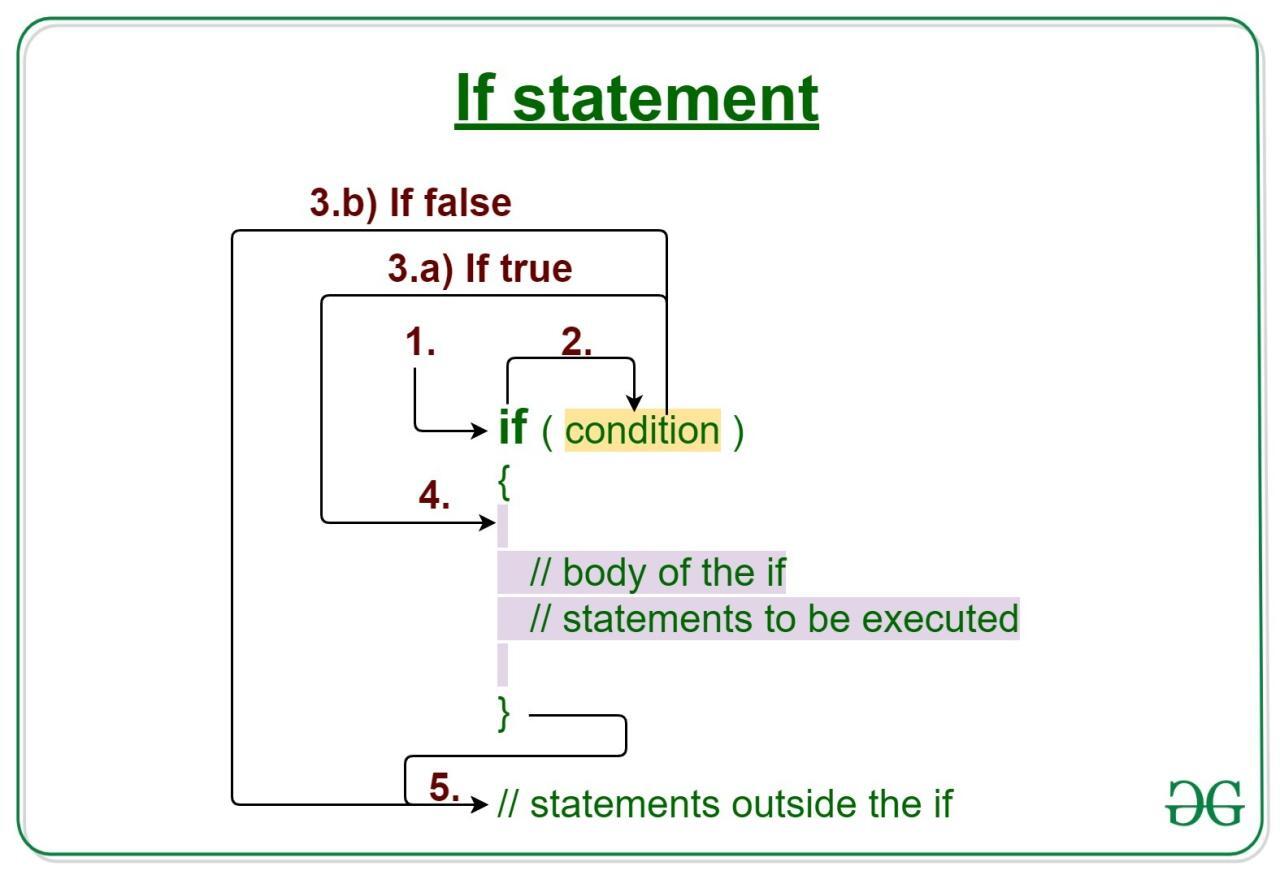
“If” statements are the cornerstone of conditional logic. They allow the program to execute a specific block of code only if a given condition is met. This condition is typically a Boolean expression, which evaluates to either true or false. If the expression is true, the code within the “if” statement’s block is executed; otherwise, it is skipped.
This structure provides a mechanism for controlling the program’s flow based on different conditions.
Scenarios Requiring Conditional Logic
Conditional logic is essential in numerous programming scenarios. For example, in a user authentication system, the program needs to verify the user’s credentials. Only if the credentials match those stored in the database, the user is granted access. Another example is a program that calculates discounts based on purchase amounts. The program must determine if the total exceeds a certain threshold to apply the discount.
These and many other situations necessitate conditional logic to tailor the program’s response.
Basic Structure of an “if” Statement (Flowchart)
A simple flowchart illustrates the basic structure of an “if” statement. The flowchart begins with a decision diamond representing the condition. If the condition evaluates to true, the program proceeds to the block of code associated with the true outcome. If the condition is false, the program bypasses the true block and continues with the rest of the program.
 (The image, though visually represented as a simple flowchart, would typically be a diagram showing a diamond-shaped decision node with “Condition” written inside. A line branching to the right would be labeled “True” and lead to a rectangular box labeled “Code to execute if true.” A second line branching to the left would be labeled “False” and lead to the rest of the program’s flow.)
Comparison of Conditional Structures
The following table compares “if,” “if-else,” and “if-else-if” statements. These structures differ in how they handle multiple conditions.
| Structure | Description | Use Cases |
|---|---|---|
| if | Executes a block of code only if a condition is true. | Simple decisions, single condition check. |
| if-else | Executes one block of code if a condition is true, and another block if it’s false. | Two possible outcomes based on a single condition. |
| if-else-if | Checks multiple conditions sequentially. Executes the code block associated with the first true condition. | Multiple possible outcomes based on different conditions. |
Syntax and Structure of IF Statements

If statements are fundamental in programming for implementing conditional logic. They allow a program to make decisions based on whether a certain condition is true or false. This flexibility is crucial for building complex and adaptable applications.Understanding the syntax and structure of if statements is essential for writing effective code. Different programming languages have slightly varying syntax, but the underlying principle remains the same: execute a block of code only if a specific condition is met.
General Syntax Across Languages
Various programming languages use if statements to control the flow of execution based on conditions. The general structure remains consistent, despite differences in specific syntax.
- A fundamental component of if statements is the conditional expression. This expression evaluates to either true or false, determining whether the associated block of code will be executed.
- The structure generally involves a (like “if” in Python, “if” in JavaScript, and “if” in Java) followed by the conditional expression, enclosed in parentheses.
- Following the condition, a block of code is defined, usually enclosed in curly braces () in languages like Java and JavaScript, or indentation in languages like Python. This block represents the code that will be executed if the condition is true.
Python Example
Python utilizes indentation to define code blocks. This structure makes the code readable and enhances maintainability.“`pythonx = 10y = 5if x > y: print(“x is greater than y”)“`This example demonstrates a simple if statement. If the condition `x > y` evaluates to true, the code inside the indented block will be executed, printing the message.
JavaScript Example
JavaScript employs curly braces to define code blocks.“`javascriptlet age = 20;if (age >= 18) console.log(“You are eligible to vote.”);“`This example checks if the `age` variable is greater than or equal to 18. If the condition is true, the message is displayed.
Java Example
Java also utilizes curly braces for code blocks.“`javaint score = 85;if (score >= 90) System.out.println(“Grade: A”); else if (score >= 80) System.out.println(“Grade: B”);“`This example demonstrates a more complex if-else structure. It checks multiple conditions to determine the appropriate grade.
Comparison Operators
Comparison operators are fundamental for forming conditional expressions within if statements. They compare values and produce boolean results (true or false).
- == (equal to)
- != (not equal to)
- > (greater than)
- < (less than)
- >= (greater than or equal to)
- <= (less than or equal to)
These operators are used to evaluate conditions, driving the flow of program execution.
Nested IF Statements
Nested if statements allow for more complex conditional logic. One if statement can be placed inside another, enabling multiple layers of checks.“`javaint temperature = 25;int humidity = 80;if (temperature > 30) if (humidity > 90) System.out.println(“It’s very hot and humid.”); else System.out.println(“It’s hot.”); else System.out.println(“It’s pleasant.”);“`This example illustrates how nested if statements can be used to make more intricate decisions based on multiple conditions.
Syntax Comparison Table
| Feature | Python | JavaScript | Java |
|---|---|---|---|
| if | if | if | |
| Conditional Expression | (condition) | (condition) | (condition) |
| Code Block | Indentation | Curly Braces | Curly Braces |
This table summarizes the syntax differences between Python, JavaScript, and Java. Notice the distinct approaches to defining code blocks.
Working with Boolean Expressions
Boolean expressions are fundamental to conditional logic, enabling programs to make decisions based on true or false evaluations. They form the core of IF statements, allowing for complex conditions to be defined and evaluated. Understanding Boolean expressions is crucial for writing flexible and efficient code.Boolean expressions evaluate to either true or false. They involve variables, constants, and comparison operators (e.g., <, >, ==, !=). They are the building blocks for constructing complex conditions using logical operators.
Constructing Complex Conditions
Logical operators, such as AND, OR, and NOT, allow combining multiple Boolean expressions into a single, more intricate condition. These operators dictate how the component expressions are evaluated and combined to produce a final true or false result. Understanding their precedence is vital for ensuring accurate evaluation of complex conditions.
Logical Operators
The fundamental logical operators, used to combine Boolean expressions, include:
- AND: Returns true only if both operands are true. Otherwise, it returns false.
- OR: Returns true if either or both operands are true. It returns false only if both operands are false.
- NOT: Reverses the truth value of the operand. A true value becomes false, and a false value becomes true.
Examples in Different Programming Languages
Boolean expressions and logical operators are employed in various programming languages. Here are examples illustrating their usage in Python, JavaScript, and Java:
- Python:
x = 10 y = 5 result = (x > 5) and (y < 10) # result is True result = (x > 15) or (y > 5) # result is True result = not (x == y) # result is True - JavaScript:
let a = 20; let b = 10; let result = (a > 15) && (b < 15); // result is false result = (a > 10) || (b > 15); // result is true result = !(a === b); // result is true - Java:
int num1 = 25;
int num2 = 15;
boolean result = (num1 > 20) & (num2 < 20); // result is false
result = (num1 > 10) | (num2 > 20); // result is true
result = !(num1 == num2); // result is true
Precedence of Logical Operators
The order in which logical operators are evaluated, known as operator precedence, is critical for accurate results. Different programming languages may have slightly varying precedence rules. Understanding the precedence ensures correct interpretation of complex conditions.
| Operator | Description | Precedence (Generally) |
|---|---|---|
| NOT | Logical negation | Highest |
| AND | Logical conjunction | Medium |
| OR | Logical disjunction | Lowest |
Note: The specific precedence may vary slightly across different programming languages. Consult the language’s documentation for precise details.
Common Errors
Errors can arise from misinterpreting Boolean expressions, particularly when dealing with complex conditions. Common errors include:
- Incorrect Operator Usage: Employing the wrong logical operator (e.g., using AND when OR is intended).
- Missing Parentheses: Improper use of parentheses to control the order of operations, leading to unexpected results.
- Typos or Syntax Errors: Errors in writing the Boolean expression itself.
- Incorrect Boolean Values: Problems related to the values used in comparisons.
Handling Different Outcomes (Else and Else If)
So far, we’ve explored how to create simple “if” statements to execute code based on a single condition. However, real-world scenarios often involve multiple possibilities and require more complex decision-making. This section delves into the “else” and “else if” clauses, enabling you to handle diverse outcomes and create sophisticated conditional logic.
The “else” Clause
The “else” clause provides a pathway for code execution when the condition specified in the “if” statement evaluates to false. It acts as a catch-all for cases not explicitly addressed by the “if” statement.
The “else if” Statement
“else if” statements allow you to check multiple conditions sequentially. This is crucial when you need to handle a variety of possibilities beyond a simple “true” or “false” outcome. Each “else if” condition is evaluated only if the preceding conditions are false.
Flowchart of Conditional Statements
Visualizing the flow of control is often helpful when understanding conditional logic. The following flowchart demonstrates the structure of “if,” “else,” and “else if” statements:
(Imagine a flowchart here that starts with a decision diamond for the if condition. If true, a rectangular box for the if block executes. If false, it branches to another decision diamond for the else if condition. If true, it executes the else if block. If all previous conditions are false, it executes the else block. Each block is connected by arrows indicating the flow of execution.)
Example of “else if” Statements
Let’s illustrate how “else if” statements create more complex decision-making logic with a simple example. Suppose you need to categorize a customer’s order based on the order value.
if (orderValue > 100)
  console.log("High-value order");
 else if (orderValue > 50)
  console.log("Medium-value order");
 else
  console.log("Low-value order");
In this example, the code first checks if the order value exceeds $100. If true, it prints “High-value order.” If false, it moves to the next “else if” condition, checking if the order value is greater than $50. If this is true, it prints “Medium-value order.” If both conditions are false, it defaults to the “else” block, printing “Low-value order.” This provides a clear way to categorize orders based on various criteria.
Nested “if-else” and “if-else if” Structures
You can nest “if-else” and “if-else if” structures within each other to create even more complex decision-making logic. This is useful when you have multiple layers of conditions to evaluate.
let age = 25;
let city = "New York";

if (age >= 18)
  if (city === "New York")
    console.log("You are eligible to vote in New York City.");
   else
    console.log("You are eligible to vote.");

 else
  console.log("You are not eligible to vote.");
This example checks age first. If the age is 18 or older, it then checks the city. If the city is New York, it prints a specific message for New York City residents. Otherwise, it prints a general message for eligible voters. If the age is below 18, it prints a message stating that the user is not eligible to vote.
Examples of IF Statements in Action
IF statements are fundamental in programming, enabling conditional logic. They allow programs to make decisions based on specific conditions, leading to diverse and dynamic outcomes. This section presents practical examples showcasing the versatility of IF statements in various programming scenarios.
Discount Calculation
Calculating discounts based on purchase amounts is a common application of IF statements. The following example demonstrates how to apply different discounts based on the total purchase value.
| Purchase Amount | Discount Rate | Discounted Price | Code Snippet |
|---|---|---|---|
| $100 or less | 0% | Original Price | “`pythondef calculate_discount(price): if price <= 100:
discount = 0
discounted_price = price
- (1 - discount)
elif price > 100 and price <= 200:
discount = 0.10
discounted_price = price
- (1 - discount)
elif price > 200: discount = 0.20 discounted_price = price
else: discounted_price = 0 # Or handle invalid input appropriately return discounted_priceprice = 150discounted_price = calculate_discount(price)print(f”Discounted price: $discounted_price:.2f”)“` |
| $150 | 10% | $135.00 | “`pythonprice = 150discounted_price = calculate_discount(price)print(f”Discounted price: $discounted_price:.2f”)“` |
| $250 | 20% | $200.00 | “`pythonprice = 250discounted_price = calculate_discount(price)print(f”Discounted price: $discounted_price:.2f”)“` |
User Input Categorization
IF-ELSE-IF statements are well-suited for categorizing user input based on different criteria. The following example demonstrates categorizing user input into different levels of access based on user roles.
| User Role | Access Level | Code Snippet |
|---|---|---|
| Admin | Full Access | “`pythondef categorize_user(role): if role == “Admin”: access_level = “Full Access” elif role == “Editor”: access_level = “Limited Access” elif role == “Viewer”: access_level = “View Only” else: access_level = “Guest” return access_levelrole = “Editor”access_level = categorize_user(role)print(f”Access level for role: access_level”)“` |
User Input Validation
Validating user input is crucial to ensure data integrity. The following example demonstrates validating user input to ensure it’s a positive integer.
| Input | Validation Result | Code Snippet |
|---|---|---|
| 5 | Valid | “`pythondef validate_input(input_value): if input_value > 0 and isinstance(input_value, int): return True else: return Falseinput_val = 5if validate_input(input_val): print(“Input is valid”)else: print(“Input is invalid”)“` |
Determining the Day of the Week
This example determines the day of the week based on user input.
| Input (Day Number) | Day of the Week | Code Snippet |
|---|---|---|
| 1 | Monday | “`pythondef get_day_of_week(day_number): days = [“Monday”, “Tuesday”, “Wednesday”, “Thursday”, “Friday”, “Saturday”, “Sunday”] if 1 <= day_number <= 7: return days[day_number - 1] else: return "Invalid input" day_number = 1 day_name = get_day_of_week(day_number) print(f"Day day_number is day_name") ``` |
Best Practices and Tips
Writing efficient and readable “if” statements is crucial for creating maintainable and robust code. Proper structure and adherence to best practices can significantly improve code clarity and reduce the likelihood of errors. This section details strategies for writing clean, understandable, and maintainable conditional logic using “if” statements.Effective “if” statements are essential for controlling the flow of a program based on specific conditions.
Understanding best practices and avoiding common pitfalls ensures your code functions correctly, is easy to debug, and is well-suited for future modifications.
Writing Efficient and Readable “if” Statements
The key to writing effective “if” statements lies in clarity and conciseness. Avoid overly complex nested structures. Break down complex conditions into smaller, more manageable “if” statements, or consider alternative structures like “switch” statements when appropriate. This improves readability and reduces the risk of logical errors.
Avoiding Common Errors
Carefully consider potential edge cases and unexpected inputs when designing your conditional logic. Thorough testing is essential to uncover and fix these issues. Incorrect use of operators (e.g., confusing “==” with “=”) can lead to subtle but significant bugs. Always double-check the logic of your conditions and the expected outcomes.
Importance of Proper Indentation
Proper indentation is paramount in making “if” statements easily readable. Consistent indentation clearly delineates the code blocks controlled by the condition, preventing confusion and errors. The visual structure created by indentation directly reflects the logical flow of the program.
Writing Concise and Understandable “if” Statements
Keep your conditions simple and direct. Avoid unnecessary complexity. Use meaningful variable names to improve comprehension. For example, instead of using `x > 5`, use `isGreaterThanFive = (x > 5)`. This enhances readability and reduces ambiguity.
Guidelines for Robust and Maintainable Conditional Logic
Following these guidelines will improve the quality of your conditional logic:
- Use clear and concise variable names. Descriptive variable names enhance the readability of your code, making it easier to understand the purpose of each variable within the context of the conditional statement.
- Break down complex conditions into smaller, manageable parts. This approach avoids nested “if” statements, making the code easier to read and maintain.
- Test your conditional logic thoroughly. Consider edge cases and unexpected inputs. Testing ensures your conditional logic functions as intended and handles various scenarios accurately.
- Avoid unnecessary nesting. Nested “if” statements can quickly become hard to follow. When possible, use alternative structures like “switch” statements or refactor complex logic to improve clarity and maintainability.
- Document your conditional logic. Clear documentation explaining the purpose and conditions of each “if” statement helps others (and your future self) understand the logic behind the code.
Example: Improving Readability
Consider this example:“`if (age >= 18 && age <= 65 && income < 30000) // ... logic ... ``` A more readable version: ``` isEligible = (age >= 18 && age <= 65) isLowIncome = (income < 30000) if (isEligible && isLowIncome) // ... logic ... ``` This revised code is more understandable because it uses meaningful variable names, and the conditions are broken down into smaller, more manageable parts.
Advanced Techniques (Optional)
This section delves into more sophisticated methods for implementing conditional logic, offering alternative approaches to traditional “if-else if” structures and enhancing code conciseness. These techniques are particularly useful for complex scenarios, streamlining the code and improving readability.
Ternary Operators for Concise Conditional Assignments
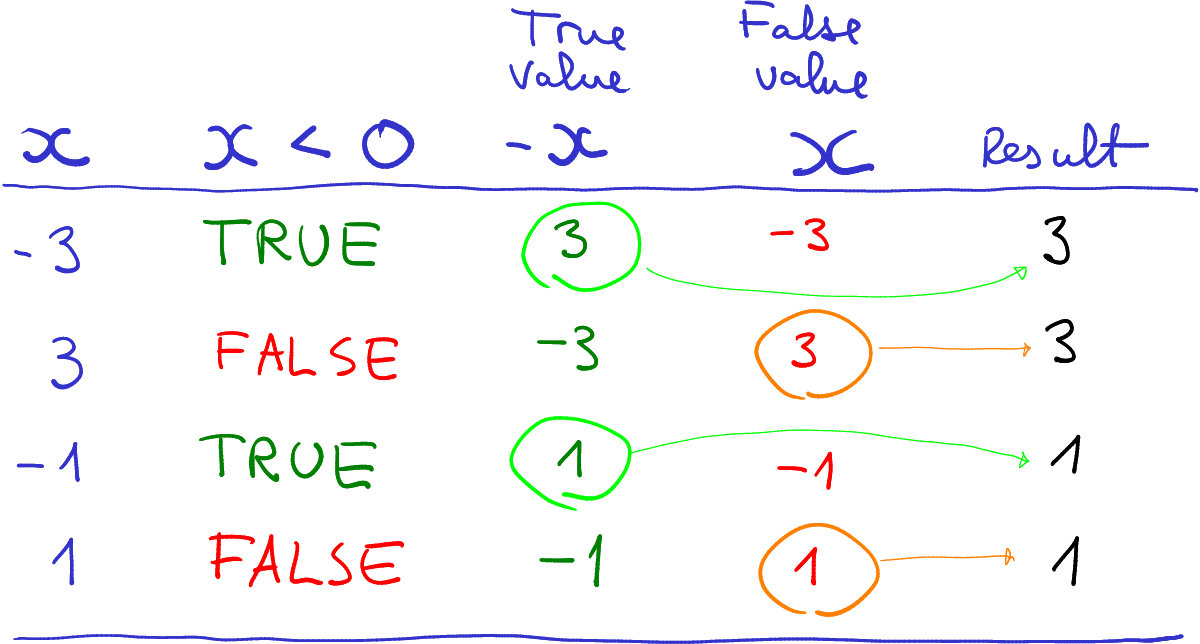
Ternary operators provide a compact way to assign values based on conditions. They are particularly beneficial when assigning a value directly as a result of a condition. Their structure follows the pattern: `condition ? value_if_true : value_if_false`.
condition ? value_if_true : value_if_false
For instance, determining if a number is positive or negative and assigning a corresponding string:“`javascriptlet number = 10;let result = number > 0 ? “Positive” : “Non-positive”;console.log(result); // Output: Positive“`This concisely expresses the logic compared to a traditional if-else statement, making the code more readable and efficient in simple conditional assignments.
Switch Statements as Alternatives to Multiple “if-else if” Statements
Switch statements are suitable for situations with multiple possible cases. They evaluate an expression against a series of cases, executing the corresponding code block if a match is found. This approach is more readable and maintainable than deeply nested “if-else if” statements when dealing with numerous possible outcomes.“`javascriptlet day = “Monday”;switch (day) case “Monday”: console.log(“Start of the week”); break; case “Friday”: console.log(“Almost the weekend!”); break; case “Saturday”: case “Sunday”: console.log(“Weekend!”); break; default: console.log(“Weekday”);“`The `break` statement is crucial; without it, the program would execute all subsequent code blocks after a match.
The `default` case handles situations where no match is found, offering a fallback option.
Using Functions to Encapsulate Conditional Logic
Encapsulating conditional logic within functions promotes code reusability and maintainability. Functions can accept inputs, perform conditional checks, and return appropriate results, effectively modularizing the code.“`javascriptfunction checkAge(age) if (age >= 18) return “Adult”; else return “Minor”; let age = 25;let status = checkAge(age);console.log(status); // Output: Adult“`This example demonstrates a function that checks the age and returns a descriptive string.
Conditional Logic Within Loops
Conditional statements are often employed within loops to control the loop’s behavior based on certain conditions. This enables dynamic adjustments to the loop’s execution based on data or criteria.“`javascriptfor (let i = 0; i < 10; i++) if (i % 2 === 0) console.log(i + " is even"); ``` This code iterates through numbers and prints even numbers, showcasing how conditions can be used to filter data within a loop's execution.
Comparison of “if-else if” and Switch Statements
| Feature | “if-else if” Statements | Switch Statements ||——————-|———————————————————|———————————————————–|| Readability | Can become less readable with many conditions | More readable and maintainable for multiple cases || Maintainability | Can become cumbersome and difficult to maintain | Easier to update and debug as conditions change || Performance | Typically performs similar to switch statements | Performance can be slightly different depending on the implementation || Complexity | More suitable for complex conditions | Best suited for situations with multiple, discrete cases |
Closing Notes
In conclusion, this comprehensive guide has provided a thorough understanding of “if” statements, from the basics to advanced techniques. We’ve explored the various aspects of conditional logic, including syntax, Boolean expressions, and handling different outcomes. By mastering these principles, you can create sophisticated applications that respond to user input and manipulate data effectively. Remember to apply the best practices discussed to write efficient and maintainable code.